

HP
HP EliteBook 1040 G9 i7-1255U 32GB 512GB 14in business laptop
- Silver
- Windows 11 Pro
US$418.99
0.00536225BTC
มีสินค้าเรารับชำระด้วยคริปโต — เหรียญที่คุณถืออยู่จึงนำมาซื้อฮาร์ดแวร์ของจริงได้จ่ายด้วยคริปโต แล้วนำไปซื้อฮาร์ดแวร์ของจริง จัดส่งฟรีพร้อมประกันภัยทั่วโลก เมื่อสั่งซื้อเกิน US$399 กล่องพัสดุเรียบไม่มีตราสินค้า จัดส่งจากประเทศเยอรมนีจัดส่งฟรีพร้อมประกันภัย เมื่อสั่งซื้อเกิน US$399 อัตราแลกเปลี่ยนของคุณจะถูกล็อกไว้ 30 นาที ทันทีที่เปิดหน้าชำระเงินล็อกอัตราแลกเปลี่ยน 30 นาที สินค้าทุกชิ้นปิดผนึกจากโรงงาน ตรวจสอบหมายเลขซีเรียล และรับประกัน 24 เดือนปิดผนึกจากโรงงาน รับประกัน 24 เดือน


Lenovo
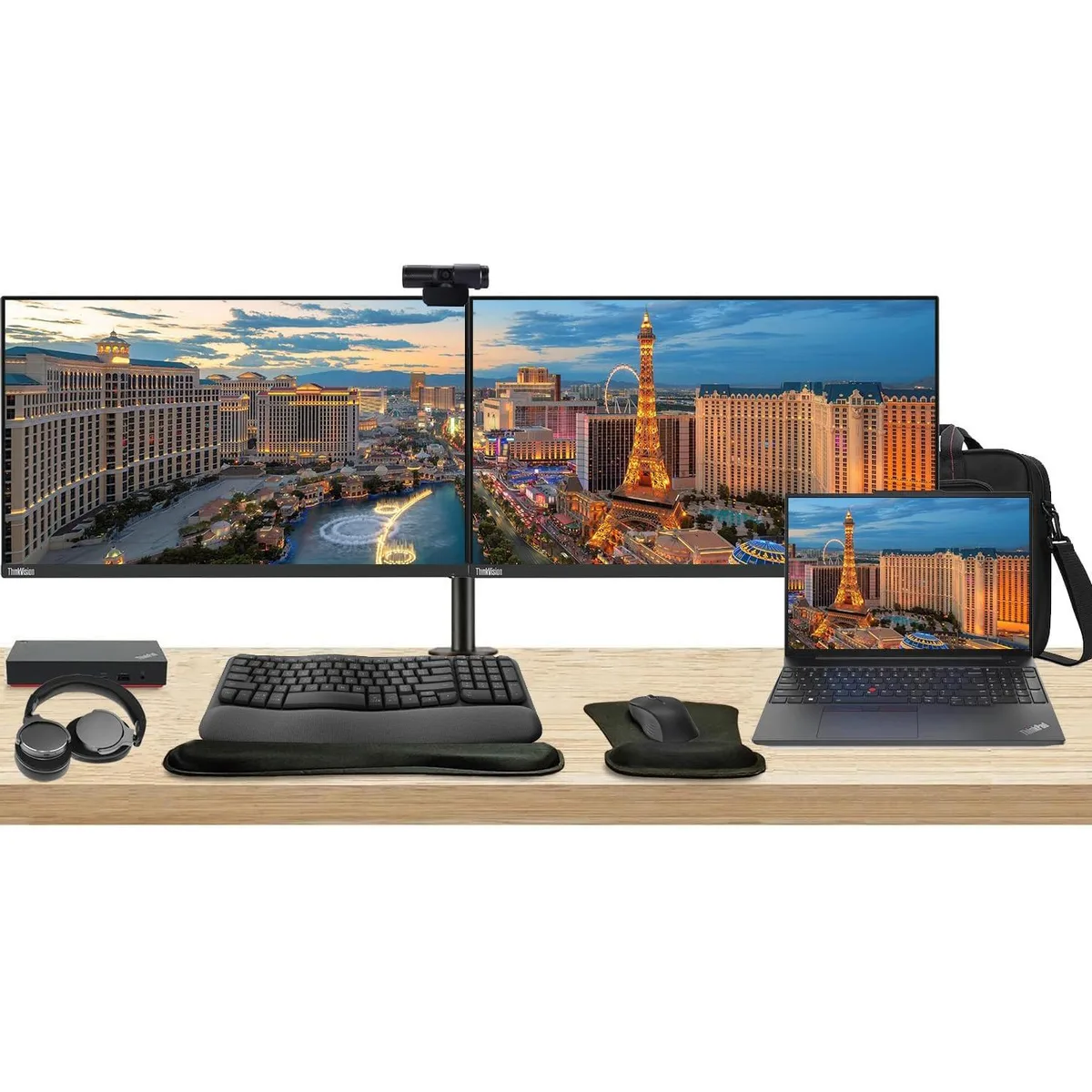
Complete workstation bundle with 16" touchscreen laptop, dual 27" monitors, USB-C dock, wireless keyboard and mouse, webcam, headphones and briefcase
The Lenovo E16 combines a 16-inch 1920 x 1200 touchscreen, Ryzen 5 7530U processor, 16GB RAM and 256GB SSD in a single chassis. Two ThinkVision T27i monitors each deliver a 27-inch 1920 x 1080 IPS panel at 60 Hz with 300 Nit brightness and 16.7 million colours. The bundle adds a 135 W USB-C dock, MK670 wireless keyboard and mouse, Cam 313 webcam, U Evolve headphones, dual monitor stand, gel wrist rest and a 12.8 x 16.8 x 3.3 inch briefcase.
The Ryzen 5 7530U 6-core 2 GHz CPU handles office workloads without demanding high-power cooling inside the laptop. The included 135 W dock powers the laptop and both monitors over a single USB-C link while adding Gigabit Ethernet, two DisplayPort outputs, one HDMI port and six USB ports. No separate power bricks are required for the displays, reducing cable count and overall heat output on the desk.
The heavy-duty clamp mount lets you position both 27-inch screens at matching height, tilt and swivel for a seamless dual-monitor canvas. The Cam 313 webcam captures 1920 x 1080 video with a built-in microphone, while the U Evolve headphones provide active noise cancellation and Bluetooth or wired connectivity for calls. The MK670 combo adds a 7-button optical mouse with multimedia keys and a gel-filled wrist rest for extended comfort.
ยังไม่มีข้อมูลจำเพาะที่เผยแพร่สำหรับสินค้านี้
Connect each monitor to the dock using its HDMI or DisplayPort inputs, then plug the dock's USB-C cable into the laptop; the step often missed is connecting the dock's 135 W power adapter so the dock can drive both displays and charge the notebook.
The MK670 wireless keyboard and mouse run on batteries that will need periodic replacement, and the gel wrist rest can wear down with daily use.
The dock supports a maximum of three displays, so the two 27" monitors at 60 Hz are within its output limit; sustained use is constrained by the laptop's thermal design rather than the dock's display capacity.
อื่น ๆ ในหมวดนี้
หมวดเดียวกัน การชำระเงินแบบเดียวกัน — แปดสกุลเงินคริปโตและอัตราแลกเปลี่ยนที่ล็อกไว้ 30 นาที
สิ่งที่คุณใช้ชำระ และสิ่งที่คุณใช้อ่านราคา
ส่งจากกระเป๋าเงินของคุณเมื่อชำระเงิน
แสดงผลเท่านั้น — แคตตาล็อกสินค้าตั้งราคาเป็นดอลลาร์สหรัฐ
ไม่พบสกุลเงินที่ตรงกัน
เลือกภาษาที่ต้องการให้เว็บไซต์แสดงผล
ไม่พบภาษาที่ตรงกัน
ยังไม่เคยใช้งานใช่ไหม
มีบัญชีอยู่แล้วใช่ไหม
ไม่มีการรีเซ็ตแบบอัตโนมัติ ร้านนี้ไม่ส่งอีเมลใด ๆ จึงไม่มีลิงก์ใช้ครั้งเดียวให้ขอ ปล่อยที่อยู่อีเมลนี้ไว้ในบัญชี แล้วเจ้าหน้าที่จะดำเนินการให้ด้วยตนเอง
รับคำขอแล้ว
ไม่มีอะไรถูกส่งไปยังกล่องจดหมายของคุณ — ร้านนี้ไม่ส่งอีเมลใด ๆ เลย มีคนดำเนินการเรื่องนี้ให้ด้วยมือ
นึกออกแล้วใช่ไหม


