
Attack Shark
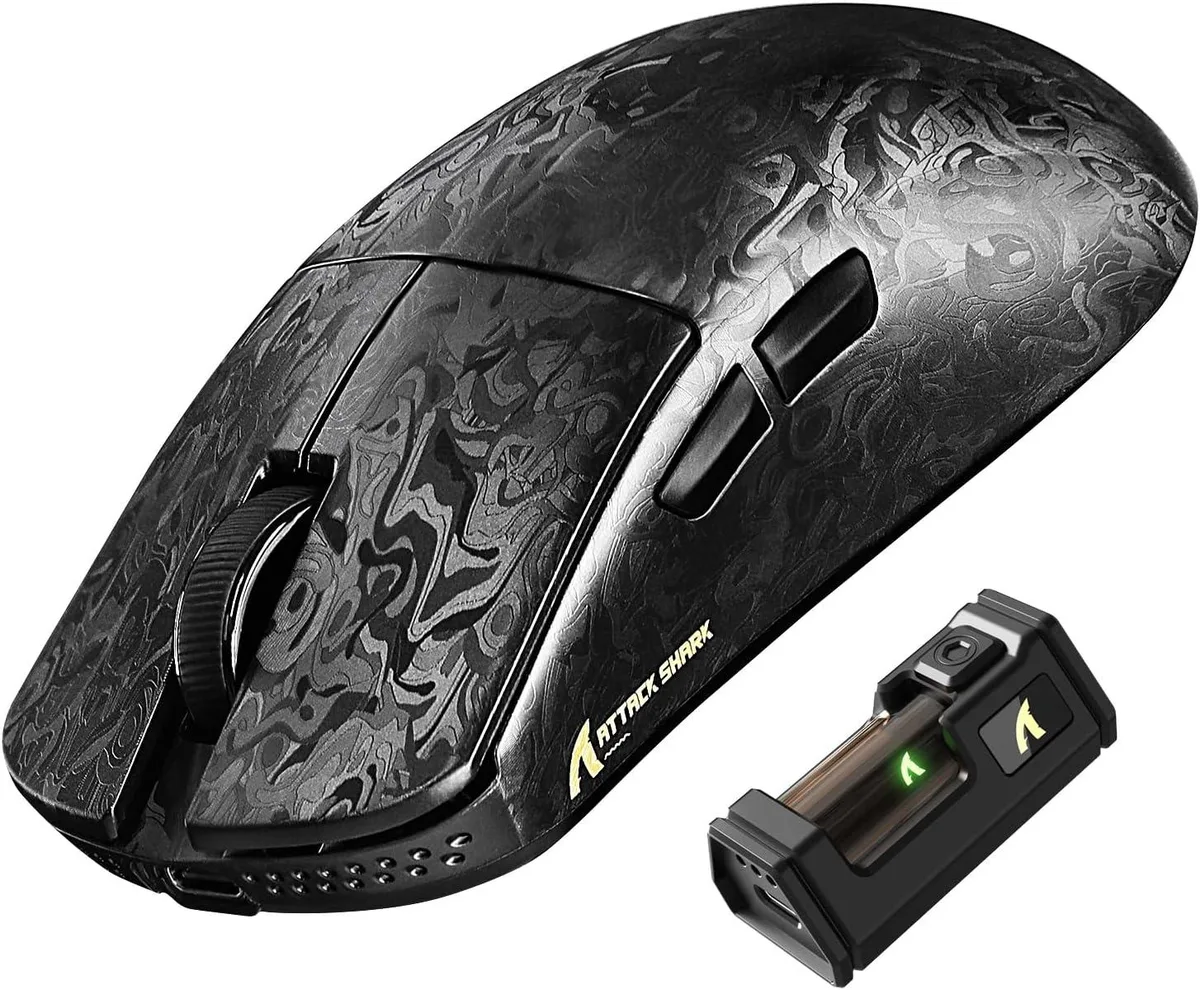
Attack Shark R11 Ultra 8K gaming mouse, carbon fiber, PAW3950MAX 42K DPI, 49g, tri-mode
- Bluetooth / 2.4GHz…
- Ink
72.99 US$
0.00093792BTC
متوفرنقبل الدفع بالعملة المشفرة — لذلك يمكن للعملات الرقمية التي تملكها أن تشتري أجهزة حقيقية.ادفع بالعملة المشفرة، وأنفقها على أجهزة حقيقية. شحن مؤمن مجانا إلى كل أنحاء العالم لما يتجاوز 399 US$. صناديق شحن بسيطة بلا علامة تجارية، ترسل من ألمانيا.شحن مؤمن مجانا لما يتجاوز 399 US$. يُقفل سعرك لمدة 30 دقيقة بمجرد فتح صفحة الدفع.السعر مقفل لمدة 30 دقيقة. كل قطعة مختومة، ورقمها التسلسلي متحقق منه، ومشمولة بضمان 24 شهرا.مختوم، وبضمان 24 شهرا.


Attack Shark
An ultralight 49 g carbon-fibre gaming mouse with a PixArt PAW3950MAX sensor up to 42 000 DPI, 8 000 Hz wireless polling and tri-mode connectivity
Color Weave Black
The Attack Shark R11 Ultra weighs 49 grams and uses a carbon fibre composite shell with a nano metallic ice coating. A PixArt PAW3950MAX optical sensor delivers up to 42000 DPI adjustable in 50-step increments. The Nordic 52840 MCU enables an 8000 Hz polling rate over 2.4 GHz wireless for low-latency input.
This model suits competitive gamers and office users who need wired USB-C, 2.4 GHz wireless and Bluetooth connectivity across PC, Mac, smartphone or tablet. Five programmable buttons and 70 million-click optical switches cover most genres. Buyers who need additional side buttons or a left-handed shape should look at something else.
Ensure your device has a USB-C port for the wired connection and the 2.4 GHz receiver. The web driver at bit.ly/R11WEBSOFT or the downloadable software at bit.ly/R11SOFT are required for DPI steps, button mapping and polling-rate changes. Verify that your operating system supports the driver installation.
| Brand | ATTACK SHARK |
|---|---|
| Model | R11 ULTRA |
| Type | Bluetooth / 2.4GHz / Wired |
| Tracking Method | Optical |
| Hand Orientation | Right Hand |
| Buttons | 5 |
| Dimension | 12.40 × 6.55 × 3.80 cm/4.88 × 2.58 × 1.50 in |
| Operating System Supported | Windows XP |
| Features | Carbon Fiber Shell,8000Hz Polling Rate,42K High DPI,Tri-Mode Connection,Web Driver,Programmable Buttons,49g Lightweight Ergonomic Design |
إصدارات أخرى من هذا الطراز
نفس الفئة، بذاكرة أو مبرّد أو تردد مختلف — قارن قبل أن تقرر.
Yes, the wired connection uses USB-C; if your device only has USB-A you will need an adapter or cable with USB-A on the host end.
The 2.4 GHz receiver handles the 8000 Hz rate independently, so the motherboard's USB polling limit does not restrict wireless performance.
Open the web driver at bit.ly/R11WEBSOFT, connect the receiver, and the dashboard displays the active polling rate; it should read 8000 Hz when the mouse is paired wirelessly.
أيضًا في هذا القسم
نفس القسم، ونفس صفحة الدفع — ثماني عملات رقمية وقفل سعر لمدة 30 دقيقة.
ما تدفعه، وما تُعرض به الأسعار.
يُرسَل من محفظتك عند إتمام الطلب
للعرض فقط — أسعار الكتالوج بالدولار الأمريكي
لا توجد عملة مطابقة.
اختر اللغة التي يخاطبك بها الموقع.
لا توجد لغة مطابقة.
هل أنت جديد هنا؟
لديك حساب بالفعل؟
لا توجد إعادة تعيين تلقائية: هذا المتجر لا يُرسل أي بريد، فلا يوجد رابط لمرة واحدة يمكن طلبه. اترك العنوان في الحساب، وسيُعالَج الأمر يدويًا.
تم تسجيل الطلب
لا شيء في طريقه إلى بريدك الوارد — هذا المتجر لا يُرسل أي بريد إطلاقًا. يتولّى أحدهم معالجة هذه الطلبات يدويًا.
تذكّرتها؟




