
Attack Shark
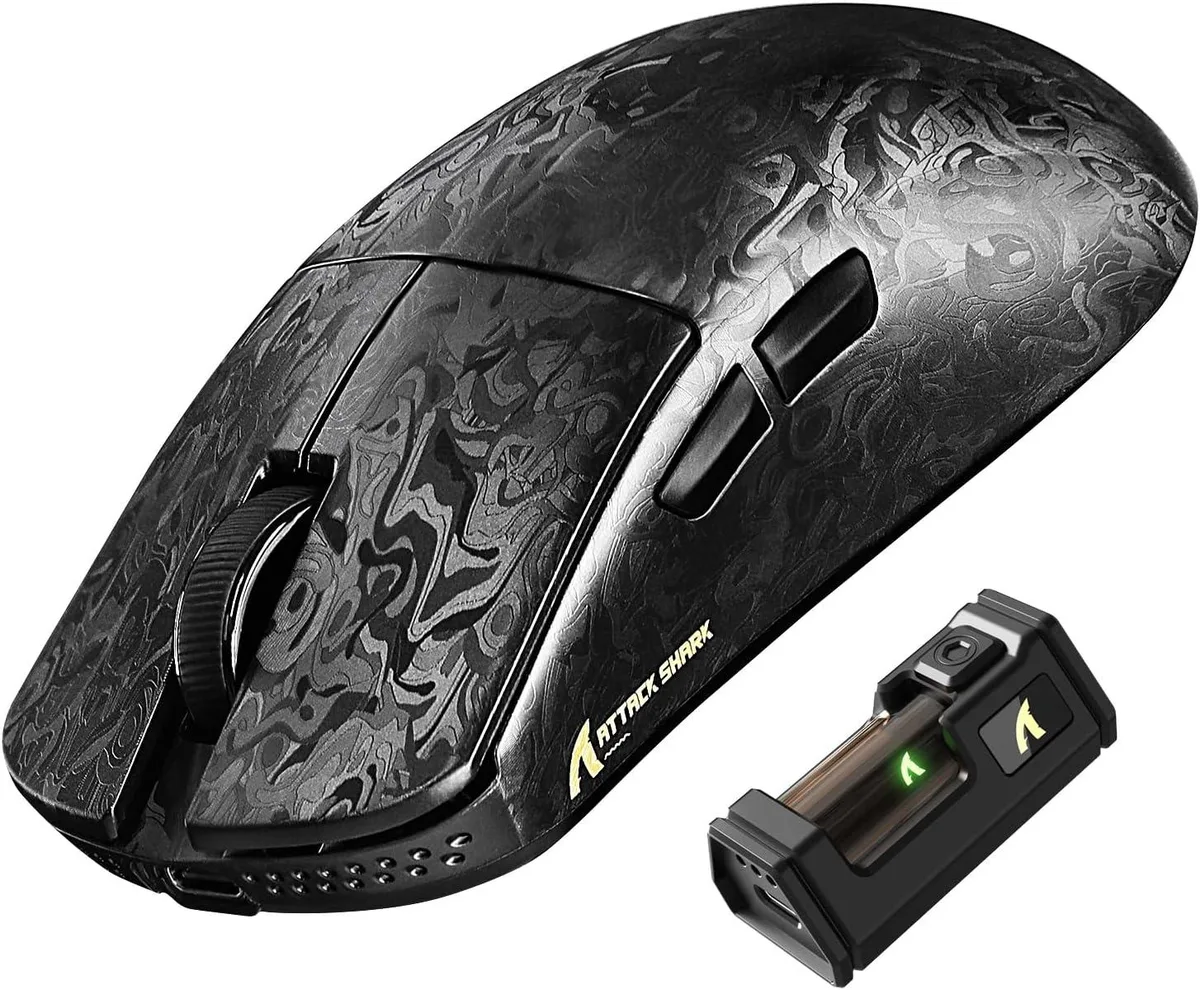
Attack Shark R11 Ultra 8K gaming mouse, carbon fiber, PAW3950MAX 42K DPI, 49g, tri-mode
- Bluetooth / 2.4GHz…
- Ink
US$72.99
0.00093861BTC
재고 있음


Attack Shark
An ultralight 49 g carbon-fibre gaming mouse with a PixArt PAW3950MAX sensor up to 42 000 DPI, 8 000 Hz wireless polling and tri-mode connectivity
Color Weave Black
The Attack Shark R11 Ultra weighs 49 grams and uses a carbon fibre composite shell with a nano metallic ice coating. A PixArt PAW3950MAX optical sensor delivers up to 42000 DPI adjustable in 50-step increments. The Nordic 52840 MCU enables an 8000 Hz polling rate over 2.4 GHz wireless for low-latency input.
This model suits competitive gamers and office users who need wired USB-C, 2.4 GHz wireless and Bluetooth connectivity across PC, Mac, smartphone or tablet. Five programmable buttons and 70 million-click optical switches cover most genres. Buyers who need additional side buttons or a left-handed shape should look at something else.
Ensure your device has a USB-C port for the wired connection and the 2.4 GHz receiver. The web driver at bit.ly/R11WEBSOFT or the downloadable software at bit.ly/R11SOFT are required for DPI steps, button mapping and polling-rate changes. Verify that your operating system supports the driver installation.
| Brand | ATTACK SHARK |
|---|---|
| Model | R11 ULTRA |
| Type | Bluetooth / 2.4GHz / Wired |
| Tracking Method | Optical |
| Hand Orientation | Right Hand |
| Buttons | 5 |
| Dimension | 12.40 × 6.55 × 3.80 cm/4.88 × 2.58 × 1.50 in |
| Operating System Supported | Windows XP |
| Features | Carbon Fiber Shell,8000Hz Polling Rate,42K High DPI,Tri-Mode Connection,Web Driver,Programmable Buttons,49g Lightweight Ergonomic Design |
이 모델의 다른 버전
같은 제품군에서 메모리·쿨러·클럭이 다릅니다 — 결정 전에 비교해 보세요.
Yes, the wired connection uses USB-C; if your device only has USB-A you will need an adapter or cable with USB-A on the host end.
The 2.4 GHz receiver handles the 8000 Hz rate independently, so the motherboard's USB polling limit does not restrict wireless performance.
Open the web driver at bit.ly/R11WEBSOFT, connect the receiver, and the dashboard displays the active polling rate; it should read 8000 Hz when the mouse is paired wirelessly.
이 진열대의 다른 상품
같은 진열대, 같은 체크아웃 — 코인 8종, 환율 잠금 30분.
결제할 코인과 가격을 확인할 통화입니다.
체크아웃 시 지갑에서 전송됩니다.
표시 전용 — 카탈로그 가격은 달러 기준입니다.
일치하는 통화가 없습니다.
사이트에서 사용할 언어를 선택하십시오.
일치하는 언어가 없습니다.
처음 방문하셨나요?
이미 계정이 있으신가요?
자동 재설정 기능은 없습니다. 이 쇼핑몰은 어떠한 메일도 보내지 않으므로 요청할 일회용 링크 자체가 없습니다. 계정에 등록된 이메일 주소를 그대로 두시면 담당자가 직접 확인해 처리합니다.
요청 접수
받은편지함으로 오는 것은 아무것도 없습니다 — 이 쇼핑몰은 메일을 전혀 보내지 않습니다. 담당자가 직접 확인해 처리합니다.
기억나셨나요?




