
Attack Shark
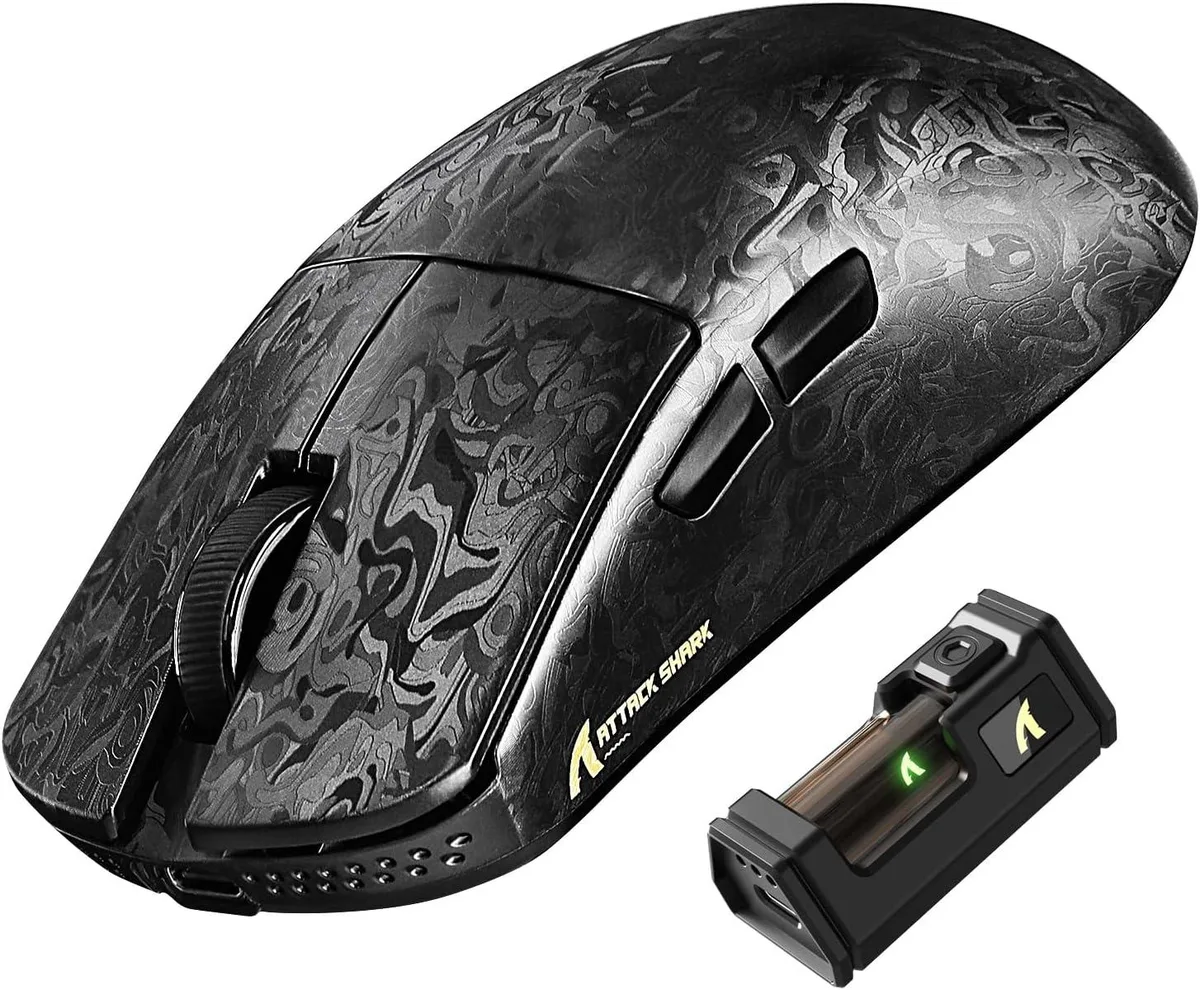
Attack Shark R11 Ultra 8K gaming mouse, carbon fiber, PAW3950MAX 42K DPI, 49g, tri-mode
- Bluetooth / 2.4GHz…
- Ink
$72.99
0.00092964BTC
In stockWe take cryptocurrency — so the coins you hold can buy real hardware.Pay in crypto, spend it on real hardware. Free insured shipping worldwide over $399. Plain, unbranded boxes, sent from Germany.Free insured shipping over $399. Your rate is locked for 30 minutes once checkout opens.Rate locked 30 minutes. Every item sealed, serial-checked and covered by a 24-month warranty.Sealed, 24-month warranty.


Attack Shark
An ultralight 49 g carbon-fibre gaming mouse with a PixArt PAW3950MAX sensor up to 42 000 DPI, 8 000 Hz wireless polling and tri-mode connectivity
Color Weave Black
The Attack Shark R11 Ultra weighs 49 grams and uses a carbon fibre composite shell with a nano metallic ice coating. A PixArt PAW3950MAX optical sensor delivers up to 42000 DPI adjustable in 50-step increments. The Nordic 52840 MCU enables an 8000 Hz polling rate over 2.4 GHz wireless for low-latency input.
This model suits competitive gamers and office users who need wired USB-C, 2.4 GHz wireless and Bluetooth connectivity across PC, Mac, smartphone or tablet. Five programmable buttons and 70 million-click optical switches cover most genres. Buyers who need additional side buttons or a left-handed shape should look at something else.
Ensure your device has a USB-C port for the wired connection and the 2.4 GHz receiver. The web driver at bit.ly/R11WEBSOFT or the downloadable software at bit.ly/R11SOFT are required for DPI steps, button mapping and polling-rate changes. Verify that your operating system supports the driver installation.
| Brand | ATTACK SHARK |
|---|---|
| Model | R11 ULTRA |
| Type | Bluetooth / 2.4GHz / Wired |
| Tracking Method | Optical |
| Hand Orientation | Right Hand |
| Buttons | 5 |
| Dimension | 12.40 × 6.55 × 3.80 cm/4.88 × 2.58 × 1.50 in |
| Operating System Supported | Windows XP |
| Features | Carbon Fiber Shell,8000Hz Polling Rate,42K High DPI,Tri-Mode Connection,Web Driver,Programmable Buttons,49g Lightweight Ergonomic Design |
Other versions of this model
Same family, different memory, cooler or clock — compare before you commit.
Yes, the wired connection uses USB-C; if your device only has USB-A you will need an adapter or cable with USB-A on the host end.
The 2.4 GHz receiver handles the 8000 Hz rate independently, so the motherboard's USB polling limit does not restrict wireless performance.
Open the web driver at bit.ly/R11WEBSOFT, connect the receiver, and the dashboard displays the active polling rate; it should read 8000 Hz when the mouse is paired wirelessly.
Also in this aisle
Same shelf, same checkout — eight coins and a 30-minute rate lock.
What you pay in, and what you read prices in.
Sent from your wallet at checkout
Display only — the catalogue is priced in USD
No currency matches that.
Pick the language the site speaks to you in.
New here?
Already have one?
There is no automatic reset: this shop sends no mail, so there is no one-time link to ask for. Leave the address on the account and it gets picked up by hand.
Request noted
Nothing is on its way to your inbox — this shop sends no mail at all. Someone picks these up by hand.
Remembered it?




