HPE
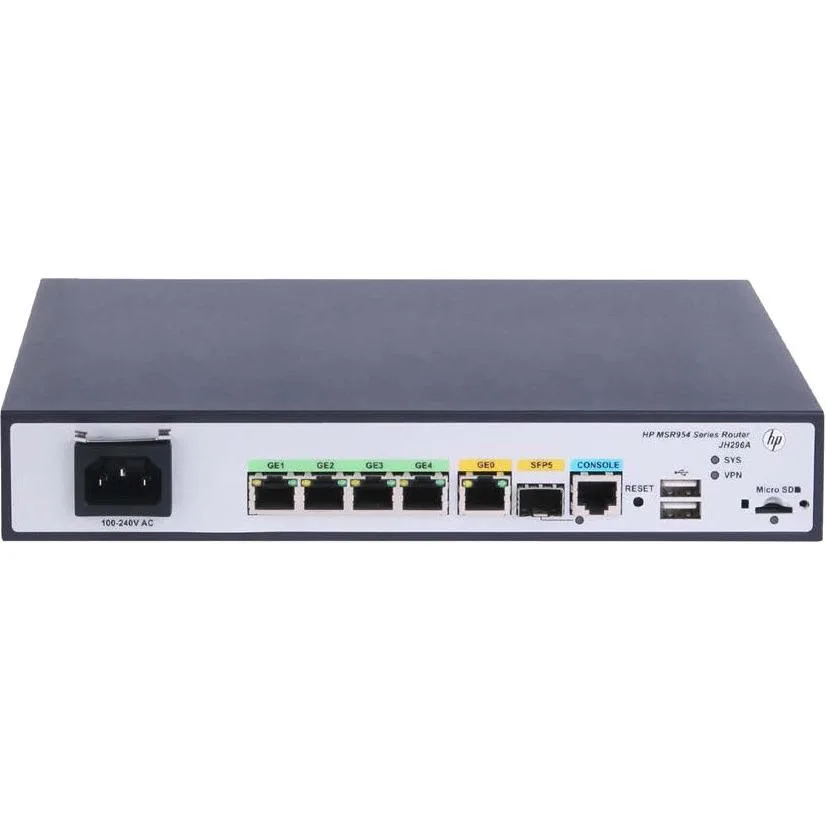
HPE MSR954 JH296AABA 1GbE SFP 2GbE WAN 4GbE LAN CWv7 wireless router
- Gigabit Ethernet
280,99 US$
0.00352122BTC
SklademPřijímáme kryptoměny — takže to, co držíte, můžete utratit za skutečný hardware.Plaťte kryptem, utrácejte ho za skutečný hardware. Pojištěná doprava zdarma po celém světě nad 399 $. Neutrální přepravní krabice bez loga, odesílané z Německa.Pojištěná doprava zdarma nad 399 $. Jakmile se otevře pokladna, je váš kurz zablokovaný na 30 minut.Kurz zablokovaný na 30 minut. Každý výrobek je zapečetěný, jeho sériové číslo je zkontrolované a vztahuje se na něj 24měsíční záruka.Zapečetěno, záruka 24 měsíců.


Cisco Systems, Inc.
Cloud-managed security appliance with integrated 4G LTE modem delivers 450 Mbit/s Wi-Fi, four Gigabit LAN ports, one WAN port and desktop or wall-mount form factor
The Meraki MX67C combines a 4G LTE cellular modem with a dual-band 802.11ac wireless router in a desktop or wall-mountable chassis. It delivers 450 Mbit/s aggregate wireless throughput and provides five Gigabit Ethernet ports, one dedicated for broadband and four for LAN devices. Cloud-managed VPN and security services are included for branch or pop-up locations.
A single unit handles both wired WAN failover and primary cellular connectivity, removing the need for a USB modem attached to a conventional router. The jump is worthwhile when a site lacks reliable fixed-line service or when rapid deployment without circuit provisioning is required. Built-in SIM ejection and included Cat 5 cables simplify first-time setup.
Four spatial streams on 2.40 GHz and 5 GHz bands serve typical office workloads, guest Wi-Fi and IoT devices. The single cellular WAN and one broadband WAN provide automatic failover but do not support load-balanced multi-WAN throughput beyond the radio limit. Environments needing higher wireless capacity or multiple concurrent cellular links will outgrow this platform.
| Brand | Meraki |
|---|---|
| Model | MX67C |
| Standards | IEEE 802.11a/b/g/n/ac |
| WAN Ports | Number of Broadband (RJ-45) Ports:1 |
| Wireless Data Rates | 450 Mbit/s |
| Dimensions | Height:1.1" Width:9.4" Depth:6.9" |
| Features | Product Type:Modem/Wireless Router Broadband Transmission Technology:Cellular Ethernet ISM Band:Yes UNII Band:Yes Ethernet Technology:Gigabit Ethernet USB:Yes Number of Network (RJ-45) Ports:4 Cellular Data Connectivity Technology:LTE Cellular Generation:4G Form Factor:Desktop Wall Mountable Weight (Approximate):1.87 lb |
| Package Contents | MX67C Modem/Wireless Router Mounting Kit 2 x Cat 5 Ethernet Cable AC Power Adapter SIM Card Ejector Tool |
| Přepravní hmotnost | 1.57 kg |
| Rozměry balení | 310 × 226 × 71 mm |
The unit measures 1.1 inches high, 9.4 inches wide and 6.9 inches deep, and the package includes a mounting kit for wall installation.
Connect the WAN broadband port and at least one of the four LAN RJ-45 ports; the step often missed is inserting the SIM card with the ejector tool before powering on.
Replace the supplied Cat 5 cables if you upgrade to a multi-gigabit internet plan or if physical damage degrades the 450 Mbit/s wireless throughput.
Také v této kategorii
Stejná kategorie, stejná pokladna — osm měn a kurz zamčený na 30 minut.
Měna, ve které platíte, a měna, ve které se zobrazují ceny.
Odesláno z vaší peněženky u pokladny
Pouze pro zobrazení — katalog je veden v dolarech
Žádná měna neodpovídá.
Vyberte jazyk, ve kterém s vámi bude web komunikovat.
Poprvé tady?
Už účet máte?
Neexistuje žádná automatická obnova hesla: tento obchod neposílá žádné e-maily, takže neexistuje jednorázový odkaz, o který by bylo možné požádat. Nechte adresu uvedenou u účtu, vyřídíme ji ručně.
Žádost zaznamenána
Do vaší schránky nic nedorazí — tento obchod neposílá žádné e-maily. Někdo se o to postará ručně.
Vzpomněli jste si?