HPE
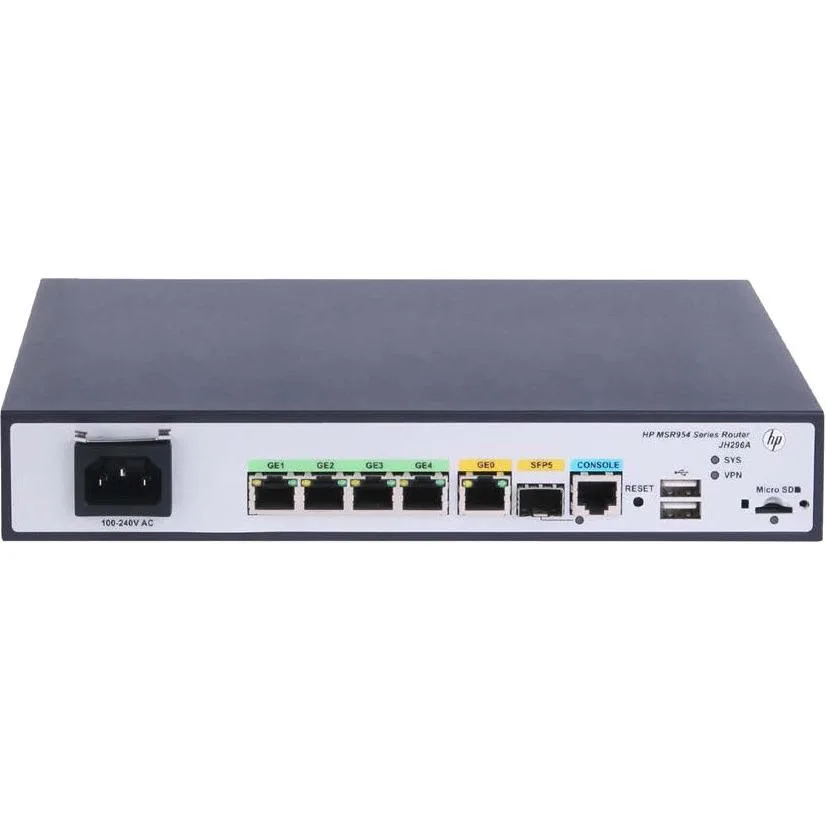
HPE MSR954 JH296AABA 1GbE SFP 2GbE WAN 4GbE LAN CWv7 wireless router
- Gigabit Ethernet
280,99 US$
0.00350148BTC
Em stockAceitamos criptomoeda — para que as moedas que detém possam comprar material informático real.Pague em cripto, gaste-a em material informático real. Envio seguro gratuito para todo o mundo acima de 399 $. Caixas neutras, sem marca, expedidas a partir da Alemanha.Envio seguro gratuito acima de 399 $. A sua taxa fica bloqueada durante 30 minutos assim que abre a finalização da compra.Taxa bloqueada 30 minutos. Cada artigo é selado, o seu número de série é verificado, e está coberto por uma garantia de 24 meses.Selado, garantido 24 meses.


Cisco Systems, Inc.
Cloud-managed security appliance with integrated 4G LTE modem delivers 450 Mbit/s Wi-Fi, four Gigabit LAN ports, one WAN port and desktop or wall-mount form factor
The Meraki MX67C combines a 4G LTE cellular modem with a dual-band 802.11ac wireless router in a desktop or wall-mountable chassis. It delivers 450 Mbit/s aggregate wireless throughput and provides five Gigabit Ethernet ports, one dedicated for broadband and four for LAN devices. Cloud-managed VPN and security services are included for branch or pop-up locations.
A single unit handles both wired WAN failover and primary cellular connectivity, removing the need for a USB modem attached to a conventional router. The jump is worthwhile when a site lacks reliable fixed-line service or when rapid deployment without circuit provisioning is required. Built-in SIM ejection and included Cat 5 cables simplify first-time setup.
Four spatial streams on 2.40 GHz and 5 GHz bands serve typical office workloads, guest Wi-Fi and IoT devices. The single cellular WAN and one broadband WAN provide automatic failover but do not support load-balanced multi-WAN throughput beyond the radio limit. Environments needing higher wireless capacity or multiple concurrent cellular links will outgrow this platform.
| Brand | Meraki |
|---|---|
| Model | MX67C |
| Standards | IEEE 802.11a/b/g/n/ac |
| WAN Ports | Number of Broadband (RJ-45) Ports:1 |
| Wireless Data Rates | 450 Mbit/s |
| Dimensions | Height:1.1" Width:9.4" Depth:6.9" |
| Features | Product Type:Modem/Wireless Router Broadband Transmission Technology:Cellular Ethernet ISM Band:Yes UNII Band:Yes Ethernet Technology:Gigabit Ethernet USB:Yes Number of Network (RJ-45) Ports:4 Cellular Data Connectivity Technology:LTE Cellular Generation:4G Form Factor:Desktop Wall Mountable Weight (Approximate):1.87 lb |
| Package Contents | MX67C Modem/Wireless Router Mounting Kit 2 x Cat 5 Ethernet Cable AC Power Adapter SIM Card Ejector Tool |
| Peso de envio | 1.57 kg |
| Dimensões da embalagem | 310 × 226 × 71 mm |
The unit measures 1.1 inches high, 9.4 inches wide and 6.9 inches deep, and the package includes a mounting kit for wall installation.
Connect the WAN broadband port and at least one of the four LAN RJ-45 ports; the step often missed is inserting the SIM card with the ejector tool before powering on.
Replace the supplied Cat 5 cables if you upgrade to a multi-gigabit internet plan or if physical damage degrades the 450 Mbit/s wireless throughput.
Também nesta secção
Mesma prateleira, mesma finalização da compra — oito moedas e uma taxa bloqueada durante 30 minutos.
O que paga, e a moeda em que vê os preços.
Enviado da sua carteira ao finalizar a compra
Apenas informativo — o catálogo está em dólares
Nenhuma moeda corresponde.
Escolha o idioma em que o site lhe fala.
Ainda não tem conta?
Já tem conta?
Não existe reposição automática: esta loja não envia qualquer e-mail, pelo que não há nenhum link de utilização única para pedir. Deixe o endereço na conta e ele será tratado manualmente.
Pedido registado
Não vai chegar nada à sua caixa de entrada — esta loja não envia qualquer e-mail. Alguém trata disto manualmente.
Recordou-se dela?