


ASUS
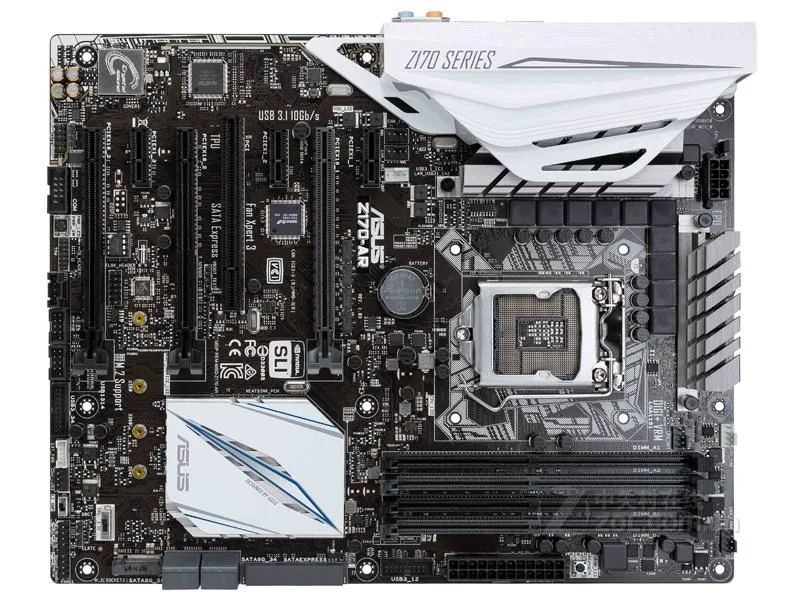
ASUS Z170-AR Intel motherboard LGA 1151 Z170 DDR4 64GB
ATX motherboard with Intel Z170 chipset, LGA 1151 socket and DDR4 memory support up to 64GB
- CPU Socket TypeLGA 1151
- ChipsetIntel Z170
- Maximum Memory Supported64GB
- Supports up to 64GB DDR4 memory for demanding workloads
- Intel Z170 chipset enables overclocking on K-series processors
- LGA 1151 socket fits 6th and 7th generation Intel CPUs
- ATX form factor fits standard desktop cases
- Includes one SATA cable and rear I/O shield
Socket and chipset
This ASUS Z170-AR motherboard uses the Intel Z170 chipset and an LGA 1151 socket. It accepts DDR4 memory up to 64 GB in an ATX form factor. The board is supplied new with a chassis I/O shield and one SATA cable.
Who this suits and who it does not
Builders assembling a system around a compatible LGA 1151 processor will find the core features they need. Buyers who want more storage connectors than a single SATA cable provides should look at other options. Those needing integrated wireless networking or a different socket type cannot use this board.
The deciding specification
The LGA 1151 socket combined with the Intel Z170 chipset determines which processors fit and what platform features are available. Match this socket and chipset to your CPU choice before purchasing.
Puntos fuertes
- Supports up to 64GB DDR4 memory for demanding workloads
- Intel Z170 chipset enables overclocking on K-series processors
- LGA 1151 socket fits 6th and 7th generation Intel CPUs
- ATX form factor fits standard desktop cases
- Includes one SATA cable and rear I/O shield
Especificaciones
| Brand | ASUS |
|---|---|
| Model | ASUS Z170-AR |
| CPU Socket Type | LGA 1151 |
| Chipset | Intel Z170 |
| Maximum Memory Supported | 64GB |
Preguntas sobre este artículo
What Z170 chipset interface limits does this board hit in practice?
The Intel Z170 chipset provides the native PCIe and storage lanes; this board caps at the limits defined by that chipset.
What physical space and mounting points does the ATX Z170-AR need?
It requires a standard ATX case with matching standoff holes and an I/O shield cutout for the rear panel.
How is the Z170-AR installed and which step is often missed?
Mount the board on standoffs, connect the 24-pin and CPU power, insert DDR4 modules, attach the supplied SATA cable, then fit the included I/O back panel before securing the case.
También en este pasillo
Los clientes también compararon
Mismo estante, mismo pago — ocho criptomonedas y un tipo de cambio fijado 30 minutos.


Mushkin Enhanced
Mushkin Enhanced 4GB DDR2-800 CL6 SoDIMM Apple 971741A memory upgrade
104,99 US$
0.0013381BTC
En stock

SK hynix
SK hynix HYMD232M646C6-J 256MB DDR 333MHz PC2700 CL2.5 SODIMM laptop RAM
- 4GB (2 x 2GB)
7,99 US$
0.00010183BTC
En stock