


Vszerda
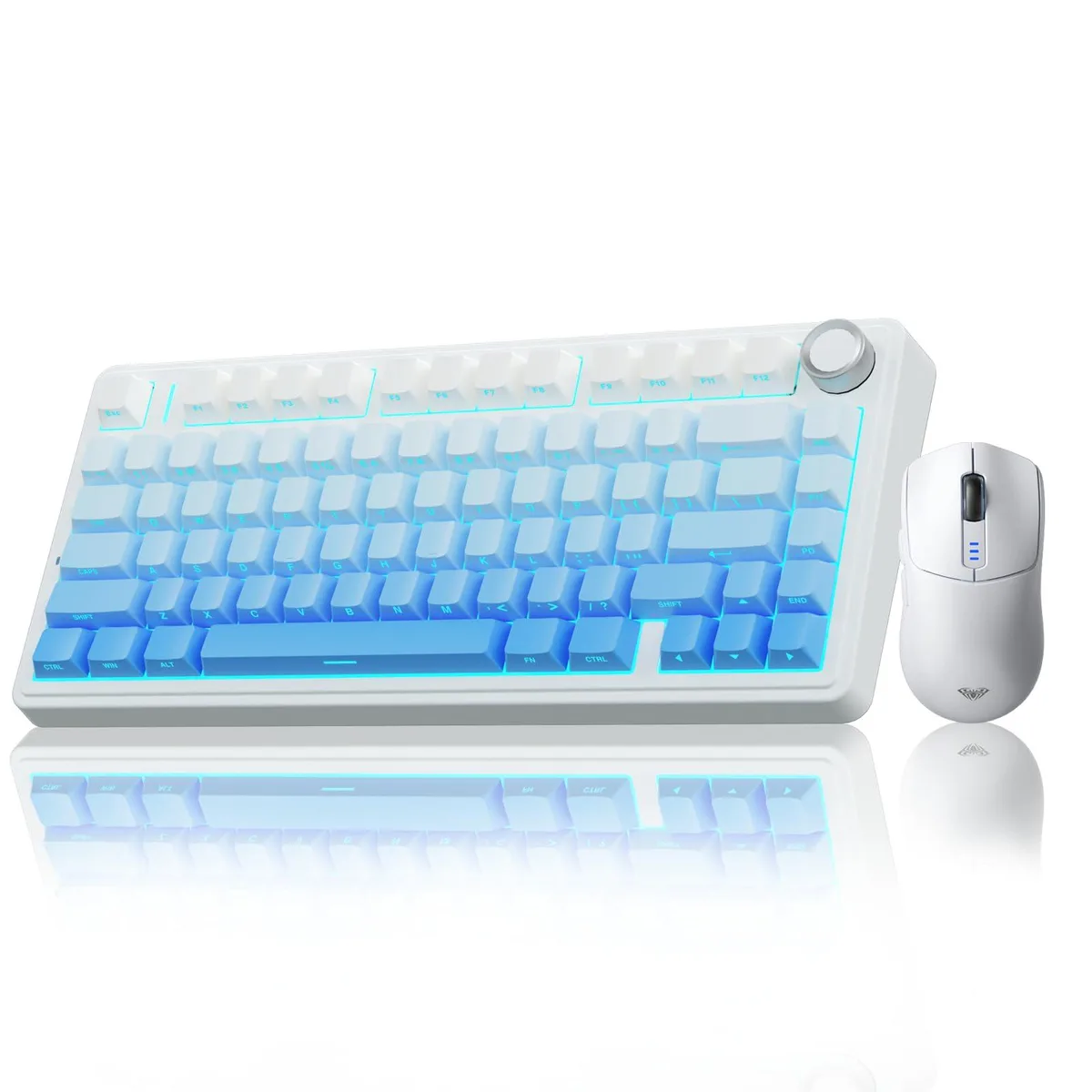
Vszerda F75 Pro 75% Hot-Swap Keyboard + SC580 Mouse White
A 75% gasket-mount hot-swap keyboard with LEOBOG star vector switches and a SC580 mouse offering 1000 Hz polling and up to 10000 DPI
- Keyboard InterfaceWireless
- Design StyleF75 Pro Gaming Keyboard+SC580 Tri-mode Mouse
- Layout75%
- Normal Keys75% gasket hot-swappable custom keyboard with tri-mode conne
- Mechanical Keyboard75% gasket hot-swappable custom keyboard with tri-mode conne
- Keyboard ColorWhite
- Tri-mode connection links up to five devices via Bluetooth 5.0, 2.4GHz and USB-C
- Hot-swappable PCB accepts 3-pin or 5-pin switches for solder-free customisation
- Gasket mount with five silencing layers gives a soft, thocky keystroke feel
- LEOBOG star vector switches come pre-lubricated for smooth, creamy sound
- SC580 mouse offers six DPI steps up to 10000 and 1000Hz polling rate
Combo Overview
The Vszerda F75 Pro pairs a 75% gasket mechanical keyboard with an SC580 gaming mouse, both in white. The keyboard uses hot-swappable LEOBOG star vector switches and pre-lubricated stabilisers for a smooth, creamy feel. Tri-mode connectivity covers Bluetooth 5.0, 2.4 GHz wireless and USB wired links. A 4000 mAh battery powers the keyboard for extended sessions.
Suitability
This set suits users who want a compact, customisable keyboard and a matching ambidextrous mouse that share the same wireless technology. It fits PC, laptop, tablet, phone and console setups thanks to multi-device pairing. Buyers who need a full-size layout, a dedicated numeric keypad or a mouse with more than six DPI steps should look elsewhere.
Deciding Spec
The keyboard offers hot-swappable sockets compatible with both 3-pin and 5-pin switches, letting you change the typing feel without soldering. The mouse provides six adjustable DPI levels at 800, 1600, 2400, 3200, 6400 and 10000, selectable via button or software. Together these specs define whether the combo matches your customisation and precision requirements.
Puntos fuertes
- Tri-mode connection links up to five devices via Bluetooth 5.0, 2.4GHz and USB-C
- Hot-swappable PCB accepts 3-pin or 5-pin switches for solder-free customisation
- Gasket mount with five silencing layers gives a soft, thocky keystroke feel
- LEOBOG star vector switches come pre-lubricated for smooth, creamy sound
- SC580 mouse offers six DPI steps up to 10000 and 1000Hz polling rate
Especificaciones
| Brand | AULA |
|---|---|
| Keyboard Interface | Wireless |
| Design Style | F75 Pro Gaming Keyboard+SC580 Tri-mode Mouse |
| Layout | 75% |
| Normal Keys | 75% gasket hot-swappable custom keyboard with tri-mode connection, pre-lubricated stabilizers, and LEOBOG star vector switches |
| Mechanical Keyboard | 75% gasket hot-swappable custom keyboard with tri-mode connection, pre-lubricated stabilizers, and LEOBOG star vector switches |
| Keyboard Color | White |
| Type | Wireless, Battery Powered |
| Mouse Interface | Wireless |
| Hand Orientation | Ambidextrous |
| Scrolling Capability | Rechargeable |
| Mouse Color | White |
| Power Source | Battery Powered, true |
| Operating Time | Battery Powered, true |
| System Requirement | Wireless |
Preguntas sobre este artículo
What desk space does the 75% layout of the F75 Pro keyboard require?
The 75% layout keeps the function row and arrow keys while removing the number pad, so it fits on a compact desk area without losing essential navigation keys.
How do I pair the keyboard and mouse via Bluetooth 5.0, and which step do users often miss?
Hold the keyboard's Bluetooth shortcut until the indicator flashes, then select it in the OS Bluetooth menu; the mouse uses its bottom switch to cycle modes. Users often forget to enable pairing mode on the device before opening system settings.
When will the 4000 mAh keyboard battery and the rechargeable mouse need charging?
The keyboard's 4000 mAh battery lasts weeks per charge depending on backlight use; the mouse recharges via USB-C when its indicator shows low power. Both can be used while charging.
También en este pasillo
Los clientes también compararon
Mismo estante, mismo pago — ocho criptomonedas y un tipo de cambio bloqueado 30 minutos.



Cherry
Cherry MX 3.1 Mechanical Wired Gaming Keyboard White MX2A Silent Red
- Red Switch
- White
116,99 US$
0.00147527BTC
En stock