

Corsair
Corsair K55 Core TKL Gaming Keyboard CH-9216065-NA
- K55 CORE TKL
- Gaming
36.99 $44.24 $−16%
0.00047683BTC
במלאיאנחנו מקבלים תשלום בקריפטו — כך שמטבעות הקריפטו שברשותך יכולים לקנות ציוד אמיתי.שלם בקריפטו, קנה איתו ציוד אמיתי. משלוח חינם ומבוטח לכל העולם מעל 399 $. קרטונים ניטרליים וללא מיתוג, נשלחים מגרמניה.משלוח חינם ומבוטח מעל 399 $. השער שלך ננעל ל-30 דקות מרגע פתיחת הקופה.שער נעול ל-30 דקות. כל פריט אטום, המספר הסידורי שלו נבדק, והוא מכוסה באחריות ל-24 חודשים.אטום, באחריות ל-24 חודשים.


Corsair
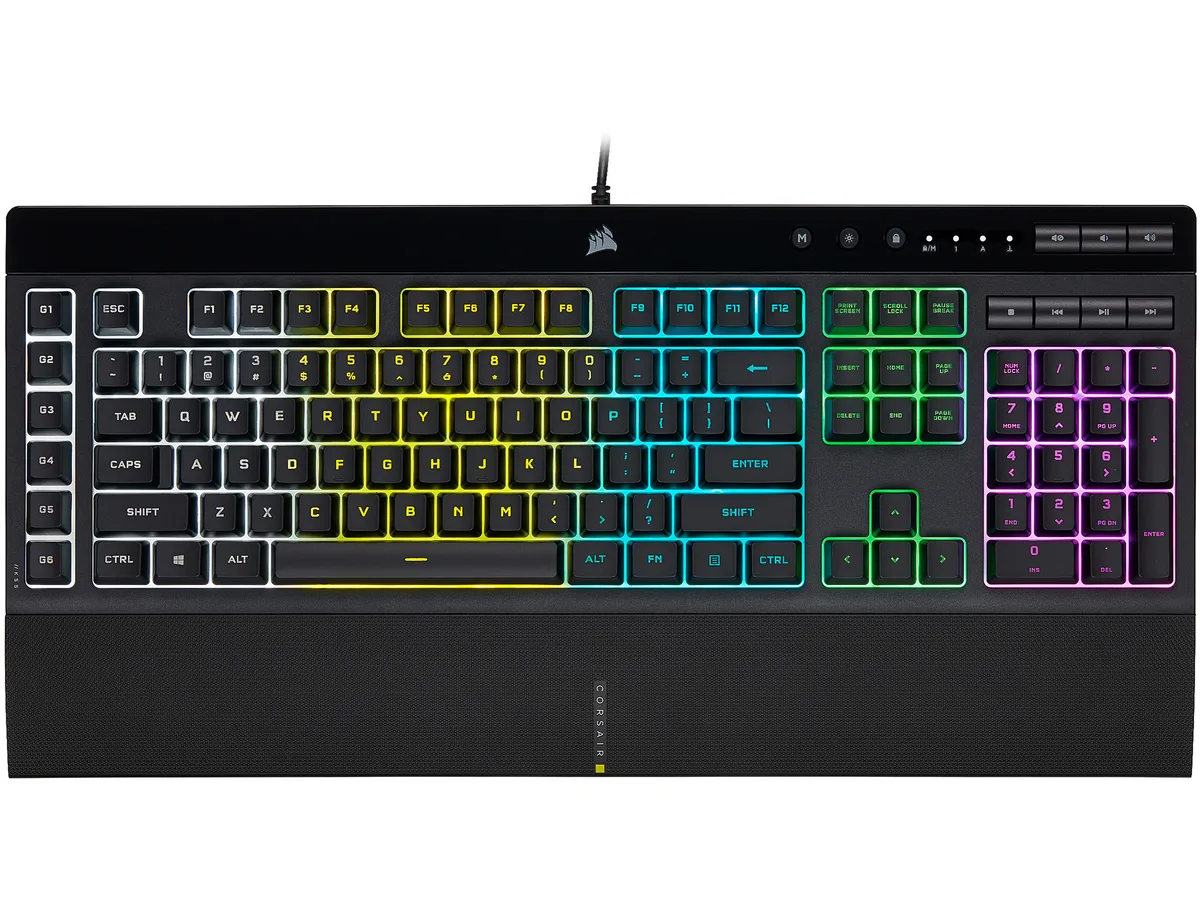
A membrane gaming keyboard with five-zone RGB lighting, six dedicated macro keys, IP42 spill resistance and a detachable palm rest
Options K55 PRO
The Corsair K55 RGB PRO is a membrane gaming keyboard built for players who want macro control and RGB lighting without a mechanical price tag. Its tactile rubber-dome switches suit both gaming sessions and everyday typing.
A wired USB 2.0 Type-A cable provides a direct link to the PC, while IP42-rated dust and spill resistance protects the internals from accidents. The detachable soft-touch palm rest adds wrist support and can be removed for a compact footprint.
This keyboard replaces basic office boards that lack dedicated macro keys, per-zone RGB control or media shortcuts. The jump is worth it when you need six programmable macro keys with Elgato Stream Deck integration and iCUE synchronisation across other Corsair gear.
| Brand | Corsair |
|---|---|
| Name | K55 RGB PRO |
| Model | CH-9226765-NA |
| Keyboard Interface | USB 2.0 Type-A |
| Design Style | Gaming |
| Palm Rest | Detachable |
| Key Switch | Rubber Dome |
| Key Switch Type | Tactile |
| Keyboard Color | Black |
| Backlit | RGB, 16.8 million colors |
| Dimensions | 1.42" x 19.00" x 6.58" |
| Type | Membrane |
| Mouse Included | No |
| Features | Dynamic RGB Backlighting: Light up your desktop with six onboard lighting effects, assign a color to each lighting zone, or program your own vibrant lighting effects across five RGB lighting zones with CORSAIR iCUE software. Six Dedicated Macro Keys: Activate functions, shortcuts, or keypresses in just one stroke with six dedicated macro keys, easily set up through CORSAIR iCUE software, or use instant streaming commands through Elgato Stream Deck software. Dust and Spill-Resistant Design: IP42-rated protection guards against accidents so your gameplay never has to stop. Detachable P |
| Package Contents | CORSAIR K55 RGB PRO gaming keyboard Detachable soft touch palm rest Quick start guide Safety information Warranty card |
| משקל משלוח | 1.27 kg |
| מידות האריזה | 502 × 197 × 53 mm |
גרסאות נוספות של דגם זה
אותה משפחה, זיכרון, קירור או תדר שונים — השווה לפני שתחליט.
The USB 2.0 Type-A interface provides standard wired connectivity; polling rate is handled by the keyboard's internal controller and iCUE software settings.
The keyboard measures 6.58 inches deep without the palm rest; adding the rest increases the total depth, so a 6-inch desk would be too shallow.
Install CORSAIR iCUE software, select the K55 RGB PRO, choose the macro keys, and create or edit macros in the Actions tab before saving to the board.
גם במדף הזה
אותו מדף, אותה קופה — שמונה מטבעות קריפטו ונעילת שער ל-30 דקות.
באיזה מטבע משלמים, ובאיזה מטבע מוצגים המחירים.
נשלח מהארנק שלך בקופה
לתצוגה בלבד — הקטלוג מתומחר בדולר ארה״ב
לא נמצא מטבע מתאים.
בחר את השפה שבה האתר פונה אליך.
חדש כאן?
כבר יש לך חשבון?
אין כאן איפוס אוטומטי: החנות הזו לא שולחת אימייל, ולכן אין קישור חד-פעמי לבקש. השאר את הכתובת בחשבון, והיא תטופל ידנית.
הבקשה נקלטה
שום דבר לא בדרך לתיבת האימייל שלך — החנות הזו לא שולחת אימייל בכלל. מישהו אוסף את הבקשות האלה ידנית.
נזכרת בה?


