

Corsair
Corsair K55 Core TKL Gaming Keyboard CH-9216065-NA
- K55 CORE TKL
- Gaming
36.99 US$44.24 US$−16%
0.00046922BTC
متوفرنقبل الدفع بالعملة المشفرة — لذلك يمكن للعملات الرقمية التي تملكها أن تشتري أجهزة حقيقية.ادفع بالعملة المشفرة، وأنفقها على أجهزة حقيقية. شحن مؤمن مجانا إلى كل أنحاء العالم لما يتجاوز 399 US$. صناديق شحن بسيطة بلا علامة تجارية، ترسل من ألمانيا.شحن مؤمن مجانا لما يتجاوز 399 US$. يُقفل سعرك لمدة 30 دقيقة بمجرد فتح صفحة الدفع.السعر مقفل لمدة 30 دقيقة. كل قطعة مختومة، ورقمها التسلسلي متحقق منه، ومشمولة بضمان 24 شهرا.مختوم، وبضمان 24 شهرا.


Corsair
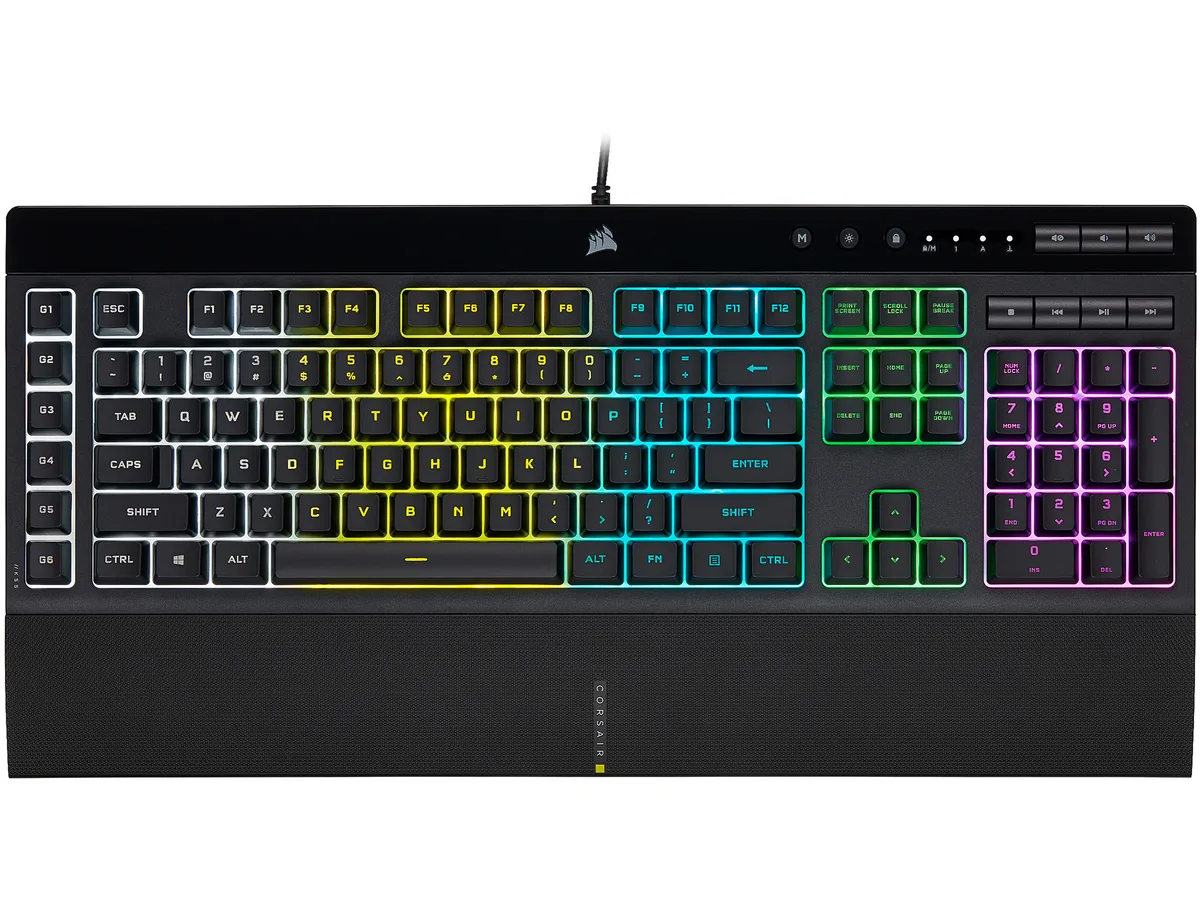
A membrane gaming keyboard with five-zone RGB lighting, six dedicated macro keys, IP42 spill resistance and a detachable palm rest
Options K55 PRO
The Corsair K55 RGB PRO is a membrane gaming keyboard built for players who want macro control and RGB lighting without a mechanical price tag. Its tactile rubber-dome switches suit both gaming sessions and everyday typing.
A wired USB 2.0 Type-A cable provides a direct link to the PC, while IP42-rated dust and spill resistance protects the internals from accidents. The detachable soft-touch palm rest adds wrist support and can be removed for a compact footprint.
This keyboard replaces basic office boards that lack dedicated macro keys, per-zone RGB control or media shortcuts. The jump is worth it when you need six programmable macro keys with Elgato Stream Deck integration and iCUE synchronisation across other Corsair gear.
| Brand | Corsair |
|---|---|
| Name | K55 RGB PRO |
| Model | CH-9226765-NA |
| Keyboard Interface | USB 2.0 Type-A |
| Design Style | Gaming |
| Palm Rest | Detachable |
| Key Switch | Rubber Dome |
| Key Switch Type | Tactile |
| Keyboard Color | Black |
| Backlit | RGB, 16.8 million colors |
| Dimensions | 1.42" x 19.00" x 6.58" |
| Type | Membrane |
| Mouse Included | No |
| Features | Dynamic RGB Backlighting: Light up your desktop with six onboard lighting effects, assign a color to each lighting zone, or program your own vibrant lighting effects across five RGB lighting zones with CORSAIR iCUE software. Six Dedicated Macro Keys: Activate functions, shortcuts, or keypresses in just one stroke with six dedicated macro keys, easily set up through CORSAIR iCUE software, or use instant streaming commands through Elgato Stream Deck software. Dust and Spill-Resistant Design: IP42-rated protection guards against accidents so your gameplay never has to stop. Detachable P |
| Package Contents | CORSAIR K55 RGB PRO gaming keyboard Detachable soft touch palm rest Quick start guide Safety information Warranty card |
| وزن الشحنة | 1.27 kg |
| أبعاد الطرد | 502 × 197 × 53 mm |
إصدارات أخرى من هذا الطراز
نفس الفئة، بذاكرة أو مبرّد أو تردد مختلف — قارن قبل أن تقرر.
The USB 2.0 Type-A interface provides standard wired connectivity; polling rate is handled by the keyboard's internal controller and iCUE software settings.
The keyboard measures 6.58 inches deep without the palm rest; adding the rest increases the total depth, so a 6-inch desk would be too shallow.
Install CORSAIR iCUE software, select the K55 RGB PRO, choose the macro keys, and create or edit macros in the Actions tab before saving to the board.
أيضًا في هذا القسم
نفس القسم، ونفس صفحة الدفع — ثماني عملات رقمية وقفل سعر لمدة 30 دقيقة.
ما تدفعه، وما تُعرض به الأسعار.
يُرسَل من محفظتك عند إتمام الطلب
للعرض فقط — أسعار الكتالوج بالدولار الأمريكي
لا توجد عملة مطابقة.
اختر اللغة التي يخاطبك بها الموقع.
لا توجد لغة مطابقة.
هل أنت جديد هنا؟
لديك حساب بالفعل؟
لا توجد إعادة تعيين تلقائية: هذا المتجر لا يُرسل أي بريد، فلا يوجد رابط لمرة واحدة يمكن طلبه. اترك العنوان في الحساب، وسيُعالَج الأمر يدويًا.
تم تسجيل الطلب
لا شيء في طريقه إلى بريدك الوارد — هذا المتجر لا يُرسل أي بريد إطلاقًا. يتولّى أحدهم معالجة هذه الطلبات يدويًا.
تذكّرتها؟




