

ASUS
ASUS CR1104FTA-YZ84T Chromebook 11.6" Touch N150 8GB 64GB Mineral Gray
- 11.6"
US$414.99
0.00528589BTC
재고 있음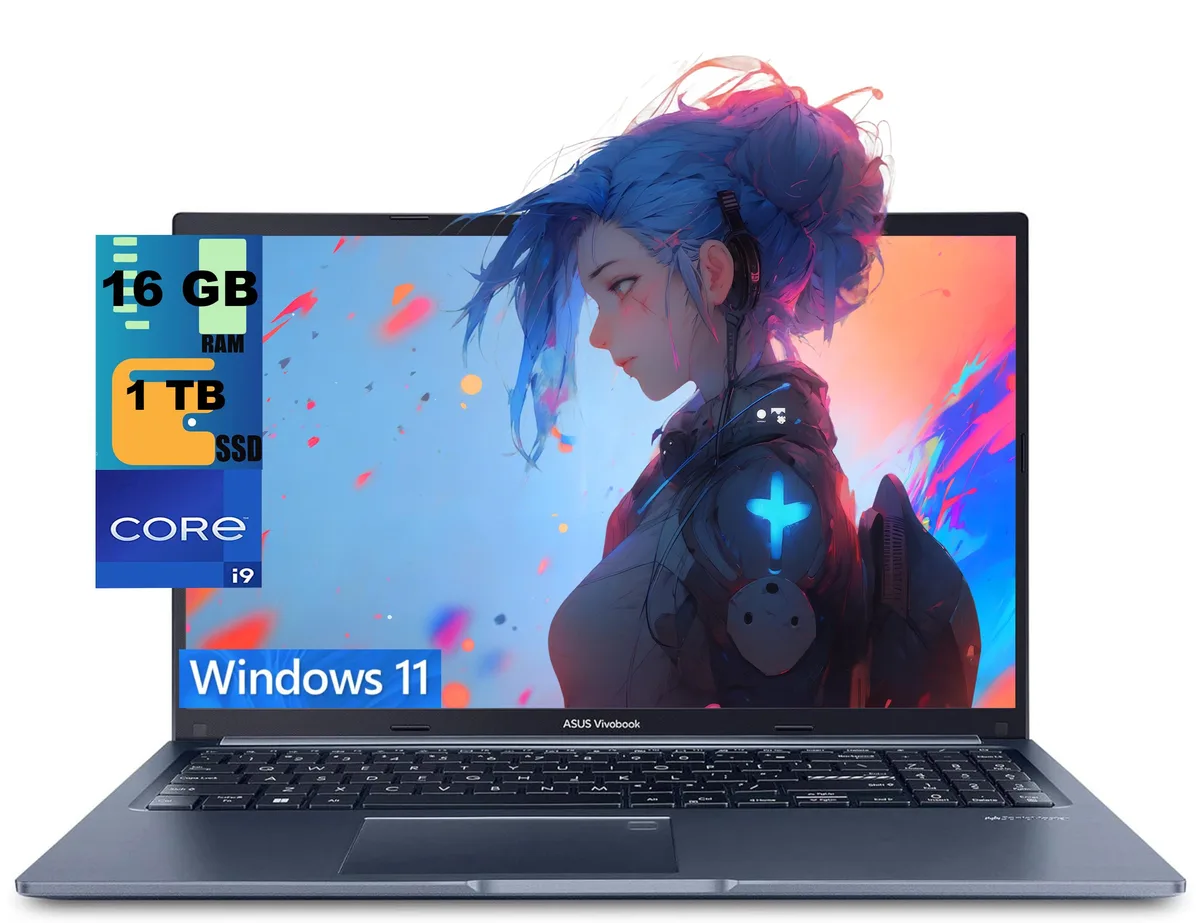


ASUS
15.6-inch FHD laptop with a 14-core i9-13900H, 16GB DDR4, 1TB PCIe SSD, Wi-Fi 6E, backlit keyboard and fingerprint reader
The ASUS Vivobook 15 is a 15.6-inch laptop powered by an Intel Core i9-13900H processor with 14 cores and 20 threads. It comes with 16GB of DDR4 memory and a 1TB PCIe solid-state drive running Windows 11 Home. The blue chassis houses a non-touch FHD display with a 1920 x 1080 resolution. Integrated Intel Iris Xe graphics handle visual output for everyday productivity and media consumption.
The 14-core processor operates at a 2.6GHz base frequency and can reach 5.0GHz with Intel Turbo Boost Technology, drawing more power under heavy multi-threaded loads. Sustained performance will raise internal temperatures and activate the cooling system, producing audible fan noise during demanding tasks. Lighter workloads such as web browsing or document editing run cooler and quieter. The 0.78-inch profile limits thermal headroom compared to thicker designs.
Connectivity includes one USB 3.2 Gen 1 Type-C port with Power Delivery, two USB 3.2 Gen 1 Type-A ports, one USB 2.0 Type-A port, an HDMI 1.4 output and a headphone combo jack. Wi-Fi 6E and Bluetooth provide wireless links. The memory and storage are not user-accessible after the factory upgrade process, so the 16GB RAM and 1TB SSD capacities are fixed. Buyers who need more memory or a second drive should consider a different platform.
| Series | Raider |
|---|---|
| Model | Vivobook 15 |
| Color | Blue |
| Operating System | Windows 11 Home |
| CPU Type | Intel Core i9 13th Gen |
| Processor Name | 2.60GHz |
| Turbo Frequency | 5.0 GHz |
| Number of Cores | 14-cores Processor |
| Screen Size | 15.6" |
| Touchscreen | Non-Touch Screen |
| Display Type | FHD |
| Resolution | 1920 x 1080 |
| GPU/VPU | Intel Iris Xe Graphics |
| Graphic Type | Integrated Card |
| SSD | 1 TB PCIe |
| HDD | No |
| Memory | 16GB |
| Optical Drive Type | No |
| WLAN | Yes |
| Bluetooth | Yes |
| USB | 2 |
| HDMI | 1 x HDMI |
| Audio Ports | 1 x Headphone/Microphone Combo Jack |
| Audio | Integrated Sound card |
| Speaker | Internal Speakers |
| Touchpad | Yes |
| Keyboard | Yes |
| Backlit Keyboard | Backlit |
| Webcam | Yes |
| Style | Standard |
| Type | Home / Personal |
| Usage | Consumer |
| Weight | 3 - 3.9 lbs. |
| Package Content | Laptop, Charger |
The laptop uses a 1 TB PCIe SSD; adding a second M.2 drive requires opening the bottom panel, inserting the stick at an angle into the spare slot, and securing it with the tiny screw — the step most people miss is re-enabling the new drive in the BIOS before Windows sees it.
The 16 GB DDR4 is soldered to the board, so it cannot be upgraded or replaced; the only memory-related maintenance is keeping the OS and drivers current to avoid unnecessary paging to the 1 TB PCIe SSD.
The integrated Intel Iris Xe shares the 16 GB DDR4 and hits its thermal ceiling before the 5.0 GHz turbo can be sustained, so frame rates drop once the cooling system saturates.
이 진열대의 다른 상품
같은 진열대, 같은 체크아웃 — 코인 8종, 환율 잠금 30분.
결제할 코인과 가격을 확인할 통화입니다.
체크아웃 시 지갑에서 전송됩니다.
표시 전용 — 카탈로그 가격은 달러 기준입니다.
일치하는 통화가 없습니다.
사이트에서 사용할 언어를 선택하십시오.
일치하는 언어가 없습니다.
처음 방문하셨나요?
이미 계정이 있으신가요?
자동 재설정 기능은 없습니다. 이 쇼핑몰은 어떠한 메일도 보내지 않으므로 요청할 일회용 링크 자체가 없습니다. 계정에 등록된 이메일 주소를 그대로 두시면 담당자가 직접 확인해 처리합니다.
요청 접수
받은편지함으로 오는 것은 아무것도 없습니다 — 이 쇼핑몰은 메일을 전혀 보내지 않습니다. 담당자가 직접 확인해 처리합니다.
기억나셨나요?


