

SanDisk
SanDisk Cruzer Blade 8 GB USB 2.0 USB flash drive Black SDCZ50-008G-B35
US$391.99
0.005031BTC
재고 있음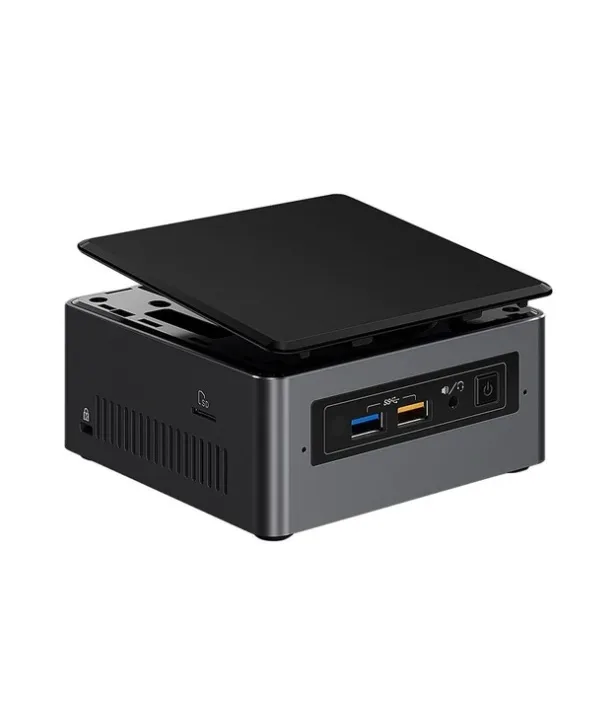
Intel
Barebone mini PC with a 2.4 GHz dual-core processor, supports up to 32 GB DDR4-2133, includes Gigabit LAN and Wi-Fi 5
The Intel BOXNUC7I3BNH is a UCFF barebone built around a 2.4 GHz dual-core i3-7100U with 15 W TDP. It ships without memory or storage so you choose the exact capacity and speed your workload requires. Two SO-DIMM slots accept up to 32 GB of DDR4-2133, while a 22 x 42/80 M.2 slot and dual SATA 6.0 Gb/s ports give flexible drive options.
Suits home-office users, digital-signage installs or secondary PCs that need a tiny footprint and quiet 15 W operation. Builders who want discrete graphics, more than two memory channels or a higher-core-count CPU should look at larger platforms.
The board only supports DDR4-2133 in 260-pin SO-DIMM form factor; standard DIMMs or faster DDR4 modules will not work. Matching this memory spec is the single decision that determines whether the kit boots.
| Brand | Intel |
|---|---|
| Series | NUC (Next Unit of Computing) |
| Model | BOXNUC7I3BNH |
| Color | Black |
| Form Factor | UCFF (4" x 4") |
| CPU Type | 7th Generation Intel Core i3-7100U 2.4 GHz, Dual Core 3MB cache, 15W TDP |
| Memory installed | No Memory |
| Memory slot | 2 x 260Pin SO-DIMM |
| Memory Type Supported | DDR4 2133 |
| Max Memory Supported | 32GB |
| Storage Installed | No Hard Drive |
| Serial ATA | 2 x SATA 6.0Gb/s |
| M.2 Slot | 22x42/80 |
| Integrated Graphics | Intel HD Graphics 620 |
| Channel | 7.1 Channel |
| LAN | Intel i219V |
| Max LAN Speed | 1Gbps |
| Wireless LAN | Intel Wireless-AC 8265 |
| Bluetooth | Bluetooth v4.2 |
| Front USB | 2 x front USB 3.0 |
| Card Reader | microSDXC with UHS-I support (Side) |
| Other Front Ports | 2 x USB 2.0 via internal headers |
| HDMI | HDMI 2.0a |
| Rear USB | 2 x USB 3.0 1 x USB 3.1 Gen 2 (10Gbps), Type-C |
| RJ45 | 1 |
| Input | 12V - 19V DC input range |
| Power Supply | 19V 65W wall-wart power supply with interchangeable plugs included |
| Dimensions | 2.01" x 4.53" x 4.37" |
| Features | Intel Optane Memory Supported Intel Virtualization Technology for Directed I/O (VT-d) Intel HD Audio Technology Intel Rapid Storage Technology Intel Virtualization Technology (VT-x) Intel Platform Trust Technology (Intel PTT) |
You must supply two 260-pin DDR4-2133 SO-DIMMs; the board supports up to 32 GB total across its two slots.
Yes, the unit provides two SATA 6.0Gb/s connectors so a 2.5-inch SATA SSD or hard drive can be installed directly.
After assembling the NUC and installing drivers, open Device Manager and verify Intel HD Graphics 620 appears under Display adapters without errors.
이 진열대의 다른 상품
같은 진열대, 같은 체크아웃 — 코인 8종, 환율 잠금 30분.
결제할 코인과 가격을 확인할 통화입니다.
체크아웃 시 지갑에서 전송됩니다.
표시 전용 — 카탈로그 가격은 달러 기준입니다.
일치하는 통화가 없습니다.
사이트에서 사용할 언어를 선택하십시오.
일치하는 언어가 없습니다.
처음 방문하셨나요?
이미 계정이 있으신가요?
자동 재설정 기능은 없습니다. 이 쇼핑몰은 어떠한 메일도 보내지 않으므로 요청할 일회용 링크 자체가 없습니다. 계정에 등록된 이메일 주소를 그대로 두시면 담당자가 직접 확인해 처리합니다.
요청 접수
받은편지함으로 오는 것은 아무것도 없습니다 — 이 쇼핑몰은 메일을 전혀 보내지 않습니다. 담당자가 직접 확인해 처리합니다.
기억나셨나요?



