

SanDisk
SanDisk Cruzer Blade 8 GB USB 2.0 USB flash drive Black SDCZ50-008G-B35
US$391.99
0.00496039BTC
재고 있음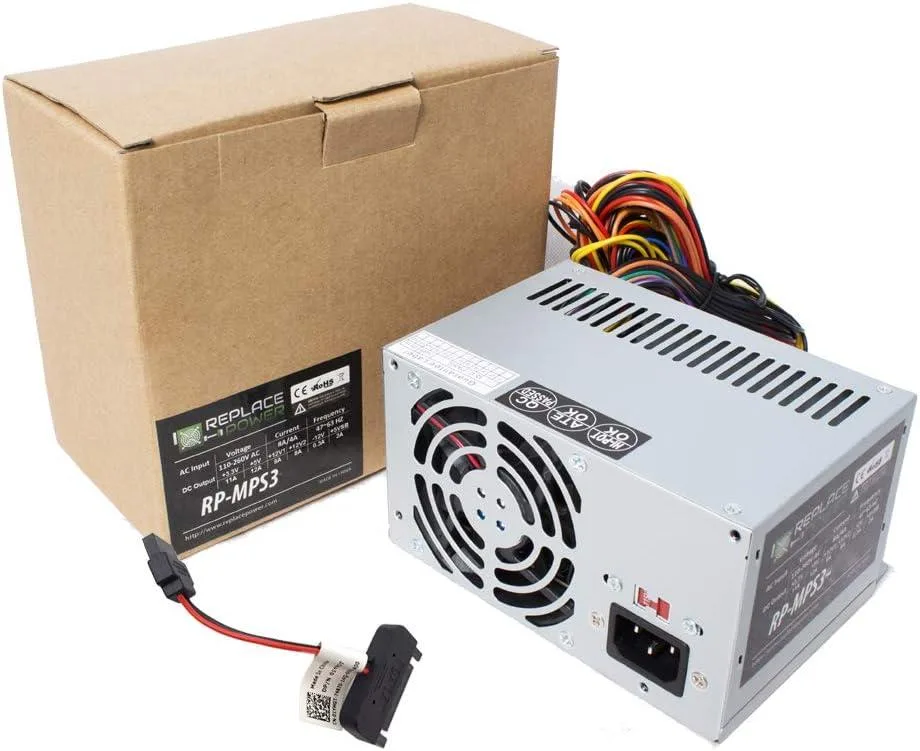
myVolts
Replacement AT power supply with 20+4 pin ATX, 12 V 4-pin, 6-pin and three SATA connectors for HP Pavilion 510-p011la desktops
This power supply is built as a direct replacement for the HP Pavilion Desktop 510-p011la DT PC. It matches the original AT form factor and connector layout so the system powers up without adapter cables or case modifications. Ideal for owners restoring a failed unit or upgrading an ageing original supply.
The unit uses a conventional AT design with a 20+4 pin ATX connector, a +12V 4-pin CPU connector, three SATA power leads and one 6-pin peripheral connector. Power draw follows the host system’s demand; acoustic output and thermal behaviour remain consistent with the original supply under normal desktop workloads.
This PSU replaces the original equipment supply when it no longer delivers stable voltage or has suffered component fatigue. The jump is worth it when the desktop shows random shutdowns, boot failures or connector damage. Builders needing higher wattage for discrete graphics cards or additional drive bays cannot use this unit.
| Type | AT |
|---|
Align the 20+4 pin ATX connector with the motherboard socket and press firmly until the latch clicks; the step often missed is fully seating the separate 4-pin +12V connector near the CPU socket.
Periodically clean dust from the intake and exhaust vents with compressed air to keep airflow steady; no user-serviceable parts inside so no further replacement is expected.
The 11 A rating on the +12 V rail is the first ceiling you will hit during prolonged heavy draw.
이 진열대의 다른 상품
같은 진열대, 같은 체크아웃 — 코인 8종, 환율 잠금 30분.
결제할 코인과 가격을 확인할 통화입니다.
체크아웃 시 지갑에서 전송됩니다.
표시 전용 — 카탈로그 가격은 달러 기준입니다.
일치하는 통화가 없습니다.
사이트에서 사용할 언어를 선택하십시오.
일치하는 언어가 없습니다.
처음 방문하셨나요?
이미 계정이 있으신가요?
자동 재설정 기능은 없습니다. 이 쇼핑몰은 어떠한 메일도 보내지 않으므로 요청할 일회용 링크 자체가 없습니다. 계정에 등록된 이메일 주소를 그대로 두시면 담당자가 직접 확인해 처리합니다.
요청 접수
받은편지함으로 오는 것은 아무것도 없습니다 — 이 쇼핑몰은 메일을 전혀 보내지 않습니다. 담당자가 직접 확인해 처리합니다.
기억나셨나요?



