Acer America
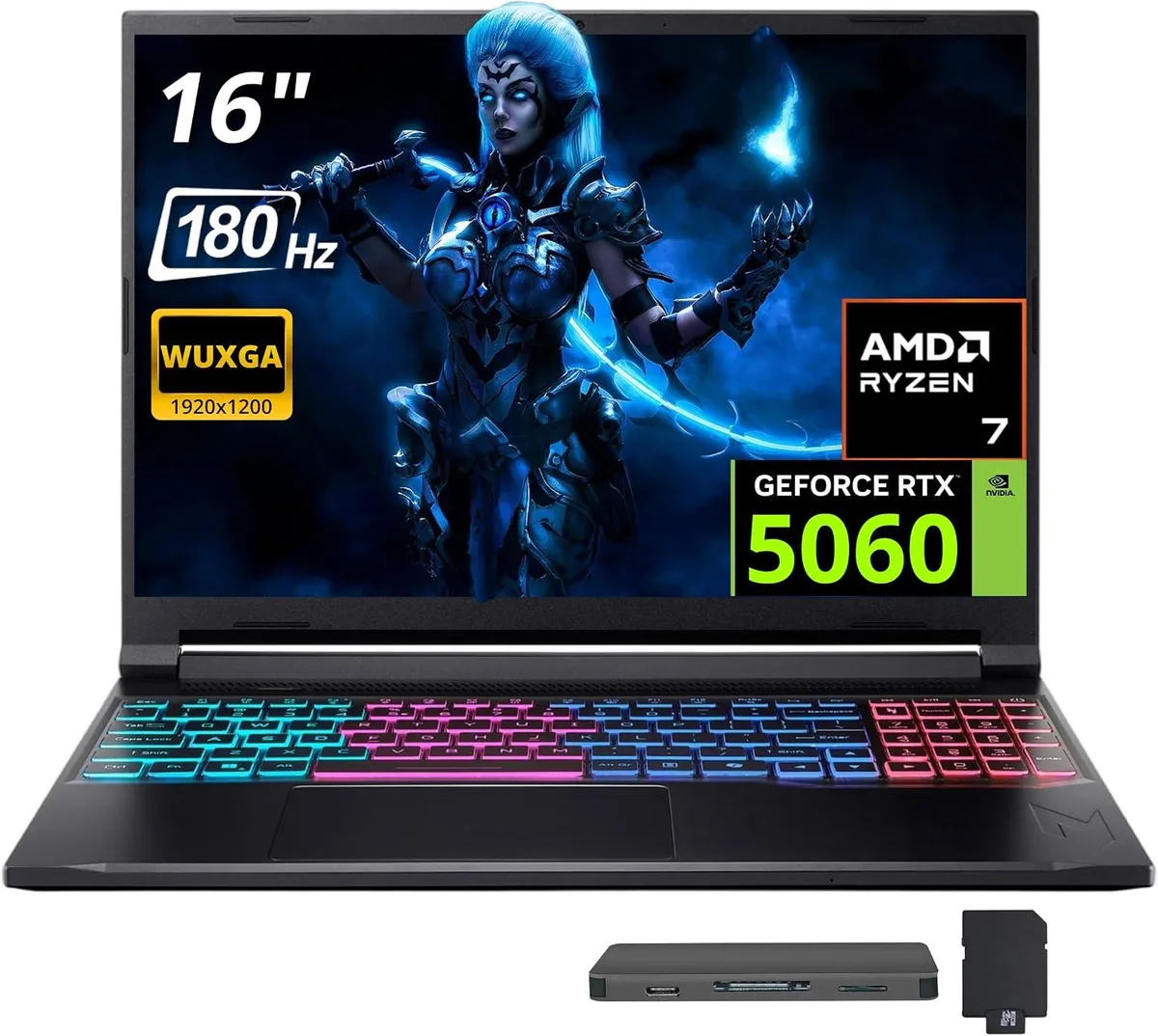
Acer America Nitro V 16S AI 16" 180 Hz gaming laptop AMD Ryzen 260 RTX 5060 16GB DDR5 1TB
- Black
- AMD Ryzen 260
$1,369
0.01768597BTC
In stockWe take cryptocurrency — so the coins you hold can buy real hardware.Pay in crypto, spend it on real hardware. Free insured shipping worldwide over $399. Plain, unbranded boxes, sent from Germany.Free insured shipping over $399. Your rate is locked for 30 minutes once checkout opens.Rate locked 30 minutes. Every item sealed, serial-checked and covered by a 24-month warranty.Sealed, 24-month warranty.


Acer America
16-inch 180 Hz gaming laptop with Ryzen 260, RTX 5060, 32 GB DDR5 and a 1 TB dock bundle
Capacity 32GB DDR5 | 1TB SSD
The Acer Nitro V 16S AI ships with a 16.0-inch WQXGA panel running at 1920 x 1200 and a 180 Hz refresh rate. An AMD Ryzen 260 eight-core processor operates at a 3.8 GHz base clock and can boost to 5.1 GHz. The system includes 32 GB of DDR5 5600 memory and an NVIDIA GeForce RTX 5060 GPU with GDDR7 video memory. Windows 11 Home is pre-installed.
Wireless networking uses 802.11ax and Bluetooth 5.3 for peripherals. Physical ports comprise one USB-C, three USB-A and one HDMI 2.1 output for external displays. A bundled 7-in-1 docking station adds a 1 TB SSD, a 32 GB microSD card with adapter, a USB-C data cable, a 3-in-1 charging cable and a suede cleaning cloth. The laptop’s own 1 TB SSD remains available for the operating system and active projects.
The eight-core Ryzen 260 maintains its 3.8 GHz base frequency across extended sessions while the RTX 5060’s GDDR7 frame buffer feeds the GPU without throttling. DDR5 5600 system memory keeps data moving to both compute engines during long rendering or gaming workloads. The 180 Hz panel continues to deliver smooth motion without frame-time spikes when the hardware is pushed continuously.
| Color | Black |
|---|---|
| Processor Name | AMD Ryzen 260 |
| Number of Cores | 8-core Processor |
| Screen Size | 16.0" |
| Touchscreen | Non-Touch Screen |
| Display Type | WQXGA |
| Resolution | 1920 x 1200 |
| Refresh Rate | 180 Hz |
| Operating System | Windows 11 Home |
| GPU/VPU | NVIDIA GeForce RTX 5060 |
| Memory | 32GB |
| Memory Speed | DDR5 5600 |
| Memory Type | GDDR7 |
| WLAN | 802.11ax Wireless LAN |
| Bluetooth | Bluetooth 5.3 |
| USB | 1 x USB-C, 3 x USB-A |
| HDMI | 1 x HDMI 2.1 |
| Backlit Keyboard | Backlit |
| Webcam | Yes |
| Type | Gaming |
| Usage | Gaming |
Other versions of this model
Same family, different memory, cooler or clock — compare before you commit.
The Ryzen 260 has an 8-core design with a 3.8 GHz base clock and 5.1 GHz max boost. Sustained loads will hit thermal limits before the silicon limit, so expect clocks to settle below the peak boost after several minutes.
The RTX 5060 with 8 GB GDDR7 and the Ryzen 260 share a compact 16-inch chassis. Under continuous load the fans spin up audibly and the keyboard deck grows warm, though the 4-zone RGB backlight remains usable.
The dock connects via the laptop's single USB-C port and adds HDMI 2.1, extra USB-A ports and the 1 TB SSD. You need an HDMI 2.1 cable for high-refresh displays and standard USB-A cables for mice or drives.
Also in this aisle
Same shelf, same checkout — eight coins and a 30-minute rate lock.
What you pay in, and what you read prices in.
Sent from your wallet at checkout
Display only — the catalogue is priced in USD
No currency matches that.
Pick the language the site speaks to you in.
New here?
Already have one?
There is no automatic reset: this shop sends no mail, so there is no one-time link to ask for. Leave the address on the account and it gets picked up by hand.
Request noted
Nothing is on its way to your inbox — this shop sends no mail at all. Someone picks these up by hand.
Remembered it?