

Micron Technology, Inc.
Micron Technology, Inc. MT4JTF12864AZ-1G4D1 1GB DDR3 1333 Desktop RAM
- 1GB
- DDR3 1333 (PC3 1060…
$28.99
0.00037491BTC
In stockWe take cryptocurrency — so the coins you hold can buy real hardware.Pay in crypto, spend it on real hardware. Free insured shipping worldwide over $399. Plain, unbranded boxes, sent from Germany.Free insured shipping over $399. Your rate is locked for 30 minutes once checkout opens.Rate locked 30 minutes. Every item sealed, serial-checked and covered by a 24-month warranty.Sealed, 24-month warranty.
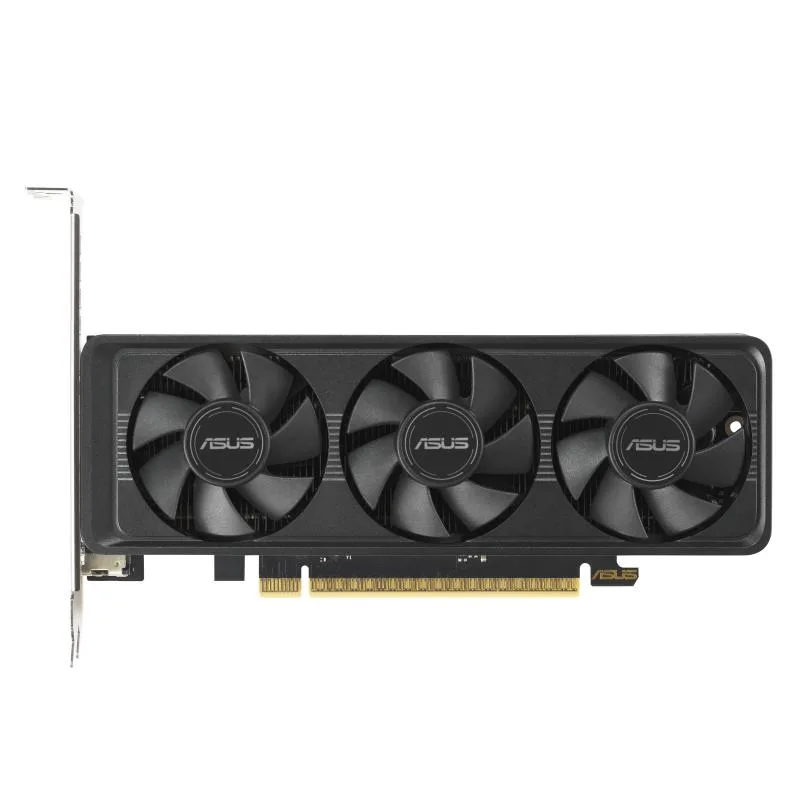


ASUS
Low-profile GeForce RTX 5060 with 8GB GDDR7, 3840 CUDA cores and PCIe 5.0 x8 for compact builds
This low-profile graphics card targets compact PC builds that need modern GPU performance. It fits small chassis while leaving room for cables and airflow. The card uses the NVIDIA Blackwell architecture and supports DLSS 4 for AI-enhanced rendering. It delivers 627 AI TOPS for machine-learning workloads.
The reduced-height bracket simplifies installation in tight cases and mini-ITX boards. IP5X dust resistance protects the PCB from particle ingress during long-term use. Dual ball fan bearings extend cooler lifespan compared to sleeve designs. Auto-Extreme automated manufacturing improves solder joint reliability.
Eight gigabytes of GDDR7 memory at 28 Gbps feed the 3840 CUDA cores for 1440p gaming and content creation. The 128-bit interface limits bandwidth for heavy 4K textures or large AI batches. PCI Express 5.0 x8 provides sufficient host throughput for current workloads. GPU Tweak III software allows clock and fan tuning for thermal headroom.
| Brand | ASUS |
|---|---|
| Series | LP BRK |
| Model | RTX5060-O8G-LP-BRK |
| Interface | PCI Express 5.0 x8 |
| Chipset Manufacturer | NVIDIA |
| GPU Series | NVIDIA GeForce RTX 50 Series |
| GPU | GeForce RTX 5060 |
| Architecture | Blackwell |
| Boost Clock | OC mode: 2565MHz Default mode: 2535MHz (Boost Clock) |
| CUDA Cores | 3840 |
| Effective Memory Clock | 28 Gbps |
| Memory Size | 8GB |
| Memory Interface | 128-Bit |
| Memory Type | GDDR7 |
| DirectX | DirectX 12 Ultimate |
| OpenGL | OpenGL 4.6 |
| Multi-Monitor Support | 4 |
| HDMI | 1 x HDMI 2.1b |
| DisplayPort | 3 x DisplayPort 2.1b |
| Color | Black |
| Max Resolution | 7680 x 4320 |
| CrossFireX Support | No |
| SLI Support | No |
| Virtual Reality Ready | Yes |
| Cooler | Double Fans |
| Recommended PSU Wattage | 550W |
| Power Connector | 8-Pin |
| HDCP Ready | Yes |
| Form Factor | ATX |
| Max GPU Length | 228 mm |
| Card Dimensions (L x H) | 175.8 x 69 x 38 mm 6.92 x 2.72 x 1.50 inches |
| Slot Width | 2.5 Slots |
| Package Contents | 1 x Speedsetup Manual 1 x Thank You Card |
Open GPU Tweak III and check the real-time sensor panel; the GPU clock should read 2565 MHz when the card is under load in OC mode.
The box contains the low-profile graphics card and documentation; the card draws power from the PCI Express 5.0 x8 slot so no extra power cable is required.
Select OC mode in GPU Tweak III for the higher 2565 MHz boost clock; use default mode at 2535 MHz if you prefer lower power draw and quieter operation.
Also in this aisle
Same shelf, same checkout — eight coins and a 30-minute rate lock.
What you pay in, and what you read prices in.
Sent from your wallet at checkout
Display only — the catalogue is priced in USD
No currency matches that.
Pick the language the site speaks to you in.
New here?
Already have one?
There is no automatic reset: this shop sends no mail, so there is no one-time link to ask for. Leave the address on the account and it gets picked up by hand.
Request noted
Nothing is on its way to your inbox — this shop sends no mail at all. Someone picks these up by hand.
Remembered it?



