

Micron Technology, Inc.
Micron Technology, Inc. MT4JTF12864AZ-1G4D1 1GB DDR3 1333 Desktop RAM
- 1GB
- DDR3 1333 (PC3 1060…
$28.99
0.00037491BTC
In stockWe take cryptocurrency — so the coins you hold can buy real hardware.Pay in crypto, spend it on real hardware. Free insured shipping worldwide over $399. Plain, unbranded boxes, sent from Germany.Free insured shipping over $399. Your rate is locked for 30 minutes once checkout opens.Rate locked 30 minutes. Every item sealed, serial-checked and covered by a 24-month warranty.Sealed, 24-month warranty.
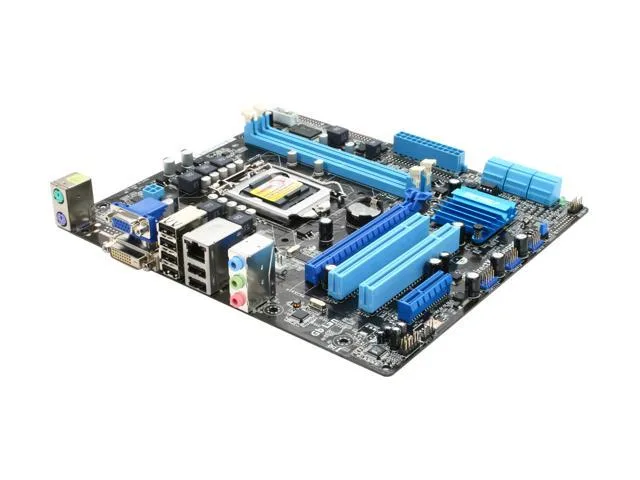


ASUS
Micro ATX board for LGA 1156 CPUs with DDR3 1333/1066, dual-channel memory, one PCIe 2.0 x16 slot, one PCIe x4 slot, two PCI slots, 8-channel audio and Gigabit LAN
This micro-ATX board uses the Intel H55 chipset and accepts Core i7, i5, i3 and Pentium processors in an LGA 1156 socket. It provides two 240-pin DDR3 slots running at 1333 or 1066 MHz with dual-channel support up to 8 GB. A single PCI Express 2.0 x16 slot, one PCI Express x4 slot and two legacy PCI slots handle expansion.
Builders upgrading an existing LGA 1156 system or assembling a basic office PC will find the feature set adequate. The lack of onboard graphics means a discrete video card is mandatory, so systems relying on integrated output cannot use this board. Enthusiasts needing more than two memory slots or newer CPU generations must choose a different platform.
Verify that your processor is an LGA 1156 Core i7, i5, i3 or Pentium model and that your cooler fits the socket mounting holes. Confirm the power supply provides the required 24-pin ATX and 4-pin CPU connectors for this board. Ensure your case accepts micro-ATX dimensions and that a graphics card is available for the D-Sub and DVI video outputs.
| Brand | ASUS |
|---|---|
| Model | P7H55-M LX |
| CPU Socket Type | LGA 1156 |
| CPU Type | Core i7 / i5 / i3 / Pentium (LGA1156) |
| Chipset | Intel H55 |
| Onboard Video Chipset | None |
| Number of Memory Slots | 2x240pin |
| Memory Standard | DDR3 1333/1066 |
| Maximum Memory Supported | 8GB |
| Channel Supported | Dual Channel |
| PCI Express 2.0 x16 | 1 x PCI Express 2.0 x16 |
| PCI Express x4 | 1 x PCI Express x4 |
| PCI Slots | 2 x PCI Slots |
| Audio Chipset | VIA VT1708S |
| Audio Channels | 8 Channels |
| LAN Chipset | Realtek 8112L |
| Max LAN Speed | 1Gbps |
| Back I/O Ports | 2 x PS/2 / 6 x USB 2.0/1.1 |
| PS/2 | 2 |
| Video Ports | D-Sub + DVI |
| USB 1.1/2.0 | 6 x USB 2.0 |
| Audio Ports | 3 Ports |
| Onboard USB | 6 x USB 2.0 |
| Form Factor | Micro ATX |
| Dimensions (W x L) | 9.6" x 8.6" |
| Power Pin | 24 Pin |
| Features | Anti-Surge Protection: Full-time power guardian to safeguard your motherboard from over-voltageASUS Q-Fan2: Quiet, cool and efficient operationLegacy Features: Maximum expansion and flexible connectivity |
Yes, the board has no onboard video chipset, so a discrete graphics card is required for any display output. The back panel provides D-Sub and DVI ports that connect to the installed card.
No, the PCI Express x4 slot accepts only PCIe devices. The board does include two legacy PCI slots, so a PCI sound card can be installed in one of those instead.
Enter the BIOS and verify the memory configuration shows dual-channel operation, or use a system-information utility in the OS that reports the active channel mode.
Also in this aisle
Same shelf, same checkout — eight coins and a 30-minute rate lock.
What you pay in, and what you read prices in.
Sent from your wallet at checkout
Display only — the catalogue is priced in USD
No currency matches that.
Pick the language the site speaks to you in.
New here?
Already have one?
There is no automatic reset: this shop sends no mail, so there is no one-time link to ask for. Leave the address on the account and it gets picked up by hand.
Request noted
Nothing is on its way to your inbox — this shop sends no mail at all. Someone picks these up by hand.
Remembered it?



