

Micron Technology, Inc.
Micron Technology, Inc. MT4JTF12864AZ-1G4D1 1GB DDR3 1333 Desktop RAM
- 1GB
- DDR3 1333 (PC3 1060…
$28.99
0.00037461BTC
In stockWe take cryptocurrency — so the coins you hold can buy real hardware.Pay in crypto, spend it on real hardware. Free insured shipping worldwide over $399. Plain, unbranded boxes, sent from Germany.Free insured shipping over $399. Your rate is locked for 30 minutes once checkout opens.Rate locked 30 minutes. Every item sealed, serial-checked and covered by a 24-month warranty.Sealed, 24-month warranty.


ASUS
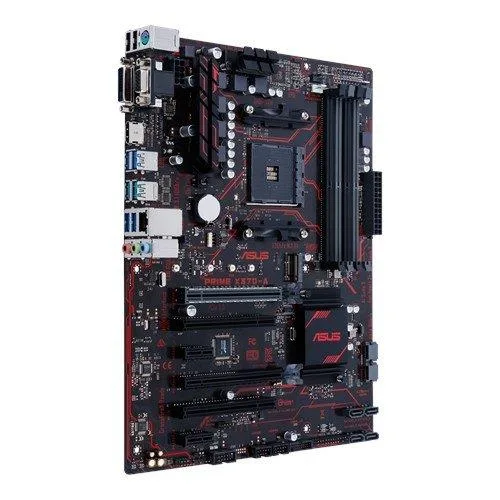
ATX motherboard for AM4 CPUs with four DDR4 slots up to 64 GB, one M.2 socket, six SATA ports, HDMI, DVI, VGA, USB 3.1 and gigabit LAN
The ASUS Prime X370-A is an ATX motherboard built on the AMD X370 chipset for AM4 socket processors. It supports Ryzen 1000 through 5000 series CPUs and 7th generation A-Series or Athlon APUs. Four 288-pin slots accept up to 64GB of DDR4 memory. Integrated graphics output via HDMI 1.4b, DVI-D and VGA is available when using a compatible APU.
This board replaces earlier 300-series models that lack native NVMe M.2 support or USB 3.1 Gen 1 ports. The single M.2 Socket 3 M-key slot handles 2242, 2260, 2280 and 22110 drives in PCIe 3.0 x4 or SATA mode with Ryzen CPUs. Six SATA 6Gb/s ports provide RAID 0, 1 and 10. The move is worth it when adding fast M.2 storage or needing more USB 3.1 connectivity without a PCIe add-in card.
5X Protection III hardware safeguards and a reinforced SafeSlot PCIe 3.0 x16 slot protect components during extended high-power operation. FanXpert 2+ controls chassis and CPU fans based on thermal sensors for steady airflow under continuous load. The Realtek RTL8111H Gigabit LAN and ALC887 8-channel audio maintain stable I/O during long sessions. A secondary PCIe 2.0 x16 slot runs at x4 mode and two PCIe 2.0 x1 slots remain available for additional cards.
| Brand | ASUS |
|---|---|
| Model | Prime X370-A |
| CPU Socket Type | AM4 |
| CPU Type | A-Series / Athlon with Radeon Graphics / Ryzen 1000 Series / Ryzen 2000 Series / Ryzen 2000G Series / Ryzen 3000 Series / Ryzen 3000G Series / Ryzen 4000 Series / Ryzen 4000G Series / Ryzen 5000 Series / Ryzen 5000G Series |
| Chipset | AMD X370 |
| Number of Memory Slots | 4x288pin (DDR4) |
| Memory Standard | Ryzen Processors: DDR4 3200(O.C.)/ 2933(O.C.)/ 2666/ 2400/ 2133 *1 7th Gen A-series/ Athlon Processors: DDR4 2400/ 2133 * *1 Due to the limitation of AMD Ryzen processors, memory frequencies higher than DDR4 2666 MHz are supported only when using one DIMM. * Hyper DIMM support is subject to the physical characteristics of individual CPUs. |
| Maximum Memory Supported | 64GB |
| PCI Express 3.0 x16 | AMD Ryzen Processors: 1 x PCIe 3.0/2.0 x16 (x16 mode) AMD 7th Generation A-series/Athlon Processors: 1 x PCIe 3.0/2.0 x16 (x8 mode) |
| PCI Express 2.0 x16 | 1 x PCIe 2.0 x16 (max at x4 mode) |
| PCI Express x1 | 2 x PCIe 2.0 x1 |
| PCI Slots | 2 x PCI Slots |
| Serial ATA (SATA) | 6 x SATA 6Gb/s |
| M.2 | Ryzen Processors: 1 x M.2 Socket 3, with M key, type 2242/2260/2280/22110 storage devices support (SATA & PCIE 3.0 x 4 mode) 7th Gen A-series/Athlon Processors: 1 x M.2 Socket 3, with M key, type 2242/2260/2280/22110 storage devices support (SATA & PCIE 3.0 x 2 mode) |
| SATA RAID | 0/1/10 |
| Onboard Video Chipset | Integrated AMD Radeon R Series Graphics in the 7th Generation A-Series APU *2 Multi-VGA output support: HDMI/DVI-D/RGB ports - Supports HDMI 1.4b with max. resolution 4096 x 2160 @ 24 Hz / 2560 x 1600 @ 60 Hz - Supports DVI-D with max. resolution 1920 x 1200 @ 60 Hz - Supports RGB with max. resolution 1920 x 1200 @ 60 Hz Maximum shared memory of 2048MB *2 AMD Ryzen Processor does not support |
| Audio Chipset | Realtek ALC887-VD2 |
| Audio Channels | 8 Channels |
| LAN Chipset | Realtek RTL8111H |
| Max LAN Speed | 1Gbps |
| Back I/O Ports | 1 x D-Sub / 1 x DVI-D / 1 x HDMI / 1 x LAN (RJ45) / 1 x PS/2 / 2 x USB 2.0/1.1 / 3 x Audio Jacks / 4 x USB 3.1 Gen 1 |
| PS/2 | 1 x PS/2 keyboard/mouse port |
| Video Ports | 1 x DVI-D 1 x D-Sub |
| HDMI | 1 x HDMI |
| RJ45 | 1 x RJ45 |
| USB 3.1 | 2 x USB 3.1 |
| USB 3.0 | 4 x USB 3.0 |
| USB 1.1/2.0 | 2 x USB 2.0 |
| Audio Ports | 3 Ports |
| Onboard USB | 1 x USB 3.0 connector(s) support(s) additional 2 USB 3.0 port(s) 2 x USB 2.0 connector(s) support(s) additional 4 USB 2.0 port(s) |
| Other Connectors | 1 x Fan RGB header 1 x COM port(s) connector(s) 1 x CPU Fan connector(s) (1 x 4-pin) 2 x Chassis Fan connector(s) (2 x 4-pin) 1 x S/PDIF out header(s) 1 x Front panel audio connector(s) (AAFP) 1 x System panel(s) 1 x Clear CMOS jumper(s) |
| Form Factor | ATX |
| Dimensions (W x L) | 12.0" x 9.3" |
| Power Pin | 1 x 8-pin EATX 12 V Power connector 1 x 24-pin EATX Power connector(s) |
| Features | Multi-GPU Support: Supports AMD CrossFireX Technology Special Features: ASUS 5X Protection III: - ASUS SafeSlot Core: Fortified PCIe Slot prevents damage - ASUS LANGuard: Protects against LAN surges, lightning strikes and static-electricity discharges! - ASUS Overvoltage Protection: World-class circuit-protecting power design - ASUS Stainless-Steel Back I/O: 3X corrosion-resistance for greater durability! - ASUS DIGI+ VRM: 6 Phase digital power design ASUS Exclusive Features: - AI Suite 3 - Ai Charger - ESD Guards ASUS Quiet Thermal Solution: - Stylish Fanless Design Heat-sink soluti |
| Package Contents | Accessories: User's manual I/O Shield 2 x SATA 6Gb/s cable(s) 1 x M.2 Screw Package |
The M.2 slot supports type 2242, 2260, 2280 and 22110 drives in both SATA and PCIe 3.0 x4 modes when a Ryzen processor is installed.
Install the GPU in the top PCIe 3.0 x16 SafeSlot; it runs at x16 with Ryzen CPUs and x8 with 7th-gen A-series APUs, and the metal-reinforced latch clicks only when the card is fully seated.
Four 288-pin DDR4 slots accept up to 64 GB total; with Ryzen processors the board runs 3200 or 2933 MT/s overclocked and 2666 MT/s standard.
Also in this aisle
Same shelf, same checkout — eight coins and a 30-minute rate lock.
What you pay in, and what you read prices in.
Sent from your wallet at checkout
Display only — the catalogue is priced in USD
No currency matches that.
Pick the language the site speaks to you in.
New here?
Already have one?
There is no automatic reset: this shop sends no mail, so there is no one-time link to ask for. Leave the address on the account and it gets picked up by hand.
Request noted
Nothing is on its way to your inbox — this shop sends no mail at all. Someone picks these up by hand.
Remembered it?



