
ASUS
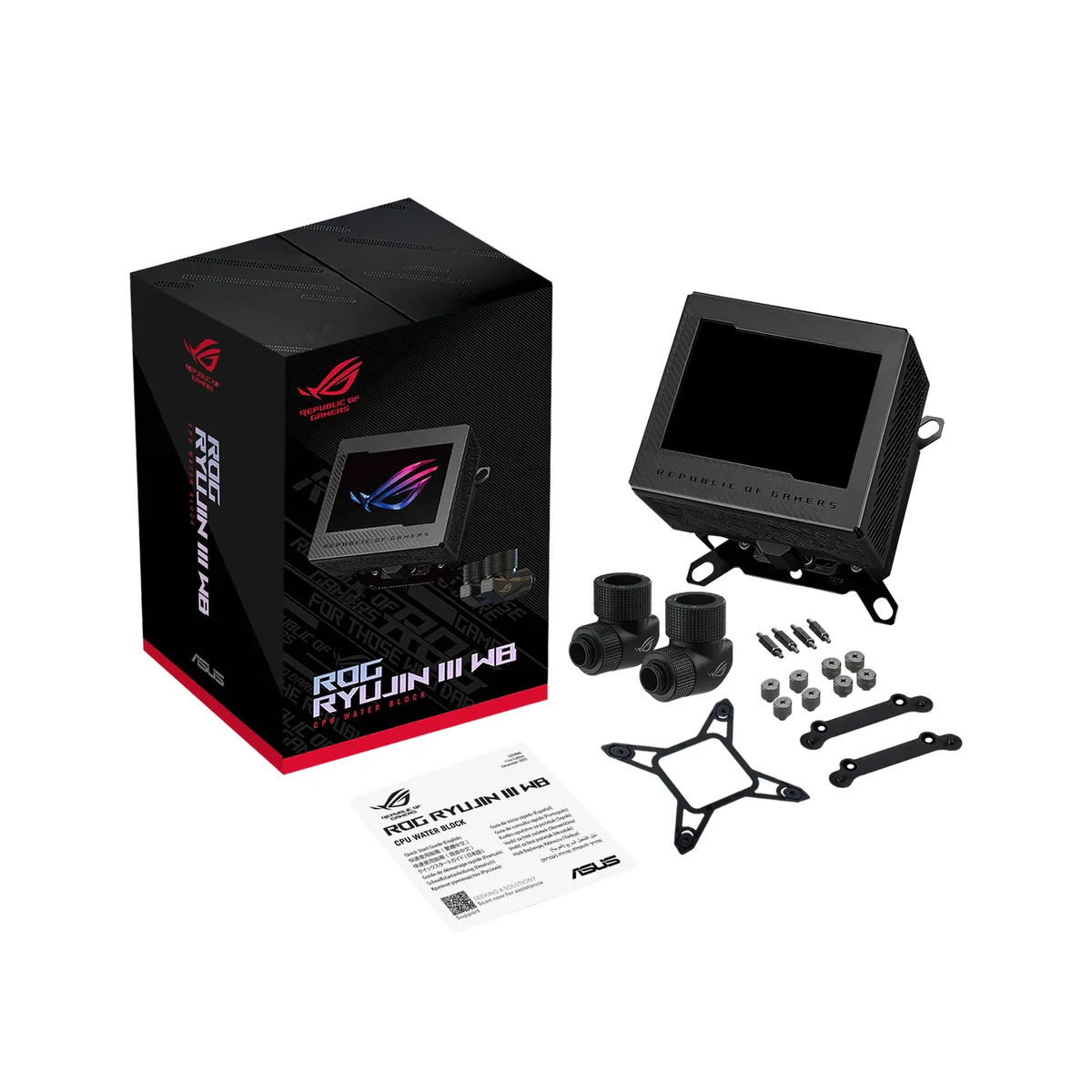
ASUS ROG RYUJIN III WB CPU Water Block Black 3.5 Inch LCD 178 Fins
- Water Blocks
- AMD Socket AM4 / AM…
$219.99
0.00278892BTC
In stockWe take cryptocurrency — so the coins you hold can buy real hardware.Pay in crypto, spend it on real hardware. Free insured shipping worldwide over $399. Plain, unbranded boxes, sent from Germany.Free insured shipping over $399. Your rate is locked for 30 minutes once checkout opens.Rate locked 30 minutes. Every item sealed, serial-checked and covered by a 24-month warranty.Sealed, 24-month warranty.


ASUS
A white CPU water block with a 3.5 inch 60 FPS LCD display, 178 micro-cooling fins, a copper cold plate and an embedded VRM fan that can lower motherboard temperatures by up to 35°C.
Color White
The ASUS ROG Ryujin III WB WHT is a white CPU water block built for custom liquid-cooling loops. It pairs an Asetek-powered copper cold plate with 178 micro-cooling fins and a 3.5-inch full-colour LCD running at 60 FPS. An embedded axial-tech fan delivers 21.08 CFM to lower motherboard VRM temperatures by up to 35°C. The block measures 89 x 89 x 101mm and includes all-copper ROG fittings plus a cable organiser. Compatible with Intel LGA 1700, 1200, 1150, 1151, 1155, 1156 and AMD AM4, AM5 sockets.
This block suits enthusiasts building a custom loop who want integrated VRM airflow and a high-refresh LCD for system stats or custom graphics. It fits the mainstream Intel and AMD desktop sockets listed in the specifications. Builders using HEDT or server platforms not listed above cannot mount this unit. Users planning an air-cooled or all-in-one build have no use for a bare water block. Anyone whose case or loop layout cannot accommodate the 101mm block height should verify clearance first.
The block compatibility list is the single specification that decides whether this part fits your motherboard. It covers Intel LGA 1700, 1200, 1150, 1151, 1155, 1156 and AMD AM4, AM5. If your CPU socket is not in that list, the water block will not mount. No other specification overrides this constraint.
| Brand | ASUS |
|---|---|
| Model | ROG RYUJIN III WB WHT |
| Part Number | 90RC00V2-M0AAY0 |
| Type | Water Blocks |
| Block Compatibility | AMD Socket AM4 / AMD Socket AM5 / Intel LGA 1150 / Intel LGA 1151 / Intel LGA 1155 / Intel LGA 1156 / Intel LGA 1200 / Intel LGA 1700 |
| Block Dim. | 89 x 89 x 101mm |
| Block Material | Copper |
| Fan Air Flow | 21.08 CFM |
| Color | White |
| Package Contents | 1 x ROG cable organizer |
| Shipping weight | 2.27 kg |
| Package size | 203 × 127 × 76 mm |
Other versions of this model
Same family, different memory, cooler or clock — compare before you commit.
You need a pump, reservoir, radiator, tubing and coolant to complete the loop; the block includes copper fittings for G1/4 threads.
The fan sits above the block and is designed to lower VRM temperatures by up to 35 °C on compatible Intel LGA 1700, 1200, 115X and AMD AM5, AM4 boards.
Open the Armoury Crate display settings and confirm the panel shows a smooth 60 FPS animation or real-time hardware read-out without stutter.
Also in this aisle
Same shelf, same checkout — eight coins and a 30-minute rate lock.
What you pay in, and what you read prices in.
Sent from your wallet at checkout
Display only — the catalogue is priced in USD
No currency matches that.
Pick the language the site speaks to you in.
No language matches that.
New here?
Already have one?
There is no automatic reset: this shop sends no mail, so there is no one-time link to ask for. Leave the address on the account and it gets picked up by hand.
Request noted
Nothing is on its way to your inbox — this shop sends no mail at all. Someone picks these up by hand.
Remembered it?


