

Micron Technology, Inc.
Micron Technology, Inc. MT4JTF12864AZ-1G4D1 1GB DDR3 1333 Desktop RAM
- 1GB
- DDR3 1333 (PC3 1060…
$28.99
0.00037515BTC
In stockWe take cryptocurrency — so the coins you hold can buy real hardware.Pay in crypto, spend it on real hardware. Free insured shipping worldwide over $399. Plain, unbranded boxes, sent from Germany.Free insured shipping over $399. Your rate is locked for 30 minutes once checkout opens.Rate locked 30 minutes. Every item sealed, serial-checked and covered by a 24-month warranty.Sealed, 24-month warranty.
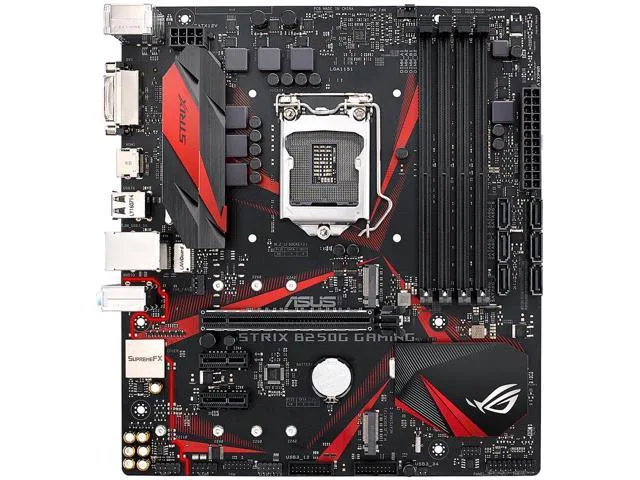


ASUS
Micro-ATX Intel B250 board with LGA 1151 socket, four DDR4 slots up to 64 GB, dual M.2, USB 3.1, HDMI and DVI-D
The ASUS ROG STRIX B250G GAMING uses the Intel B250 chipset and an LGA 1151 socket to support Core i7, i5, i3, Pentium and Celeron processors. It is not compatible with 8th generation Intel CPUs. The Micro-ATX form factor suits compact gaming builds.
Builders who want a small chassis with dual M.2 slots, USB 3.1 and 8-channel SupremeFX audio will fit this board. Anyone planning an 8th generation or later Intel processor must choose a different platform because the socket and chipset do not support those CPUs.
Four 288-pin slots accept DDR4 2400 and 2133 modules up to 64 GB total. 7th generation processors reach 2400 MHz; 6th generation processors top out at 2133 MHz. One M.2 slot handles 2242, 2260, 2280 and 22110 lengths over PCIe 3.0 x4 or SATA, while a second slot covers 2242, 2260 and 2280 devices. Six SATA 6 Gb/s ports add further storage room.
| Brand | ASUS |
|---|---|
| Series | ROG |
| Model | ROG STRIX B250G GAMING |
| CPU Socket Type | LGA 1151 |
| CPU Type | Core i7 / i5 / i3 / Pentium / Celeron (LGA1151) |
| Supported CPU Technologies | Turbo Boost Technology 2.0 * Not Compatible with Intel 8th Gen CPUs |
| Chipset | Intel B250 |
| Onboard Video Chipset | Integrated Graphics Processor - Intel HD Graphics supportMulti-VGA output support: HDMI/DVI-D ports- Supports HDMI with max. resolution 4096 x 2160 @ 24 Hz- Supports DVI-D with max. resolution 1920 x 1200 @ 60 HzMaximum shared memory of 1024MBSupports Intel InTru 3D, Quick Sync Video, Clear Video HD Technology, Insider |
| Number of Memory Slots | 4x288pin (DDR4) |
| Memory Standard | DDR4 2400/ 2133* Due to Intel chipset limitation, DDR4 2400 MHz memory frequency is only supported by 7th Gen Intel processors. Higher memory modules will run at the maximum transfer rate of DDR4 2400 MHz.** Due to Intel chipset limitation, DDR4 2133 MHz and higher memory modules on 6th Gen Intel processors will run at the maximum transfer rate of DDR4 2133 MHz. |
| Maximum Memory Supported | 64GB |
| Channel Supported | Dual Channel |
| PCI Express 3.0 x16 | 1 x PCIe 3.0/2.0 x1 (x16 mode) |
| PCI Express x1 | 2 x PCIe 3.0/2.0 x1 |
| Serial ATA (SATA) | 6 x SATA 6Gb/s |
| M.2 | 1 x M.2 Socket 3, with M key, type 2242/2260/2280 storage devices support (SATA & PCIE 3.0 x 4 mode)1 x M.2 Socket 3, with M key, type 2242/2260/2280/22110 storage devices support (PCIE 3.0 x 4 mode)** Intel Optane Memory Ready |
| Audio Chipset | ROG SupremeFX High Definition Audio CODEC S1220A |
| Audio Channels | 8 Channels |
| LAN Chipset | Intel I219-V |
| Max LAN Speed | 1Gbps |
| Back I/O Ports | 1 x HDMI / 1 x PS/2 Keyboard/Mouse Combo / 2 x USB 3.0 / 4 x USB 2.0/1.1 |
| PS/2 | 1 x PS/2 keyboard/mouse port |
| Video Ports | 1 x DVI-D |
| HDMI | 1 x HDMI |
| RJ45 | 1 x RJ45 |
| USB 3.0 | 2 x USB 3.0 |
| USB 1.1/2.0 | 4 x USB 2.0 |
| Audio Ports | 3 Ports |
| Onboard USB | 2 x USB 3.0 connector(s) support(s) additional 4 USB 3.0 port(s)1 x USB 2.0 connector(s) support(s) additional 2 USB 2.0 port(s) |
| Other Connectors | 1 x AAFP connector1 x TPM connector(s)1 x COM port(s) connector(s)1 x CPU Fan connector(s) (x 4-pin)1 x Chassis Fan connector(s) (x 4-pin)1 x Clear CMOS jumper(s)1 x System panel connector |
| Form Factor | Micro ATX |
| Dimensions (W x L) | 9.6" x 8.6" |
| Power Pin | 1 x 8-pin EATX 12 V Power connector1 x 24-pin EATX Power connector(s) |
| Features | ROG Exclusive Features:ROG CPU-ZOverwolfSpecial FeaturesGamer's Guardian:- ESD Guards on LAN, Audio, KBMS and USB3.0/2.0 ports- DRAM Overcurrent Protection- Stainless Steel Back I/O- Highly Durable Components- DIGI+ VRM- SafeSlotGPU BoostASUS Exclusive Features:- AI Suite 3- Ai Charger- ASUS UEFI BIOS EZ Mode featuring friendly graphics user interfaceASUS EZ DIY:- ASUS CrashFree BIOS 3- ASUS EZ Flash 3- ASUS MyLogoASUS Q-Design:- ASUS Q-Shield- ASUS Q-Slot- ASUS Q-DIMMFan Xpert 3BIOS:128MB Flash ROM, UEFI AMI BIOS, PnP, DMI 3.0, WfM 2.0, SM BIOS 3.0, ACPI 6.1, Multi-language BIOS, AS |
| Package Contents | Accessories:User's manualI/O Shield2 x SATA 6Gb/s cable(s)1 x M.2 Screw Package1 x Supporting DVD1 x ROG Strix stickers1 x 10-in-1 ROG cable label |
The board uses an LGA 1151 socket, so the installed processor must be an LGA 1151 Core i7, i5, i3, Pentium or Celeron.
On a 6th Gen Intel processor the memory controller is limited to DDR4 2133, so DDR4 2400 modules will operate at 2133 MHz.
Check the slot configuration in the BIOS or use a system-information utility to verify the link reports PCIe 3.0 x16.
Also in this aisle
Same shelf, same checkout — eight coins and a 30-minute rate lock.
What you pay in, and what you read prices in.
Sent from your wallet at checkout
Display only — the catalogue is priced in USD
No currency matches that.
Pick the language the site speaks to you in.
New here?
Already have one?
There is no automatic reset: this shop sends no mail, so there is no one-time link to ask for. Leave the address on the account and it gets picked up by hand.
Request noted
Nothing is on its way to your inbox — this shop sends no mail at all. Someone picks these up by hand.
Remembered it?



