

Micron Technology, Inc.
Micron Technology, Inc. MT4JTF12864AZ-1G4D1 1GB DDR3 1333 Desktop RAM
- 1GB
- DDR3 1333 (PC3 1060…
$28.99
0.00037461BTC
In stockWe take cryptocurrency — so the coins you hold can buy real hardware.Pay in crypto, spend it on real hardware. Free insured shipping worldwide over $399. Plain, unbranded boxes, sent from Germany.Free insured shipping over $399. Your rate is locked for 30 minutes once checkout opens.Rate locked 30 minutes. Every item sealed, serial-checked and covered by a 24-month warranty.Sealed, 24-month warranty.
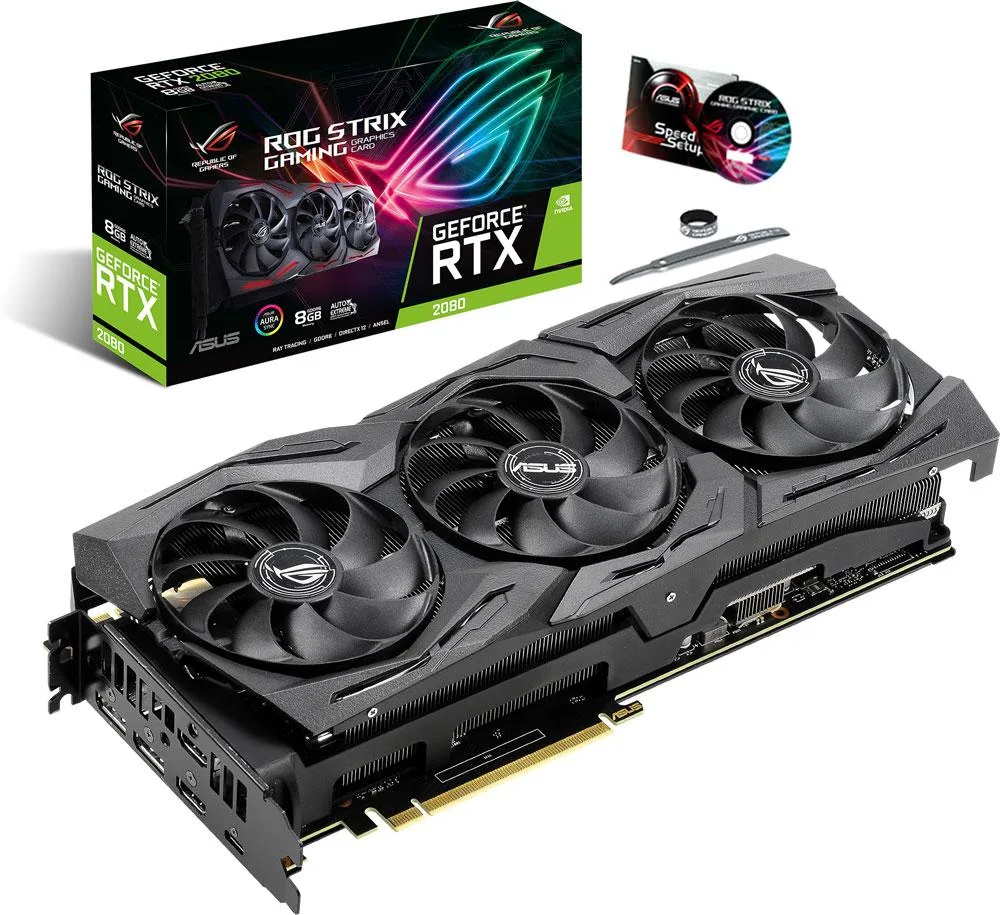
ASUS
Delivers 8 GB GDDR6 on a 256-bit bus with 3072 CUDA cores and boost clocks up to 1860 MHz
The ASUS ROG STRIX GeForce RTX 2080 SUPER delivers 3072 CUDA cores and 8GB of GDDR6 memory on a 256-bit bus. It targets gamers and creators who need high frame rates at 1440p or entry-level 4K. The card operates at a gaming-mode core clock of 1650 MHz with a boost to 1830 MHz, while an OC mode pushes those figures to 1680 MHz and 1860 MHz respectively.
Installation follows the standard PCI Express 3.0 x16 slot procedure, but the ROG STRIX cooler occupies three expansion slots and extends well beyond the bracket. Ensure your case has enough length and width clearance, and that your power supply provides the required 8-pin connectors. The most common issue is discovering the card blocks adjacent slots or SATA ports once seated.
Verify that your monitor cables support the 7680 x 4320 maximum resolution across the two HDMI 2.0b and two DisplayPort 1.4 outputs. The card also includes a USB Type-C port for compatible VR headsets or displays. Confirm your power supply wattage meets NVIDIA's recommendation for the RTX 2080 SUPER and that your motherboard BIOS is current for PCIe 3.0 compatibility.
| Brand | ASUS |
|---|---|
| Series | ROG STRIX |
| Model | ROG-STRIX-RTX2080S-A8G-GAMING |
| Interface | PCI Express 3.0 |
| Chipset Manufacturer | NVIDIA |
| GPU | GeForce RTX 2080 SUPER |
| Core Clock | OC mode: 1680 MHz/Gaming mode: 1650 MHz |
| Boost Clock | OC mode: 1860 MHz/Gaming mode: 1830 MHz |
| CUDA Cores | 3072 |
| Effective Memory Clock | 15500 MHz |
| Memory Size | 8GB |
| Memory Interface | 256-Bit |
| Memory Type | GDDR6 |
| OpenGL | OpenGL 4.6 |
| Multi-Monitor Support | 4 |
| HDMI | 2 x HDMI 2.0b |
| DisplayPort | 2 x DisplayPort 1.4 |
| Other Ports | 1 x USB Type-C |
| Max Resolution | 7680 x 4320 |
| SLI Support | SLI Ready |
| Virtual Reality Ready | Yes |
| Thermal Design Power | 250W |
| System Requirements | Recommended PSU: 650W |
| Recommended PSU Wattage | 650W |
| Power Connector | 2 x 8-Pin |
| Features | RT Cores: Dedicated ray tracing hardware enables fast real-time ray tracing of objects and environments with physically accurate shadows, reflections, refractions, and global illumination.//Concurrent Floating Point and Integer Processing: Turing GPUs more efficiently process the compute heavy workloads of modern games.//Ultra-fast GDDR6: Experience up to 496 GB/s of memory bandwidth for high-speed, high-resolution gaming.//Axial-tech fan design features a smaller fan hub that facilitates longer blades and a barrier ring that increases downward air pressure.//0dB Technology lets you |
| Max GPU Length | 300 mm |
| Card Dimensions (L x H) | 11.80" x 5.13" |
| Slot Width | 2.7 Slots |
| Package Contents | Accessories:/1 x Quick Guide/1 x ROG Velcro Hook & Loop |
Open GPU-Z or ASUS GPU Tweak II, run a 3D load, and verify the core frequency reaches 1860 MHz in OC mode.
No cables, SLI bridge, driver disc or manual are included; you need two 8-pin PCIe power connectors from your PSU and an SLI bridge if you plan to link two cards.
Both modes are on the same card; select Gaming mode in GPU Tweak II for lower thermals in tight cases.
Also in this aisle
Same shelf, same checkout — eight coins and a 30-minute rate lock.
What you pay in, and what you read prices in.
Sent from your wallet at checkout
Display only — the catalogue is priced in USD
No currency matches that.
Pick the language the site speaks to you in.
New here?
Already have one?
There is no automatic reset: this shop sends no mail, so there is no one-time link to ask for. Leave the address on the account and it gets picked up by hand.
Request noted
Nothing is on its way to your inbox — this shop sends no mail at all. Someone picks these up by hand.
Remembered it?



