


ASUS
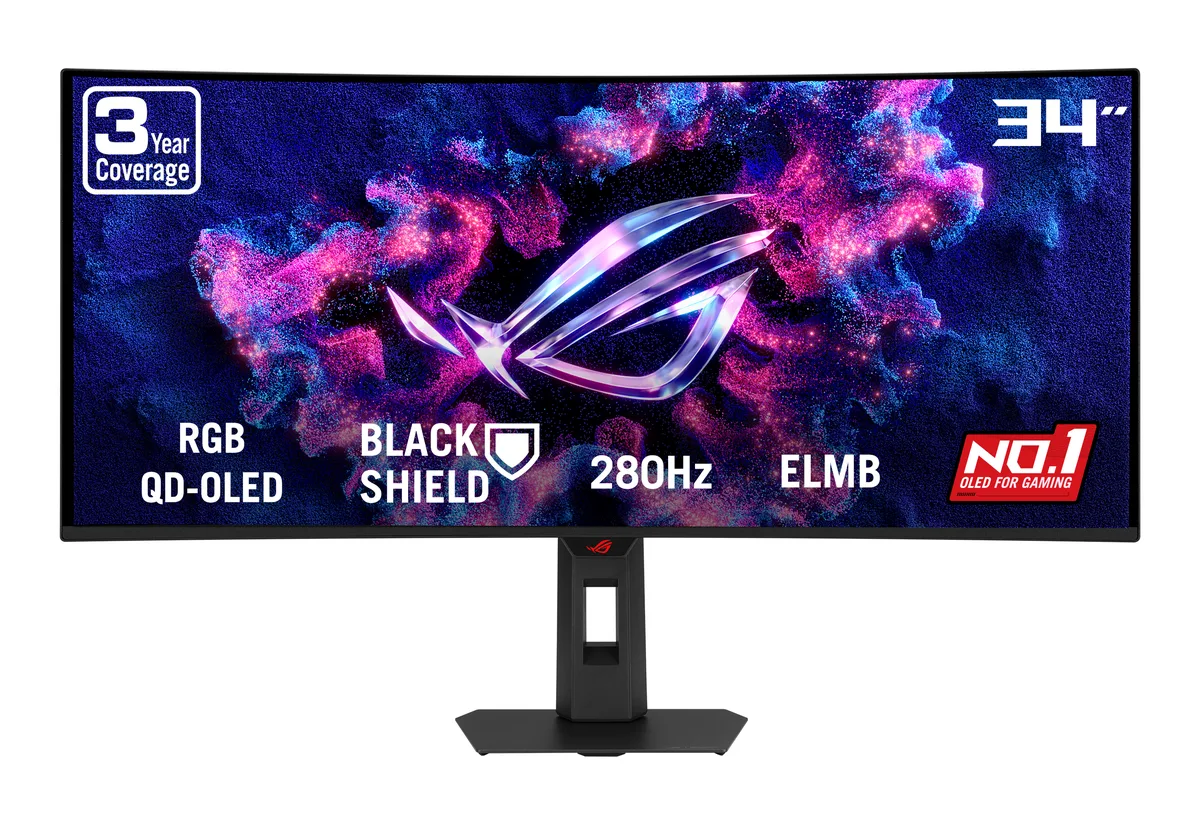
ASUS ROG Strix XG34WCDMTG 34" 240Hz OLED gaming monitor
A 34-inch curved UWQHD OLED gaming monitor with a 240Hz refresh rate, 0.03 ms response time and built-in Google TV
- Cabinet ColorBlack
- OS SupportAndroid 14 version
- Screen Size34"
- WidescreenYes
- PanelOLED
- Display TypeUWQHD
Option 240Hz Android TV OLED
- 240Hz Android TV OLED
- 280Hz Tandem RGB OLED
- Immersive 34" curved 21:9 UWQHD OLED for expansive gaming view
- 240 Hz refresh with 0.03 ms response for ultra-smooth motion
- 99 % DCI-P3 and 1,500,000:1 contrast deliver vivid, deep colour
- FreeSync Premium Pro and G-Sync Compatible prevent tearing
- Built-in Android 14 Google TV and WiFi 6 enable streaming without a PC
34" UWQHD QD-OLED for gamers and streamers
The ASUS ROG Strix XG34WCDMTG combines a 34-inch curved QD-OLED panel with a 3440 x 1440 resolution and a 240Hz refresh rate. It targets players who want ultra-responsive motion and creators who value the 21:9 aspect ratio for timeline work. Built-in Android 14 Google TV and WiFi 6 add standalone streaming and cloud gaming without a PC connected.
Upgrade from standard 144Hz ultrawides
Moving to this monitor is worth it when you need the 0.03 ms response time and 1,500,000:1 contrast that only OLED delivers. The jump pays off in fast-paced titles where motion clarity matters and in dark scenes where true blacks reveal detail. FreeSync Premium Pro and G-Sync Compatible support keep variable refresh smooth across both GPU brands.
99% DCI-P3 and 1000 cd/m² peak brightness for HDR
The panel covers 99% of the DCI-P3 gamut with 1.073 billion colours, making it comfortable for colour-grading and HDR content at the VESA DisplayHDR 400 True Black level. Typical brightness sits at 250 cd/m², so sustained full-screen white in SDR workflows stays modest. The 90W USB-C power delivery runs a thin-and-light laptop, but heavier workstations will need their own charger.
Highlights
- Immersive 34" curved 21:9 UWQHD OLED for expansive gaming view
- 240 Hz refresh with 0.03 ms response for ultra-smooth motion
- 99 % DCI-P3 and 1,500,000:1 contrast deliver vivid, deep colour
- FreeSync Premium Pro and G-Sync Compatible prevent tearing
- Built-in Android 14 Google TV and WiFi 6 enable streaming without a PC
Specifications
| Brand | ASUS |
|---|---|
| Series | ROG Strix |
| Model | XG34WCDMTG |
| Cabinet Color | Black |
| OS Support | Android 14 version |
| Screen Size | 34" |
| Widescreen | Yes |
| Panel | OLED |
| Display Type | UWQHD |
| Adaptive Sync Technology | FreeSync Premium Pro & G-Sync Compatible |
| Resolution | 3440 x 1440 |
| Viewing Angle | 178° (H) / 178° (V) |
| Aspect Ratio | 21:9 |
| Brightness | HDR, Peak: 1,000 cd/m2 Typ: 250 cd/m2 |
| Contrast Ratio | 1,500,000:1 |
| Response Time | 0.03 ms |
| Color Gamut | DCI-P3 99% |
| Display Colors | 1.073 Billion |
| Monitor Pixel Density | 0.231mm |
| Refresh Rate | 240Hz |
| Curved Surface Screen | Curved |
| Curvature Radius | 1800R |
| Connectors | HDMI, DisplayPort, USB, Audio |
| HDMI | 2 x HDMI 2.1 |
| DisplayPort | 1 x DisplayPort 1.4 |
| Video Ports | 1 x DisplayPort 1.4 / 1 x USB-C (DP Alternative) / 2 x HDMI 2.1 |
| USB Ports | 1 x USB-C (DP Alt Mode) 2 x USB 2.0 Type-A USB-C Power Delivery: 90W |
| Headphone | Earphone Jack |
| Power Supply | 100 - 240 VAC, 50/60Hz |
| Power Consumption | Power Consumption: 41.5 W Power Saving Mode: <0.5W Power Off Mode: <0.3W |
| Stand Adjustments | Height, Swivel, Tilt |
| Built-in Speakers | 2 x 5W |
| Built-in Webcam | No |
| HDCP Support | Yes, v2.2 |
| VESA Compatibility - Mountable | 100 x 100mm |
| Dimensions | 31.96" x 21.46" x 4.69" with Stand 31.96" x 14.08" x 4.27" without Stand |
| Weight | 19.40 lbs. with Stand 13.67 lbs. without Stand |
| Package Contents | AAA Battery x2 DisplayPort cable HDMI cable Power cord Remote Controller USB-C cable |
| Shipping weight | 12.38 kg |
| Package size | 914 × 508 × 224 mm |
Other versions of this model
1 more in the same range
Same family, different memory, cooler or clock — compare before you commit.

Questions about this item
Does the 1800R curved stand allow VESA wall mounting if I remove it?
Yes, the stand detaches and the monitor has a standard VESA mount pattern for wall or arm installation.
What is the correct order to connect a laptop with the single USB-C cable for 90W charging and video?
Plug the USB-C cable into the monitor first, then into the laptop; this ensures the DP Alt Mode handshake and 90W power delivery activate together.
How do I clean the QD-OLED panel without damaging the anti-reflective coating?
Use a dry microfibre cloth only; avoid liquids, sprays, or pressure on the 0.03 ms response-time surface.
Also in this aisle
People compared these
Same shelf, same checkout — eight coins and a 30-minute rate lock.


Lenovo
Lenovo Legion Pro 32UD-10 31.5 inch 144 Hz gaming monitor
- 31.5 inch"
- 144 Hz
$819.99
0.01059336BTC
In stock