


ASUS
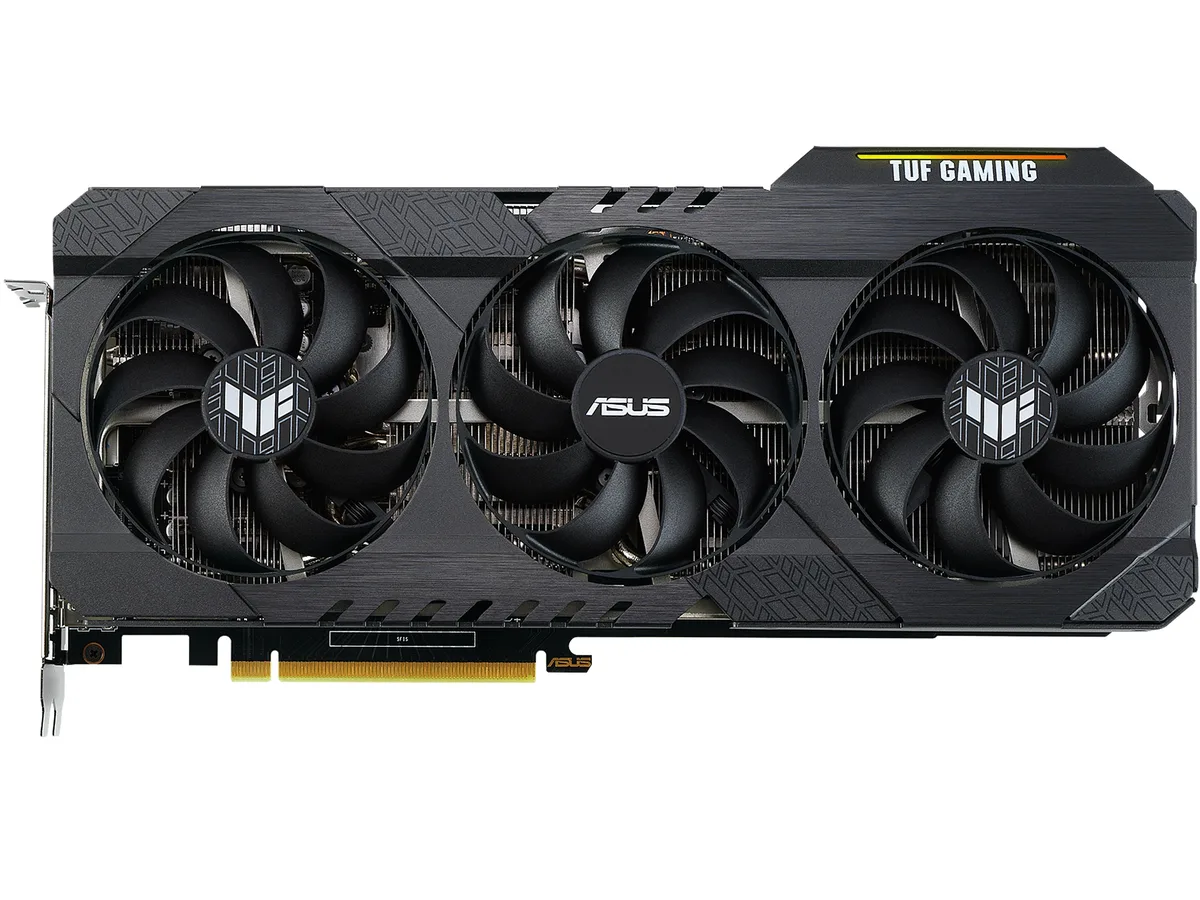
ASUS TUF-RTX3060TI-8G-V2-GAMING GeForce RTX 3060 Ti graphics card
Refurbished GeForce RTX 3060 Ti with 8 GB GDDR6, 4864 CUDA cores and a 1755 MHz boost clock
- InterfacePCI Express 4.0
- Chipset ManufacturerNVIDIA
- GPU SeriesNVIDIA GeForce RTX 30 Series
- GPUGeForce RTX 3060 Ti
- Boost ClockGaming Mode: 1755 MHz
- CUDA Cores4864
- 8 GB GDDR6 memory handles high-resolution textures
- 4864 CUDA cores accelerate compute and shading workloads
- Boost clock reaches 1755 MHz for responsive frame rates
- PCI Express 4.0 interface maximises data throughput
- Two HDMI 2.1 and three DisplayPort 1.4a ports drive up to four displays
TUF Gaming RTX 3060 Ti 8 GB
The ASUS TUF Gaming GeForce RTX 3060 Ti is a refurbished graphics card built on the NVIDIA Ampere architecture with 4864 CUDA cores and 8 GB of GDDR6 memory on a 256-bit bus. It connects via PCI Express 4.0 and reaches a boost clock of 1755 MHz in Gaming Mode. The card is aimed at enthusiasts who want reliable 1440p performance in a sturdy triple-fan design.
Upgrade from 1080p or older 200 W cards
Moving up from a 1080p-focused GPU or an earlier 200 W class board makes sense when you need the 256-bit memory interface and 14 Gbps effective memory clock for higher texture detail. The jump is worth it if your power supply meets the 750 W recommendation and you have an 8-pin connector available. DirectX 12 Ultimate and OpenGL 4.6 support ensure compatibility with current titles.
Suits 1440p gamers and multi-monitor builders
This model suits 1440p gamers who value the 2 x HDMI 2.1 and 3 x DisplayPort 1.4a outputs for up to four displays at 7680 x 4320 resolution. It is less suitable for users who need SLI multi-GPU scaling or who cannot accommodate a triple-slot cooler in their case. The 200 W TDP also requires adequate case airflow.
Highlights
- 8 GB GDDR6 memory handles high-resolution textures
- 4864 CUDA cores accelerate compute and shading workloads
- Boost clock reaches 1755 MHz for responsive frame rates
- PCI Express 4.0 interface maximises data throughput
- Two HDMI 2.1 and three DisplayPort 1.4a ports drive up to four displays
Specifications
| Brand | ASUS |
|---|---|
| Series | TUF Gaming |
| Model | TUF-RTX3060TI-8G-V2-GAMING |
| Interface | PCI Express 4.0 |
| Chipset Manufacturer | NVIDIA |
| GPU Series | NVIDIA GeForce RTX 30 Series |
| GPU | GeForce RTX 3060 Ti |
| Boost Clock | Gaming Mode: 1755 MHz |
| CUDA Cores | 4864 |
| Effective Memory Clock | 14 Gbps |
| Memory Size | 8GB |
| Memory Interface | 256-Bit |
| Memory Type | GDDR6 |
| DirectX | DirectX 12 Ultimate |
| OpenGL | OpenGL 4.6 |
| Multi-Monitor Support | 4 |
| HDMI | 2 x HDMI 2.1 |
| DisplayPort | 3 x DisplayPort 1.4a |
| Max Resolution | 7680 x 4320 |
| SLI Support | No |
| Cooler | Triple Fans |
| Thermal Design Power | 200W |
| Recommended PSU Wattage | 750W |
| Power Connector | 8-Pin |
| HDCP Ready | 2.3 |
| Features | NVIDIA Ampere Streaming Multiprocessors: The building blocks for the world's fastest, most efficient GPUs, the all-new Ampere SM brings 2X the FP32 throughput and improved power efficiency. 2nd Generation RT Cores: Experience 2X the throughput of 1st gen RT Cores, plus concurrent RT and shading for a whole new level of ray tracing performance. 3rd Generation Tensor Cores: Get up to 2X the throughput with structural sparsity and advanced AI algorithms such as DLSS. These cores deliver a massive boost in game performance and all-new AI capabilities. This GeForce RTX 3060 Ti graphics ca |
| Max GPU Length | 301 mm |
| Card Dimensions (L x H) | 11.85" x 5.63" |
| Slot Width | 2.7 slot |
| Shipping weight | 1.74 kg |
| Package size | 406 × 229 × 89 mm |
Questions about this item
What case clearance does the triple-fan cooler on this RTX 3060 Ti require?
The card uses a triple-fan thermal design with a 200 W TDP. Measure the length, height and width of your chassis against the card dimensions before purchase to confirm it will fit.
Which power connector must be attached during installation, and what is the common mistake?
Connect the single 8-Pin power connector from the PSU to the card. The frequent error is leaving this cable unplugged or using an adapter instead of a native 8-Pin lead, which prevents the GPU from starting.
When should the thermal paste on the GeForce RTX 3060 Ti be renewed?
Refresh the paste if GPU temperatures rise noticeably under load after a year or two of use. Clean the old compound with isopropyl alcohol, apply a pea-sized drop of new paste, and reseat the cooler evenly.
Also in this aisle
People compared these
Same shelf, same checkout — eight coins and a 30-minute rate lock.


PrimoChill
PrimoChill Praxis Wetbench Open-Air Test Bench 461.8mm
- Open-Air
$274.89
0.00355238BTC
In stock
Silverstone Technology
SilverStone Technology Strider 1200W 80 Plus Platinum Modular Power Supply
- ATX Mid Tower
- 1200W
$324.03
0.00418741BTC
In stock