


ASUS
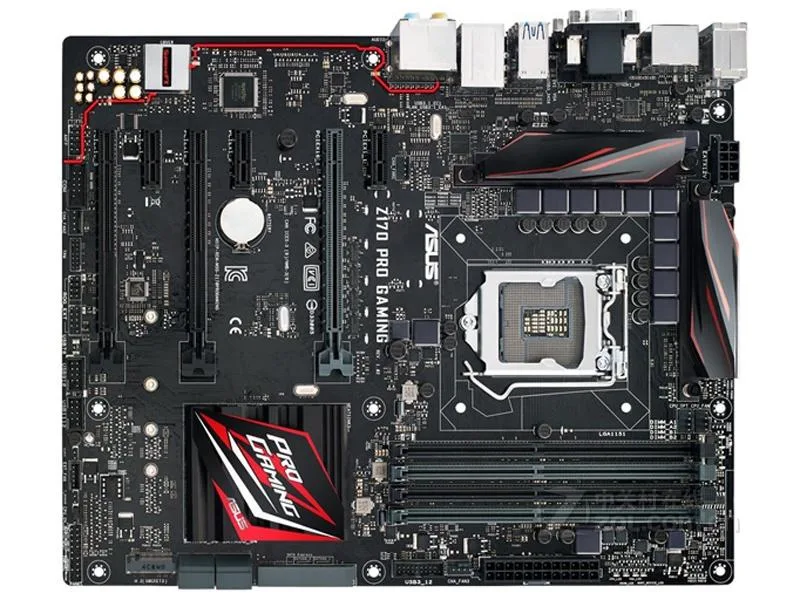
ASUS Z170 PRO GAMING Intel motherboard LGA 1151 DDR4 64GB
Supports DDR4 memory up to 64 GB on an Intel Z170 chipset with LGA 1151 socket
- CPU Socket TypeLGA 1151
- ChipsetIntel Z170
- Maximum Memory Supported64GB
- Supports 6th-gen Intel Core on LGA 1151 socket
- Z170 chipset enables CPU overclocking headroom
- Four DDR4 slots accept up to 64 GB memory
- ATX form factor fits standard gaming cases
- Includes I/O shield and one SATA cable
Intel Z170 ATX motherboard
This ASUS Z170 PRO GAMING board uses the Intel Z170 chipset and an LGA 1151 socket to support 6th and 7th generation Intel Core processors. It is built for DIY builders who want a full-size ATX foundation with DDR4 memory support and room for multi-GPU configurations. The board targets enthusiasts assembling a high-performance desktop for gaming or content creation.
Thermals noise and power draw
The board includes heatsinks on the VRM and chipset areas to dissipate heat during normal operation. Fan headers allow connection of case or CPU coolers so airflow can be tuned for quiet running at typical desktop loads. Power delivery components are rated for the 170 chipset platform and standard 64GB DDR4 configurations without extra voltage.
Sustained load behaviour
Under extended heavy workloads the VRM heatsinks maintain stable temperatures thanks to the board's power-phase layout. The 80% to 100% inspection process applied to each unit verifies that capacitors and MOSFETs meet specification before shipment. Buyers who need factory-new packaging or a full accessory bundle should look elsewhere.
Highlights
- Supports 6th-gen Intel Core on LGA 1151 socket
- Z170 chipset enables CPU overclocking headroom
- Four DDR4 slots accept up to 64 GB memory
- ATX form factor fits standard gaming cases
- Includes I/O shield and one SATA cable
Specifications
| Brand | ASUS |
|---|---|
| Model | ASUS Z170 PRO GAMING |
| CPU Socket Type | LGA 1151 |
| Chipset | Intel Z170 |
| Maximum Memory Supported | 64GB |
Questions about this item
How do I install the ASUS Z170 PRO GAMING into an ATX case and what step is often missed?
Mount the board using all ATX screw holes, fit the supplied I/O shield before securing the board, then connect the 24-pin and 8-pin power cables.
What maintenance will the ASUS Z170 PRO GAMING need later?
The board ships with a SATA cable and metal battery; keep the SATA cable spare for drive swaps and monitor the battery for BIOS retention.
What limit appears first on the ASUS Z170 PRO GAMING during sustained heavy loads?
The 64GB DDR4 memory ceiling is the first hard limit; once all slots are populated you cannot add more capacity.
Also in this aisle
People compared these
Same shelf, same checkout — eight coins and a 30-minute rate lock.


PrimoChill
PrimoChill Praxis Wetbench Open-Air Test Bench 461.8mm
- Open-Air
$274.89
0.00355155BTC
In stock
Silverstone Technology
SilverStone Technology Strider 1200W 80 Plus Platinum Modular Power Supply
- ATX Mid Tower
- 1200W
$324.03
0.00418643BTC
In stock