

DELL
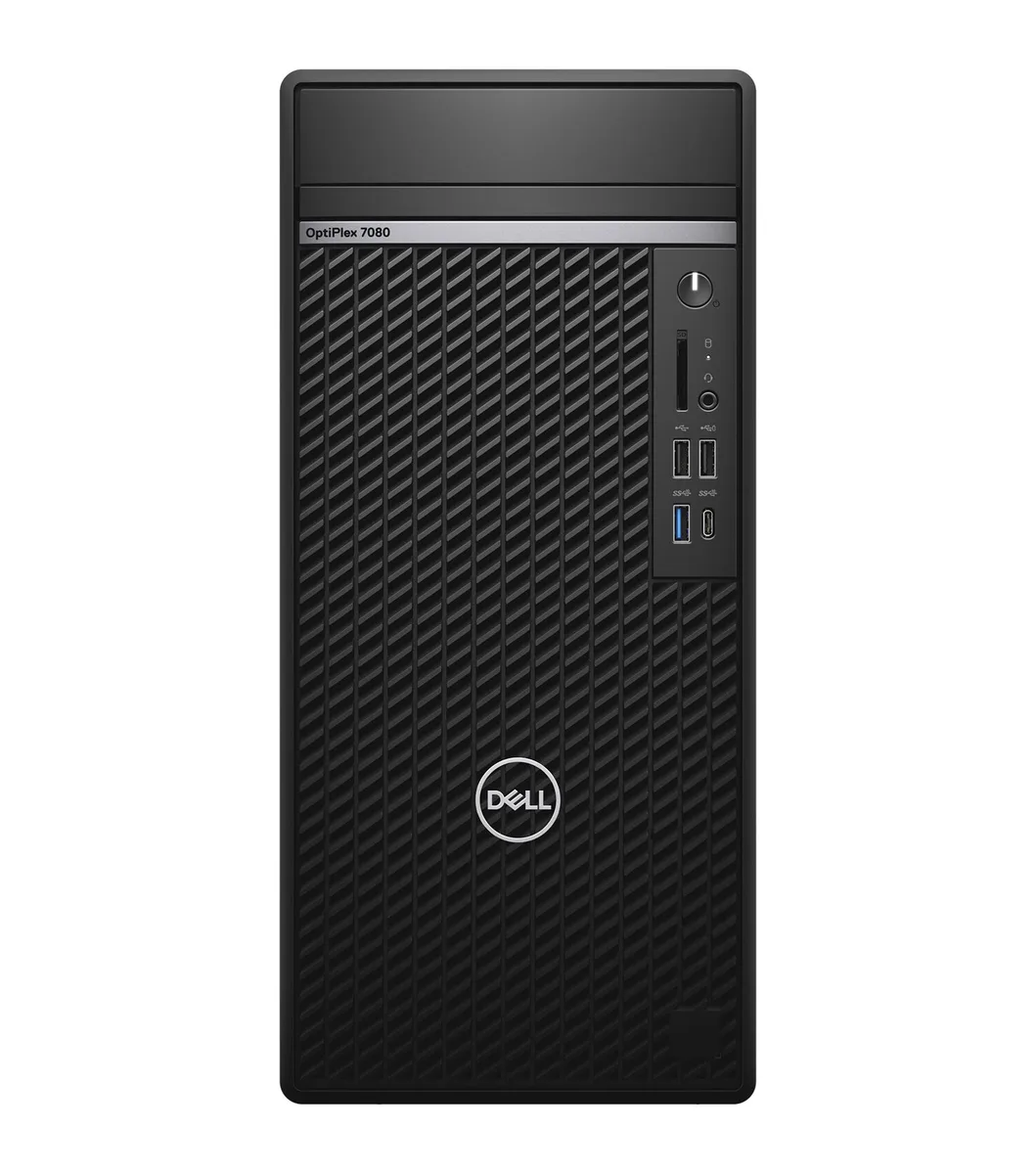
DELL J1-7080TA09 desktop PC, Core i7-10700, 32GB DDR4, 512GB NVMe
A refurbished tower desktop with an 8-core Intel Core i7-10700, 32GB DDR4 memory and a 512GB NVMe SSD running Windows 11 Pro
- TypeBusiness Desktops & Workstations
- Form FactorTower
- UsageBusiness / Mainstream / Work / Business
- ProcessorIntel Core i7-10700
- Processor Main Features64 bit 8-Core Processor
- Cache Per Processor16 MB L3 Cache
- 8-core Intel i7-10700 at 2.9 GHz powers demanding workloads
- 32 GB DDR4 memory keeps multitasking smooth and responsive
- 512 GB NVMe SSD delivers fast boot and load times
- Windows 11 Pro 64-bit provides business-grade security and management
- Tower chassis with 9 USB ports and dual DisplayPort 1.4 supports extensive connectivity
Refurbished Tower for Business Workloads
This Dell 7080 tower ships with an Intel Core i7-10700 8-core processor running at 2.9GHz, 32GB of DDR4 memory and a 512GB NVMe SSD. Windows 11 Pro 64-bit is pre-installed. It targets office professionals and IT departments needing a ready-to-deploy desktop for mainstream productivity applications.
Thermal and Power Profile in Daily Use
The tower chassis measures 14.45" x 6.65" x 11.84" and weighs 13 lbs, providing internal volume for airflow around the 8-core CPU. No optical drive is fitted, leaving additional space for circulation. The 64-bit architecture and 16MB L3 cache help the processor handle sustained workloads without excessive frequency scaling.
Connectivity Layout for Desk Deployment
Front and rear I/O includes 3 x USB 3.2 Gen1 Type-A, 2 x USB 3.2 Gen2 Type-A, 3 x USB 2.0 Type-A and 1 x USB 3.2 Gen2 Type-C ports. Video output is provided by 2 x DisplayPort 1.4 and one optional video port configurable as HDMI, VGA, DisplayPort or USB-C. A single RJ-45 Ethernet jack and an audio combo jack complete the rear panel. Buyers who need more storage bays or a second graphics card should consider a larger workstation chassis.
Highlights
- 8-core Intel i7-10700 at 2.9 GHz powers demanding workloads
- 32 GB DDR4 memory keeps multitasking smooth and responsive
- 512 GB NVMe SSD delivers fast boot and load times
- Windows 11 Pro 64-bit provides business-grade security and management
- Tower chassis with 9 USB ports and dual DisplayPort 1.4 supports extensive connectivity
Specifications
| Brand | DELL |
|---|---|
| Model | 7080 |
| Part Number | J1-7080TA09 |
| Type | Business Desktops & Workstations |
| Form Factor | Tower |
| Usage | Business / Mainstream / Work / Business |
| Processor | Intel Core i7-10700 |
| Processor Main Features | 64 bit 8-Core Processor |
| Cache Per Processor | 16 MB L3 Cache |
| Memory | 32GB DDR4 |
| Storage | 512GB SSD |
| Keyboard | USB Keyboard |
| Mouse | USB Mouse |
| Operating System | Windows 11 Pro 64-bit |
| CPU Type | Intel Core i7 10th Gen |
| CPU Name | Intel Core i7-10700 |
| L3 Cache Per CPU | 16 MB |
| CPU Main Features | 64 bit 8-Core Processor |
| Memory Capacity | 32GB DDR4 |
| SSD | 512GB NVMe |
| Optical Drive Type | No |
| Dimensions (H x W x D) | 14.45" x 6.65" x 11.84" |
| Weight | 13 lbs. |
| Shipping weight | 10.43 kg |
| Package size | 584 × 559 × 330 mm |
Questions about this item
How do I install additional DDR4 memory in the Dell 7080 tower, and which slot mistake should I avoid?
Open the side panel, align the notch on each DDR4 module with the slot key, and press firmly until the retention clips click; the common error is seating a module in only one clip instead of both.
What component will likely need replacement first during long-term use of this desktop?
The CMOS coin-cell battery on the motherboard typically lasts several years before the system loses date and time settings at boot.
Which limit appears first when the Core i7-10700 runs sustained heavy workloads in this chassis?
The 65 W processor power limit throttles clock speeds before the tower thermal solution reaches its maximum capacity.
Also in this aisle
People compared these
Same shelf, same checkout — eight coins and a 30-minute rate lock.



HPE
HPE P22020B21 2U Cable Management Arm for DL38X Gen10 Plus Rail Kit
$52.99$67.99−22%
0.00067416BTC
In stock
Lenovo
Lenovo ThinkSystem ST250 V3 7DCEA01YNA Tower Server Xeon E-2434 16 GB RAM
$1,267.99
0.01613178BTC
In stock