DELL
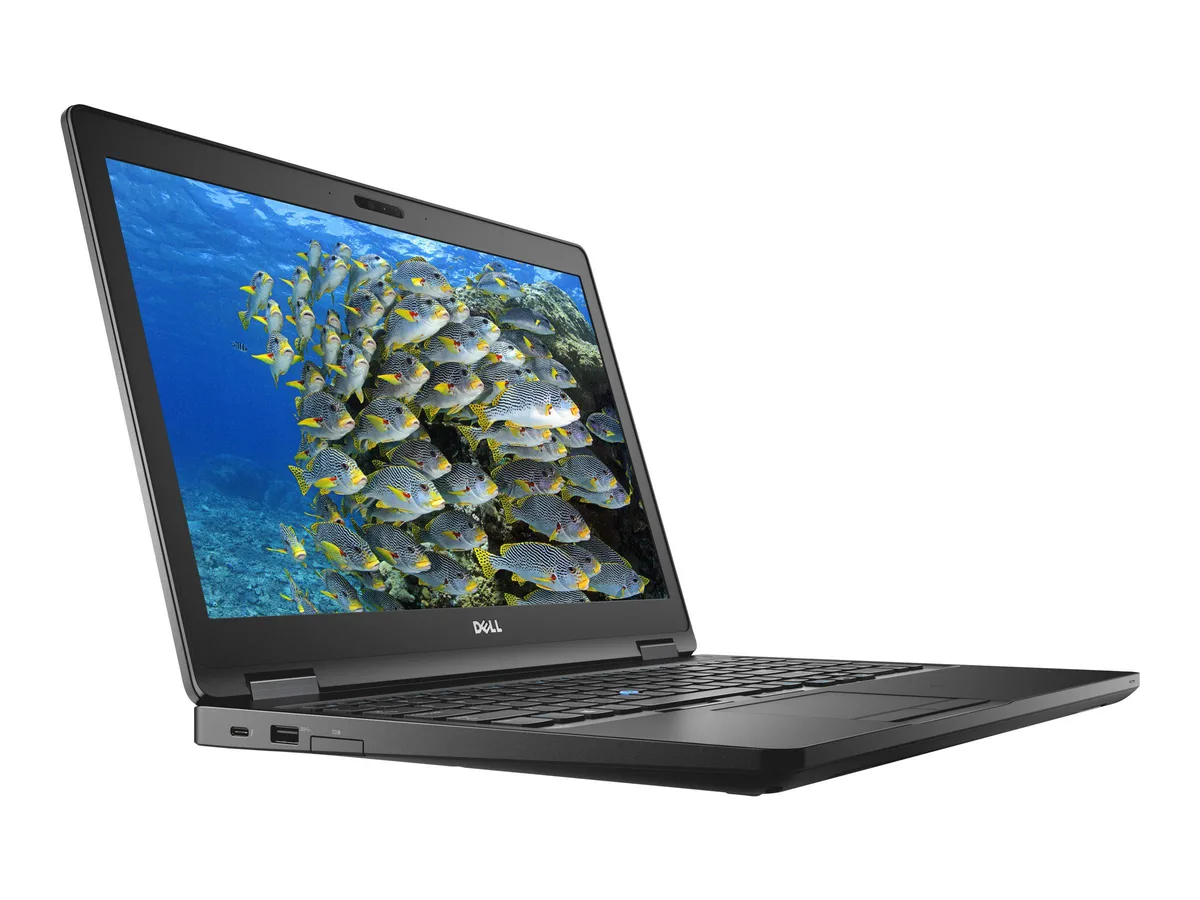
DELL Latitude 5590 laptop i5-8350U 16GB 256GB+1TB SSD 14" FHD
- Black
- Windows 10 Pro
$358.99
0.00454389BTC
In stockWe take cryptocurrency — so the coins you hold can buy real hardware.Pay in crypto, spend it on real hardware. Free insured shipping worldwide over $399. Plain, unbranded boxes, sent from Germany.Free insured shipping over $399. Your rate is locked for 30 minutes once checkout opens.Rate locked 30 minutes. Every item sealed, serial-checked and covered by a 24-month warranty.Sealed, 24-month warranty.


DELL
A 14.0" FHD IPS business laptop with a quad-core i7-8650U, 8 GB DDR4 RAM and dual 256 GB plus 1 TB SSD storage running Windows 10 Pro
Options 8GB/256GB+1TB W10P
The Dell Latitude 5590 is a 15.6 inch business laptop built around an 8th Gen Intel Core i7-8650U quad-core processor. It ships with 8 GB of DDR4 memory and a dual-drive layout that pairs a 256 GB M.2 SSD with a 1 TB secondary SSD. The 1920 x 1080 IPS panel is non-touch and framed by thin borders. Windows 10 Pro comes pre-installed for immediate deployment.
The U-series chip runs at a 1.90 GHz base with a 4.20 GHz turbo, keeping heat output modest during typical office workloads. Integrated Intel UHD Graphics 620 handles display output without a discrete GPU, so fan noise stays low when browsing or editing documents. The 45 W power adapter supplied with the unit matches the processor’s thermal envelope for efficient charging.
A USB Type-C port with DisplayPort alternate mode and optional Thunderbolt support drives external monitors or docks. Three USB 3.1 Gen 1 ports, HDMI, VGA and RJ45 cover legacy and modern peripherals alike. An SD card reader and optional SIM tray add field flexibility. The chassis measures 14.8 inches wide by 9.87 inches deep and weighs 4.19 lbs, fitting standard 15.6 inch bags and sleeves.
| Brand | DELL |
|---|---|
| Series | 5000 |
| Model | Latitude |
| Part Number | 5590 |
| Color | Black |
| Operating System | Windows 10 Pro |
| CPU Type | Intel Core i7 8th Gen |
| Processor Name | Intel Core i7-8650U |
| Number of Cores | Quad-core Processor |
| CPU L2 Cache | 8MB |
| Screen Size | 14.0" |
| Touchscreen | Non-Touch Screen |
| Display Type | FHD |
| Resolution | 1920 x 1080 |
| Panel | IPS |
| GPU/VPU | Intel UHD Graphics 620 |
| Graphic Type | Integrated Card |
| SSD | 256GB |
| HDD | 1TB HDD + 256GB SSD |
| Storage Spec | 256GB M.2 (Primary) + 1TB (Secondary) DUAL SSD |
| Memory | 8GB |
| Memory Speed | DDR4 |
| Memory Spec | 4 GB x 2 |
| Memory Slot (Total) | 2 |
| Memory Slot (Available) | 0 |
| Max Memory Supported | 32 GB |
| Optical Drive Type | No |
| LAN | 10/100/1000Mbps |
| WiFi Generation | Wi-Fi 4 and earlier generation |
| Bluetooth | Yes |
| USB | 3x USB 3.1 Gen1 (one with PowerShare) , 1 x USB Type-C (DisplayPort) |
| Thunderbolt | 1 x Thunderbolt |
| Video Port | 1 x HDMI 1.4 - DisplayPort over USB Type-C(optional Thunderbolt 3(1) |
| HDMI | 1 x HDMI |
| Ethernet | 1 x RJ-45 (1Gbps) |
| Audio Ports | 1 x Microphone Jack, 1 x Headphone Jack |
| Audio | Integrated Sound card |
| Touchpad | Yes |
| Keyboard | Standard |
| Webcam | Yes |
| Style | Ultrabook |
| Type | Mainstream |
| Usage | Consumer |
| AC Adapter/Charger | 65-watt AC Adapter |
| Weight | 3 - 3.9 lbs. |
Other versions of this model
Same family, different memory, cooler or clock — compare before you commit.
Remove the base cover, insert the drive into the empty M.2 slot at an angle, then secure it with the screw; the step often missed is pressing the drive fully flat before tightening the screw.
Run TRIM periodically in Windows 10 Pro to keep write performance consistent; no mechanical parts require lubrication or replacement.
The processor reduces clocks once its thermal threshold is reached, so sustained speed depends on the cooling solution rather than a fixed time limit.
Also in this aisle
Same shelf, same checkout — eight coins and a 30-minute rate lock.
What you pay in, and what you read prices in.
Sent from your wallet at checkout
Display only — the catalogue is priced in USD
No currency matches that.
Pick the language the site speaks to you in.
New here?
Already have one?
There is no automatic reset: this shop sends no mail, so there is no one-time link to ask for. Leave the address on the account and it gets picked up by hand.
Request noted
Nothing is on its way to your inbox — this shop sends no mail at all. Someone picks these up by hand.
Remembered it?