


DELL
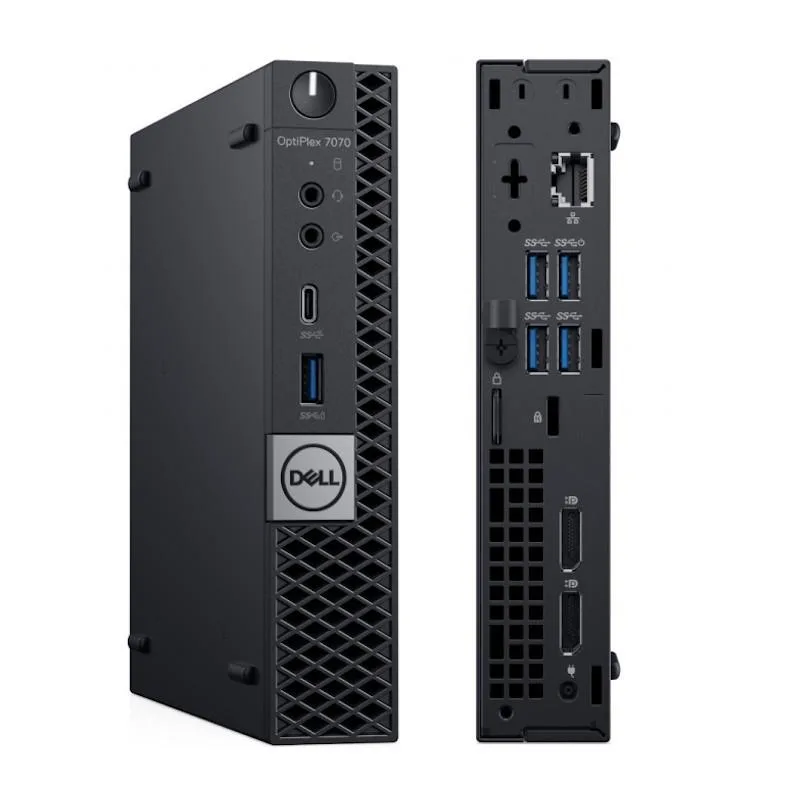
Dell OptiPlex 7070 Micro i5-9500T 2.2 GHz 16 GB 512 GB desktop PC
Ultra-compact desktop with Intel Core i5-9500T at 2.2 GHz, 16 GB DDR4, 512 GB SSD and Windows 11 Pro
- TypeDesktop PC
- MonitorMonitor not included
- Operating SystemWindows 11 Pro
- CPU TypeIntel Core i5
- Memory CapacityGB DDR4
- HDDNo
- Intel Core i5-9500T at 2.2 GHz handles daily workloads smoothly
- 16 GB DDR4 memory keeps multiple apps responsive
- 512 GB solid-state drive boots Windows 11 Pro quickly
- Micro form factor saves desk space without sacrificing ports
- Fully tested unit includes power cord, keyboard and mouse ready to use
Compact desktop for office work
The Dell OptiPlex 7070 Micro is a small-form-factor desktop PC built around an Intel Core i5-9500T processor running at 2.2 GHz. It ships with 16 GB of DDR4 memory and a 512 GB solid-state drive. Windows 11 Pro is pre-installed and a keyboard and mouse are included. The unit is designed for general business tasks in space-constrained environments.
Upgrade from older Micro towers
This model replaces earlier OptiPlex Micro desktops that used slower processors, less memory or mechanical hard drives. The jump is worthwhile when daily workloads involve multiple browser tabs, office suites and light multitasking that benefit from the 6-core CPU and solid-state storage. Buyers who need discrete graphics, expandable drive bays or higher core counts should look at larger form factors.
Check power and peripheral needs
Verify that the included AC adapter matches your local mains voltage and connector type. Confirm that your display uses a video input supported by the Micro’s onboard ports, as no dedicated graphics card is present. Ensure the USB port count and type meet your peripheral requirements before ordering.
Highlights
- Intel Core i5-9500T at 2.2 GHz handles daily workloads smoothly
- 16 GB DDR4 memory keeps multiple apps responsive
- 512 GB solid-state drive boots Windows 11 Pro quickly
- Micro form factor saves desk space without sacrificing ports
- Fully tested unit includes power cord, keyboard and mouse ready to use
Specifications
| Brand | DELL |
|---|---|
| Model | Optiplex 7070 |
| Type | Desktop PC |
| Monitor | Monitor not included |
| Operating System | Windows 11 Pro |
| CPU Type | Intel Core i5 |
| Memory Capacity | GB DDR4 |
| HDD | No |
| Screen Size | No Screen |
| WLAN | Wireless Included! |
Questions about this item
What mounting hardware fits the Dell OptiPlex 7070 Micro chassis?
The 7070 Micro uses Dell's standard Micro form-factor mount and VESA bracket, so it attaches to the back of a compatible monitor or to a Dell Micro All-in-One stand without extra adapters.
Which step is often missed when installing the OptiPlex 7070 Micro for the first time?
Connect the external power adapter to the barrel jack on the rear before pressing the power button; the unit will not start on USB-C power alone.
What user-replaceable part will the OptiPlex 7070 Micro need after several years of daily use?
The M.2 2280 solid-state drive can be swapped for a larger 512 GB or 1 TB module when more storage is required.
Also in this aisle
People compared these
Same shelf, same checkout — eight coins and a 30-minute rate lock.



HPE
HPE P22020B21 2U Cable Management Arm for DL38X Gen10 Plus Rail Kit
$52.99$67.99−22%
0.00067613BTC
In stock
Lenovo
Lenovo ThinkSystem ST250 V3 7DCEA01YNA Tower Server Xeon E-2434 16 GB RAM
$1,267.99
0.01617912BTC
In stock