

Epomaker
Epomaker Aula MINI60 HE Max 60% Hall Effect Gaming Keyboard
- MINI60 HE
- Plastic
$44.99
0.00057238BTC
In stockWe take cryptocurrency — so the coins you hold can buy real hardware.Pay in crypto, spend it on real hardware. Free insured shipping worldwide over $399. Plain, unbranded boxes, sent from Germany.Free insured shipping over $399. Your rate is locked for 30 minutes once checkout opens.Rate locked 30 minutes. Every item sealed, serial-checked and covered by a 24-month warranty.Sealed, 24-month warranty.


Epomaker
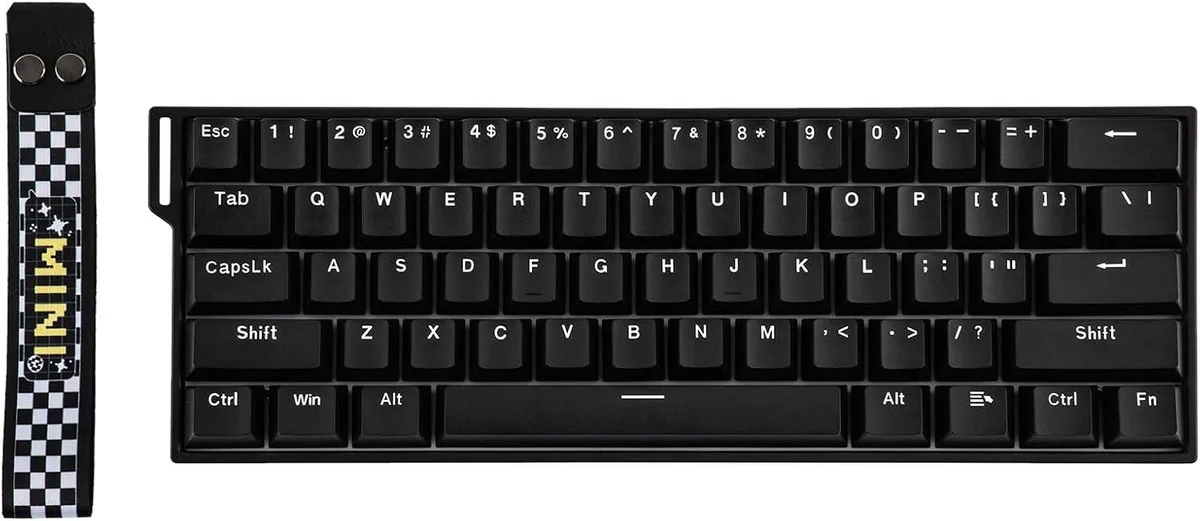
A 60% wireless mechanical keyboard with magnetic linear switches, adjustable actuation from 0.1 to 3.4 mm, SOCD and DKS features, PBT keycaps, 8000 Hz wired polling, and 44-hour battery life
Model Standard Version
The Epomaker Aula MINI60 HE Standard is a 60% gaming keyboard with 61 magnetic linear switches and per-key adjustable actuation. It connects over USB, 2.4 GHz wireless, or Bluetooth and runs on a 3000mAh battery rated for 44 hours with lighting disabled. N-key rollover and a 128K scan rate support fast input in titles such as CS2 or Valorant.
The hall-effect switches let you set actuation from 0.1 mm to 3.4 mm in 0.01 mm steps and enable features such as Snap Key SOCD, DKS, MT and Toggle Key modes. Wired polling reaches 8000 Hz while the bundled 2.4 GHz dongle operates at 1000 Hz. Buyers who need dedicated arrow keys, a numpad or per-key backlighting should look at a larger or illuminated model.
The package includes a detachable USB-A-to-C cable, the 2.4 GHz dongle, a wrist strap with screws, a 2-in-1 switch-and-keycap puller and two spare switches. Configuration is handled through the online Aula portal where you can remap layouts, record macros and adjust the four pre-set sensitivity profiles without installing local software.
| Brand | EPOMAKER |
|---|---|
| Series | MINI60 HE |
| Name | MINI60 HE |
| Model | Standard |
| Material | Plastic |
| Keyboard Interface | USB / 2.4GHz / Bluetooth |
| Design Style | Compact |
| Layout | 60% |
| Anti-Ghosting | N-Key Rollover |
| Key Switch | Magnetic Switches |
| Key Switch Type | Linear |
| Keycaps | OEM Profile PBT Keycaps |
| Backlit | No Backlight |
| Dimensions | 11.77"L x 4.02"W x 1.46"H |
| Type | 2.4 GHz / Bluetooth / Wired |
| Power Source | 3000mAh |
| Operating System Supported | Mac/WIN/Android |
| Package Contents | 1*Aula Mini60 HE Magnetic Keyboard (Standard) 1*Detachable Wrist Strap and Pack of Screws 1*2-in-1 Switch-and-Keycap Puller & 2* Extra Switches 1*Detachable USB A-to-C Cable 1*2.4Ghz Wireless Dongle (1,000 Polling) & 2*Storage Cap for Dongle (Insert the dongle into the computer’s hub to connect) |
Other versions of this model
Same family, different memory, cooler or clock — compare before you commit.
The included 2.4 GHz dongle plugs into a USB-A port on your computer and provides a 1,000 Hz polling rate.
No, the 8,000 Hz polling rate is only available in wired USB mode; the 2.4 GHz dongle operates at 1,000 Hz.
Use the web software at hec.aulacn.com to set actuation between 0.1 mm and 3.4 mm, then test key response in-game or in a text editor.
Also in this aisle
Same shelf, same checkout — eight coins and a 30-minute rate lock.
What you pay in, and what you read prices in.
Sent from your wallet at checkout
Display only — the catalogue is priced in USD
No currency matches that.
Pick the language the site speaks to you in.
New here?
Already have one?
There is no automatic reset: this shop sends no mail, so there is no one-time link to ask for. Leave the address on the account and it gets picked up by hand.
Request noted
Nothing is on its way to your inbox — this shop sends no mail at all. Someone picks these up by hand.
Remembered it?


