
EVGA
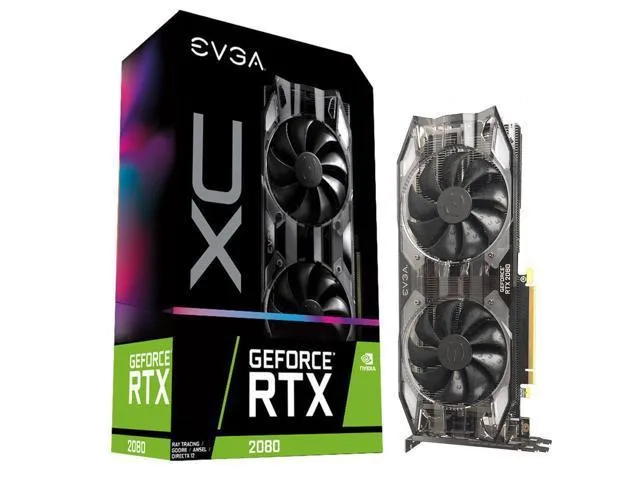
EVGA GeForce RTX 2080 XC GAMING 8GB GDDR6 graphics card
A GeForce RTX 2080 graphics card with 8 GB GDDR6 memory, dual HDB fans and adjustable RGB LED lighting
- Memory TypeGDDR5
- 8 GB GDDR6 memory supports high-resolution textures
- NVIDIA Turing architecture delivers up to 6X faster performance
- Real-time ray tracing enables hyper-realistic in-game graphics
- Dual HDB fans provide higher cooling performance with quieter acoustics
- Adjustable RGB LED allows customisable PC lighting configuration
EVGA RTX 2080 XC Gaming 8GB
This EVGA GeForce RTX 2080 XC Gaming card delivers Turing architecture performance with 8GB of GDDR6 memory. Dual HDB fans provide cooling while adjustable RGB LED lighting allows visual customisation. It suits builders wanting a factory-overclocked design from EVGA's XC line.
Ideal for 1440p gaming and ray tracing
The Turing GPU enables real-time ray tracing in supported titles for enhanced visual fidelity. Dual HDB fans run quieter than standard coolers under load. Buyers needing lower power draw or a smaller form factor should consider other models.
8GB GDDR6 frame buffer
The 8GB GDDR6 memory capacity determines texture and resolution headroom in modern titles. This specification decides whether the card fits your target workload and monitor resolution.
Highlights
- 8 GB GDDR6 memory supports high-resolution textures
- NVIDIA Turing architecture delivers up to 6X faster performance
- Real-time ray tracing enables hyper-realistic in-game graphics
- Dual HDB fans provide higher cooling performance with quieter acoustics
- Adjustable RGB LED allows customisable PC lighting configuration
Specifications
| Memory Type | GDDR5 |
|---|
Questions about this item
Will the 8GB GDDR6 EVGA 2080 fit a standard dual-slot case opening?
The EVGA 2080 XC GAMING uses a dual-slot bracket and dual HDB fans, so it occupies two rear expansion slots and needs a case with at least that much rear clearance.
Which power connectors must be plugged in during installation?
Connect the required 8-pin PCIe power cables from the PSU to the card before securing the bracket; the system will not boot if they are left unplugged.
How do I clean the dual HDB fans on this 2080 card?
Remove dust with short bursts of compressed air while holding the fan blades still; avoid liquids and do not disassemble the HDB fan units.
Also in this aisle
People compared these
Same shelf, same checkout — eight coins and a 30-minute rate lock.


PrimoChill
PrimoChill Praxis Wetbench Open-Air Test Bench 461.8mm
- Open-Air
$274.89
0.00353779BTC
In stock
Silverstone Technology
SilverStone Technology Strider 1200W 80 Plus Platinum Modular Power Supply
- ATX Mid Tower
- 1200W
$324.03
0.00417022BTC
In stock