


Gevilion
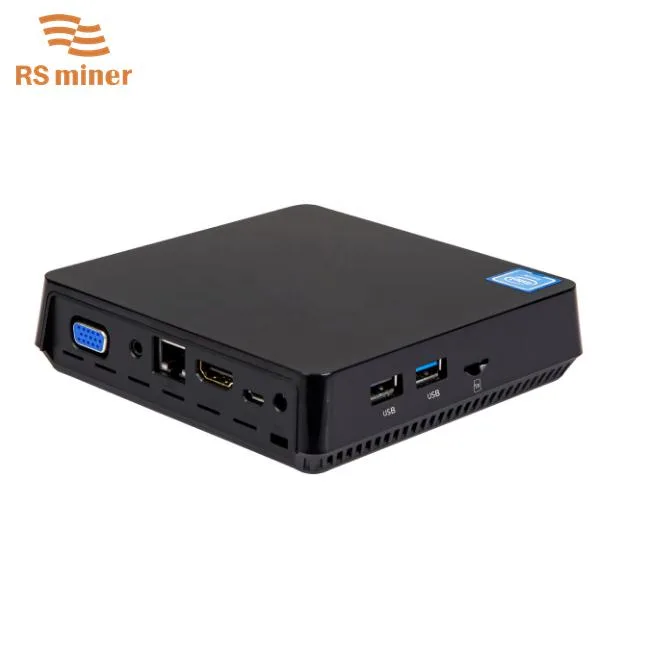
Gevilion T11 8GB 128GB Atom Z8350 desktop PC
A palm-sized desktop with an Intel Atom Z8350 processor, 8 GB DDR3 memory, 128 GB eMMC storage and dual VGA plus HDMI video outputs
- TypeStudent / Home Office
- ColorBlack
- MonitorMonitor not included
- Screen Size4"
- Dimensions (H x W x D)12.5*12.5*3.5cm
- Weight0.8kg
- 8GB DDR3 and 128GB eMMC for responsive multitasking
- Internal 2.5-inch SATA bay accepts up to 2TB SSD
- Quad-core Atom Z8350 runs at 1.44GHz base and 1.9GHz burst
- Dual HDMI and VGA outputs drive two displays simultaneously
- Four USB ports (2.0 and 3.0) plus Gigabit Ethernet and SD slot
Gevilion T11 mini PC for home office
The Gevilion T11 is a compact desktop computer designed for student and home office tasks. It arrives with Windows 10 Pro (64-bit) pre-installed and measures 12.5 by 12.5 by 3.5 centimetres. Weighing 0.8 kilograms, it fits on any desk or shelf without taking up space.
Suits light workloads; not for heavy multitasking
This system suits users who need a quiet, low-power device for web browsing, document editing and video playback. Buyers who want more memory than the supplied 8GB DDR3 or who need discrete graphics performance should look at something else. The integrated Gen8-LP graphics handle basic display output only.
128GB eMMC plus 2.5-inch SATA bay
The key specification is the 128GB eMMC drive paired with an internal bay that accepts a 2.5-inch SATA SSD up to 2TB. This combination lets you keep the operating system on fast embedded storage while adding high-capacity solid-state storage for files and applications.
Highlights
- 8GB DDR3 and 128GB eMMC for responsive multitasking
- Internal 2.5-inch SATA bay accepts up to 2TB SSD
- Quad-core Atom Z8350 runs at 1.44GHz base and 1.9GHz burst
- Dual HDMI and VGA outputs drive two displays simultaneously
- Four USB ports (2.0 and 3.0) plus Gigabit Ethernet and SD slot
Specifications
| Type | Student / Home Office |
|---|---|
| Color | Black |
| Monitor | Monitor not included |
| Screen Size | 4" |
| Dimensions (H x W x D) | 12.5*12.5*3.5cm |
| Weight | 0.8kg |
Questions about this item
How do I install a 2.5-inch SATA SSD in the internal expansion bay?
Open the chassis, connect the 2.5-inch SATA SSD to the internal SATA connector, secure it with the supplied screws, then close the case and initialise the drive in Windows 10 Pro.
What maintenance will the eMMC storage need over time?
The 128GB eMMC is soldered and has no user-serviceable parts; keep at least 10 percent free space and run Windows storage optimisation periodically.
At what clock speed does the Atom Z8350 throttle during sustained load?
The processor runs at a base 1.44 GHz and can burst to 1.9 GHz; under continuous load it will settle at the base frequency when thermal limits are reached.
Also in this aisle
People compared these
Same shelf, same checkout — eight coins and a 30-minute rate lock.



HPE
HPE P22020B21 2U Cable Management Arm for DL38X Gen10 Plus Rail Kit
$52.99$67.99−22%
0.00067489BTC
In stock
Lenovo
Lenovo ThinkSystem ST250 V3 7DCEA01YNA Tower Server Xeon E-2434 16 GB RAM
$1,267.99
0.01614945BTC
In stock