


GIGABYTE
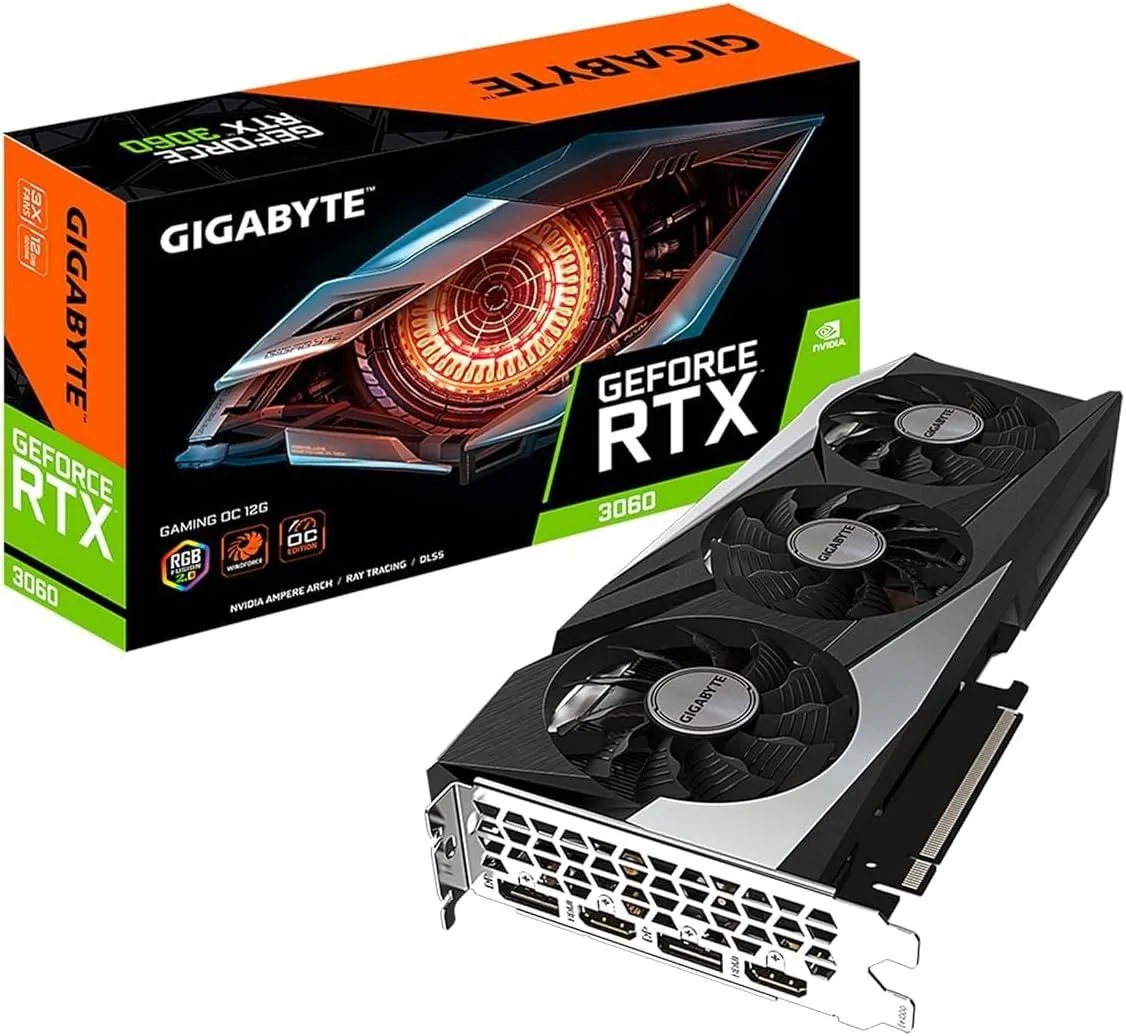
GIGABYTE GeForce RTX 3060 Gaming OC 12GB graphics card (rev. 2.0) (LHR)
12 GB GDDR6 graphics card with 3584 CUDA cores, 1837 MHz boost clock and PCIe 4.0 interface for 4K gaming
- InterfacePCI Express 4.0
- Chipset ManufacturerNVIDIA
- GPU SeriesNVIDIA GeForce RTX 30 Series
- GPUGeForce RTX 3060
- Core Clock1837 MHz
- CUDA Cores3584
- 12 GB GDDR6 memory enables high-resolution textures
- 3584 CUDA cores accelerate parallel workloads
- 1837 MHz core clock boosts gaming frame rates
- WINDFORCE 3X cooling with alternate spinning fans maintains lower temperatures
- HDMI 2.1 and DisplayPort 1.4a drive up to four displays at 7680 x 4320
12 GB GDDR6 192-Bit Memory
The GIGABYTE GeForce RTX 3060 Gaming OC 12GB graphics card targets 1080p and 1440p gaming as well as entry-level creative workloads. Its NVIDIA Ampere architecture delivers 3584 CUDA cores and 12 GB of GDDR6 memory across a 192-bit bus. The factory core clock reaches 1837 MHz while the effective memory clock runs at 15000 MHz. A PCI Express 4.0 interface and four display outputs support modern multi-monitor setups.
WINDFORCE 3X Cooling Alternate Spinning Fans
The WINDFORCE 3X cooling system uses three alternate-spinning fans to move air through a heatsink and metal backplate. At idle and light desktop loads the fans stop completely, eliminating noise. During typical gaming sessions the card runs at moderate temperatures while power draw follows the 3060 reference design. RGB Fusion 2.0 lighting adds optional visual customisation without affecting thermals.
Sustained Load Behaviour Boost Clock 1837 MHz
Under extended load the GPU maintains its 1837 MHz boost clock as the cooling assembly dissipates heat steadily. Fan speeds ramp gradually to keep core temperatures stable rather than spiking in short bursts. The 192-bit memory subsystem feeds texture and compute units consistently for long rendering or encode sessions. Outputs remain limited to two HDMI 2.1 and two DisplayPort 1.4a ports driving up to 7680 x 4320 resolution.
Highlights
- 12 GB GDDR6 memory enables high-resolution textures
- 3584 CUDA cores accelerate parallel workloads
- 1837 MHz core clock boosts gaming frame rates
- WINDFORCE 3X cooling with alternate spinning fans maintains lower temperatures
- HDMI 2.1 and DisplayPort 1.4a drive up to four displays at 7680 x 4320
Specifications
| Brand | GIGABYTE |
|---|---|
| Series | Gaming |
| Model | GV-N3060GAMING OC-12GD (rev. 2.0) |
| Interface | PCI Express 4.0 |
| Chipset Manufacturer | NVIDIA |
| GPU Series | NVIDIA GeForce RTX 30 Series |
| GPU | GeForce RTX 3060 |
| Core Clock | 1837 MHz |
| CUDA Cores | 3584 |
| Effective Memory Clock | 15000 MHz |
| Memory Size | 12GB |
| Memory Interface | 192-Bit |
| Memory Type | GDDR6 |
| DirectX | DirectX 12 Ultimate |
| OpenGL | OpenGL 4.6 |
| Multi-Monitor Support | 4 |
| HDMI | 2 x HDMI 2.1 |
| DisplayPort | 2 x DisplayPort 1.4a |
| Max Resolution | 7680 x 4320 |
| SLI Support | No |
| Cooler | WINDFORCE 3X |
| Thermal Design Power | 170W |
| System Requirements | Recommended PSU: 550W |
| Recommended PSU Wattage | 550W |
| Power Connector | 1 x 8-Pin |
| Features | NVIDIA Ampere Streaming Multiprocessors 2nd Generation RT Cores 3rd Generation Tensor Cores Powered by GeForce RTX 3060 Integrated with 12GB GDDR6 192-bit memory interface WINDFORCE 3X Cooling System with alternate spinning fans RGB Fusion 2.0 Protection metal back plate Limited Hash Rate version |
| Form Factor | ATX |
| Max GPU Length | 282 mm |
| Card Dimensions (L x H) | 11.10" x 4.61" |
| Slot Width | 2 Slots |
| Package Contents | Accessories: Quick guide |
Questions about this item
How do I install the GIGABYTE RTX 3060 Gaming OC 12GB into a PCI Express 4.0 slot?
Align the card with the PCI Express 4.0 slot, press down firmly until the retention latch clicks, then connect the required auxiliary power cables; the step most often missed is securing the power cables before closing the case.
What maintenance will the WINDFORCE 3X cooling system need later?
The WINDFORCE 3X cooling system with alternate spinning fans needs periodic dust removal from the heatsink and fan blades using compressed air to maintain airflow.
What limit appears first during sustained heavy loads on the 12GB GDDR6 memory?
The 192-Bit memory interface and 15000 MHz effective clock set the bandwidth ceiling that appears first during sustained heavy loads on the 12GB GDDR6 memory.
Also in this aisle
People compared these
Same shelf, same checkout — eight coins and a 30-minute rate lock.


Silverstone Technology
SilverStone Technology Strider 1200W 80 Plus Platinum Modular Power Supply
- ATX Mid Tower
- 1200W
$324.03
0.00418449BTC
In stock