


GIGABYTE
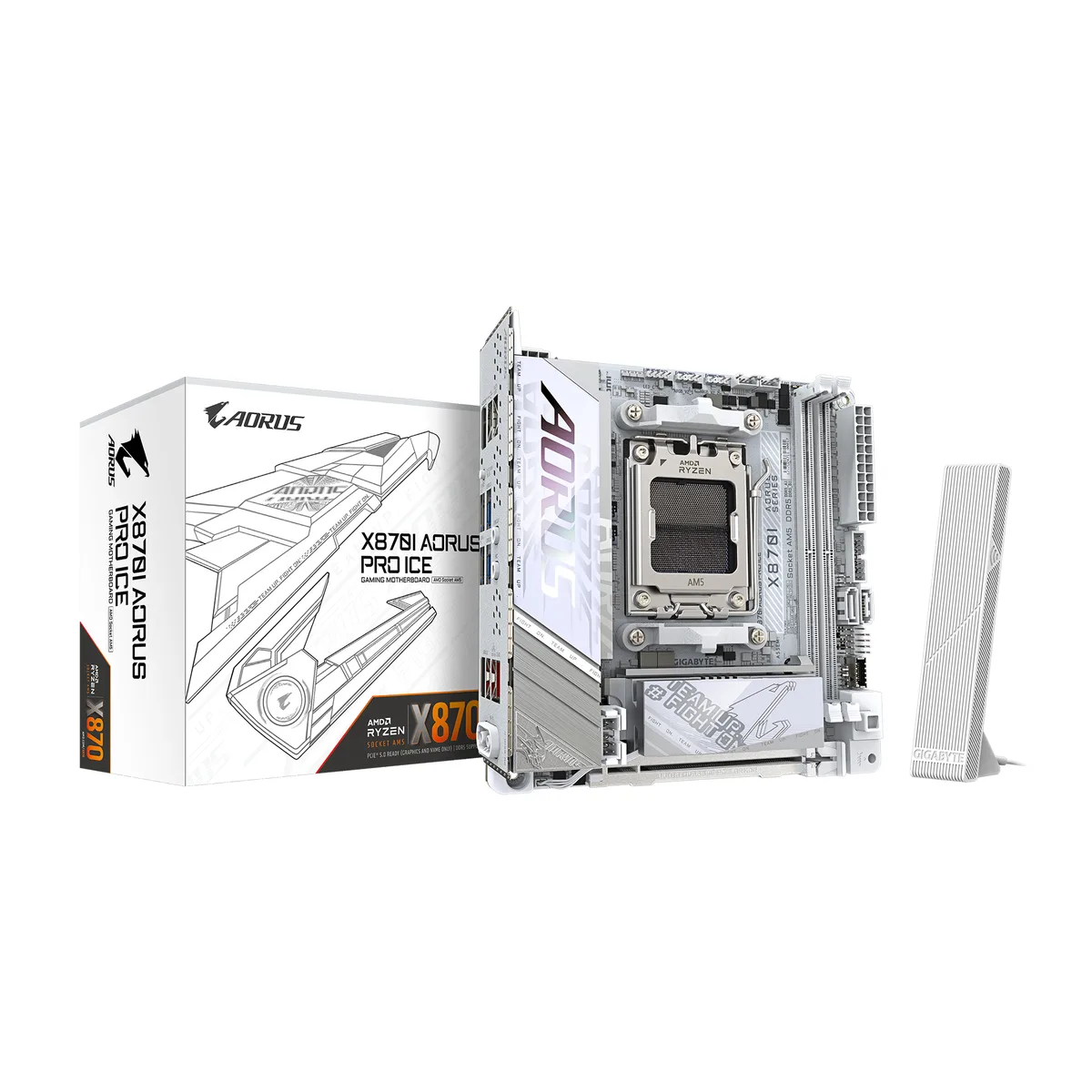
GIGABYTE X870I AORUS PRO ICE AMD motherboard Mini-ITX
Mini-ITX AM5 board with DDR5 support up to 9000 MT/s, PCIe 5.0 graphics slot, dual M.2, Wi-Fi 7 and 2.5 GbE LAN
- CPU Socket TypeAM5
- CPU TypeRyzen 7000 Series / Ryzen 8000 Series / Ryzen 9000 Series
- ChipsetAMD X870
- Number of Memory Slots2x288pin (DDR5)
- Memory StandardDDR5 5600 / DDR5 6000 / DDR5 6200 / DDR5 6400 / DDR5 6600 /
- Maximum Memory Supported128GB
- Supports Ryzen 7000, 8000 and 9000 series on AM5 socket
- Dual-channel DDR5 up to 128GB with EXPO and XMP 3.0 profiles
- PCIe 5.0 x16 graphics slot and CPU-linked M.2 for 5.0 NVMe drives
- Wi-Fi 7 plus 2.5GbE LAN for low-latency networking
- 8+2+1 110A power stages with VRM and M.2 thermal guards
Socket AM5 Mini-ITX board for compact Ryzen builds
The GIGABYTE X870I AORUS PRO ICE fits AMD Ryzen 7000, 8000 and 9000 series processors into a Mini-ITX footprint. It targets builders who need full X870 chipset features in small-form-factor cases or workstations where space is at a premium.
Dual-channel DDR5 up to 128 GB with EXPO support
Two 288-pin slots accept DDR5 modules from 5600 up to 9000 MT/s, delivering 128 GB maximum capacity. Memory scales cleanly through the listed speeds, but the board stops at two slots, so four-DIMM kits and densities beyond 128 GB are not supported.
One CPU-linked PCIe 5.0 x16 slot
The sole expansion slot runs at PCIe 5.0 x16 with Ryzen 9000 and 7000 CPUs, dropping to PCIe 4.0 x8 or x4 with Ryzen 8000 series processors. The primary M.2 socket shares the same CPU lanes and supports PCIe 5.0 x4 or x2 SSDs only when a Ryzen 9000 or 7000 chip is installed.
Highlights
- Supports Ryzen 7000, 8000 and 9000 series on AM5 socket
- Dual-channel DDR5 up to 128GB with EXPO and XMP 3.0 profiles
- PCIe 5.0 x16 graphics slot and CPU-linked M.2 for 5.0 NVMe drives
- Wi-Fi 7 plus 2.5GbE LAN for low-latency networking
- 8+2+1 110A power stages with VRM and M.2 thermal guards
Specifications
| Brand | GIGABYTE |
|---|---|
| Model | X870I AORUS PRO ICE |
| CPU Socket Type | AM5 |
| CPU Type | Ryzen 7000 Series / Ryzen 8000 Series / Ryzen 9000 Series |
| Chipset | AMD X870 |
| Number of Memory Slots | 2x288pin (DDR5) |
| Memory Standard | DDR5 5600 / DDR5 6000 / DDR5 6200 / DDR5 6400 / DDR5 6600 / DDR5 6666 / DDR5 6800 / DDR5 7000 / DDR5 7200 / DDR5 7600 / DDR5 7800 / DDR5 8000 / DDR5 8200 / DDR5 8800 / DDR5 9000 |
| Maximum Memory Supported | 128GB |
| Channel Supported | Dual Channel |
| Memory Performance Profile | Intel XMP 3.0 / AMD EXPO |
| ECC Supported | Non-ECC |
| Buffer Supported | Un-buffered |
| PCI Express 5.0 x16 | 1 x PCI Express x16 slot, integrated in the CPU: AMD Ryzen 9000/7000 Series Processors support PCIe 5.0 x16 mode AMD Ryzen 8000 Series-Phoenix 1 Processors support PCIe 4.0 x8 mode AMD Ryzen 8000 Series-Phoenix 2 Processors support PCIe 4.0 x4 mode * The PCIEX16 slot can only support a graphics card or an NVMe SSD. |
| Serial ATA (SATA) | 2 x SATA 6Gb/s |
| M.2 | 1 x M.2 connector (M2A_CPU), integrated in the CPU, supporting Socket 3, M key, type 2280 SSDs: AMD Ryzen 9000/7000 Series Processors support PCIe 5.0 x4/x2 SSDs AMD Ryzen 8000 Series-Phoenix 1 Processors support PCIe 4.0 x4/x2 SSDs AMD Ryzen 8000 Series-Phoenix 2 Processors support PCIe 4.0 x4/x2 SSDs 1 x M.2 connector on the back of the motherboard (M2C_SB), integrated in the Chipset, supporting Socket 3, M key, type 2280 PCIe 4.0 x4/x2 SSDs |
| SATA RAID | RAID 0, RAID 1, RAID 5, and RAID 10 support for NVMe SSD storage devices * RAID 5 is only available on AMD Ryzen 9000 Series Processors. RAID 0 and RAID 1 support for SATA storage devices |
| Audio Chipset | Realtek ALC4080 |
| Audio Channels | 2 Channels |
| Max LAN Speed | 2.5Gbps |
| Wireless LAN | Realtek Wi-Fi 7 RTL8922AE |
| Back I/O Ports | 1 x Q-Flash Plus button 1 x HDMI port (Note) 2 x antenna connectors (2T2R) 1 x USB4 USB Type-C port (DisplayPort (Note)) 1 x USB Type-C port, with USB 3.2 Gen 2 support 2 x USB 3.2 Gen 2 Type-A ports (red) 2 x USB 3.2 Gen 1 ports 2 x USB 2.0/1.1 ports 1 x RJ-45 port 2 x audio jacks (Note) Actual support may vary by CPU. |
| Onboard USB | 1 x USB Type-C header, with USB 3.2 Gen 2 support 1 x USB 3.2 Gen 1 header 1 x USB 2.0/1.1 header |
| Other Connectors | 1 x CPU fan header 1 x CPU fan/water cooling pump header 1 x system fan header 2 x addressable RGB Gen2 LED strip headers 1 x RGB LED strip header 2 x M.2 Socket 3 connectors 2 x SATA 6Gb/s connectors 1 x front panel header 1 x speaker header 1 x front panel audio header (routed from the adapter card on the rear panel) 1 x reset jumper 1 x Clear CMOS jumper 1 x chassis intrusion header |
| Form Factor | Mini ITX |
| Dimensions (W x L) | 6.7" x 6.7" |
| Power Pin | 1 x 24-pin ATX main power connector 1 x 8-pin ATX 12V power connector |
| BIOS Feature | 1 x 256 Mbit flash Use of licensed AMI UEFI BIOS PnP 1.0a, DMI 2.7, WfM 2.0, SM BIOS 2.7, ACPI 5.0 |
| Windows 11 | Support for Windows 11 64-bit |
| Features | Support for GIGABYTE Control Center (GCC) Support for Q-Flash Support for Q-Flash Plus Support for Smart Backup |
| Shipping weight | 1.29 kg |
| Package size | 241 × 229 × 102 mm |
Questions about this item
Will my existing DDR5-6000 memory kit run at its rated speed on the X870I AORUS PRO ICE?
The board supports DDR5 speeds from 5600 up to 9000 MT/s and AMD EXPO profiles, so a DDR5-6000 kit will operate at its rated frequency when EXPO is enabled in the BIOS.
How can I verify the Realtek ALC4080 audio and RTL8922AE Wi-Fi 7 are functioning after first boot?
Open Device Manager in Windows; both the Realtek Audio Controller and Realtek RTL8922AE Wireless LAN adapter should appear without warning icons, and the Wi-Fi 7 connection will show a 6 GHz band option in network settings.
Does the box include mounting screws for the M.2 2280 SSD and the Wi-Fi antenna, or must I source them separately?
The motherboard ships with M.2 standoffs and screws pre-installed, plus a Wi-Fi 7 antenna kit in the accessory bag; no extra fasteners or antennas are required for installation.
Also in this aisle
People compared these
Same shelf, same checkout — eight coins and a 30-minute rate lock.


PrimoChill
PrimoChill Praxis Wetbench Open-Air Test Bench 461.8mm
- Open-Air
$274.89
0.00353779BTC
In stock
Silverstone Technology
SilverStone Technology Strider 1200W 80 Plus Platinum Modular Power Supply
- ATX Mid Tower
- 1200W
$324.03
0.00417022BTC
In stock