


GIGABYTE
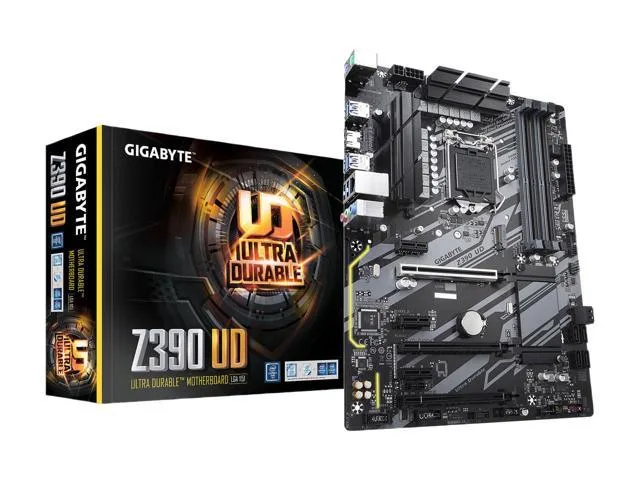
GIGABYTE Z390 UD LGA 1151 (300 Series) Intel Motherboard
An Intel Z390 ATX motherboard with LGA 1151 socket, DDR4 memory support, SATA 6Gbps, USB 3.1 and HDMI output
- Supports high-definition displays via HDMI connection
- Delivers efficient memory throughput with DDR4 SDRAM slots
- Provides data reliability through RAID-supported configurations
- Offers extensive expansion capacity with ATX form factor
- Enables fast peripheral connectivity using USB 3.1 interface
GIGABYTE Z390 UD Intel Motherboard
This ATX motherboard uses the Intel Z390 chipset and an LGA 1151 socket for 300-series processors. It provides HDMI video output, SATA 6Gb/s ports and USB 3.1 connectivity. Ultra Durable construction and enhanced heat dissipation support stable operation in a standard desktop build.
Suited for builders using a compatible Intel
This board fits users who need RAID-supported storage reliability and DDR4 memory synchronisation for everyday workloads. Buyers who want more storage interfaces than SATA provides or who require a different processor socket should look at other platforms.
LGA 1151 (300 Series) socket compatibility
The socket and chipset combination determines which Intel processors can be installed. Verify that the chosen CPU matches this specific 300-series LGA 1151 requirement before purchase.
Highlights
- Supports high-definition displays via HDMI connection
- Delivers efficient memory throughput with DDR4 SDRAM slots
- Provides data reliability through RAID-supported configurations
- Offers extensive expansion capacity with ATX form factor
- Enables fast peripheral connectivity using USB 3.1 interface
Specifications
| Brand | GIGABYTE |
|---|
Questions about this item
Which processor socket must my CPU match to fit this Z390 board?
The board uses the LGA 1151 socket, so the installed processor must be an LGA 1151 model.
Can I keep my existing DDR4 memory modules when upgrading to this motherboard?
Yes, the board provides DDR4 SDRAM slots that accept standard DDR4 modules.
How can I verify the board is posting correctly after assembly?
Connect a display to the HDMI port; a successful POST will show the BIOS splash screen or boot device prompt.
Also in this aisle
People compared these
Same shelf, same checkout — eight coins and a 30-minute rate lock.


PrimoChill
PrimoChill Praxis Wetbench Open-Air Test Bench 461.8mm
- Open-Air
$274.89
0.00355238BTC
In stock
Silverstone Technology
SilverStone Technology Strider 1200W 80 Plus Platinum Modular Power Supply
- ATX Mid Tower
- 1200W
$324.03
0.00418741BTC
In stock