

Panasonic
Panasonic Toughbook CF-19 10.1" Touch 2.7GHz i5 500GB HDD 4GB RAM Verizon 4G LTE
- Black
- Windows 10 Pro
$464.99
0.00598273BTC
In stockWe take cryptocurrency — so the coins you hold can buy real hardware.Pay in crypto, spend it on real hardware. Free insured shipping worldwide over $399. Plain, unbranded boxes, sent from Germany.Free insured shipping over $399. Your rate is locked for 30 minutes once checkout opens.Rate locked 30 minutes. Every item sealed, serial-checked and covered by a 24-month warranty.Sealed, 24-month warranty.


HP
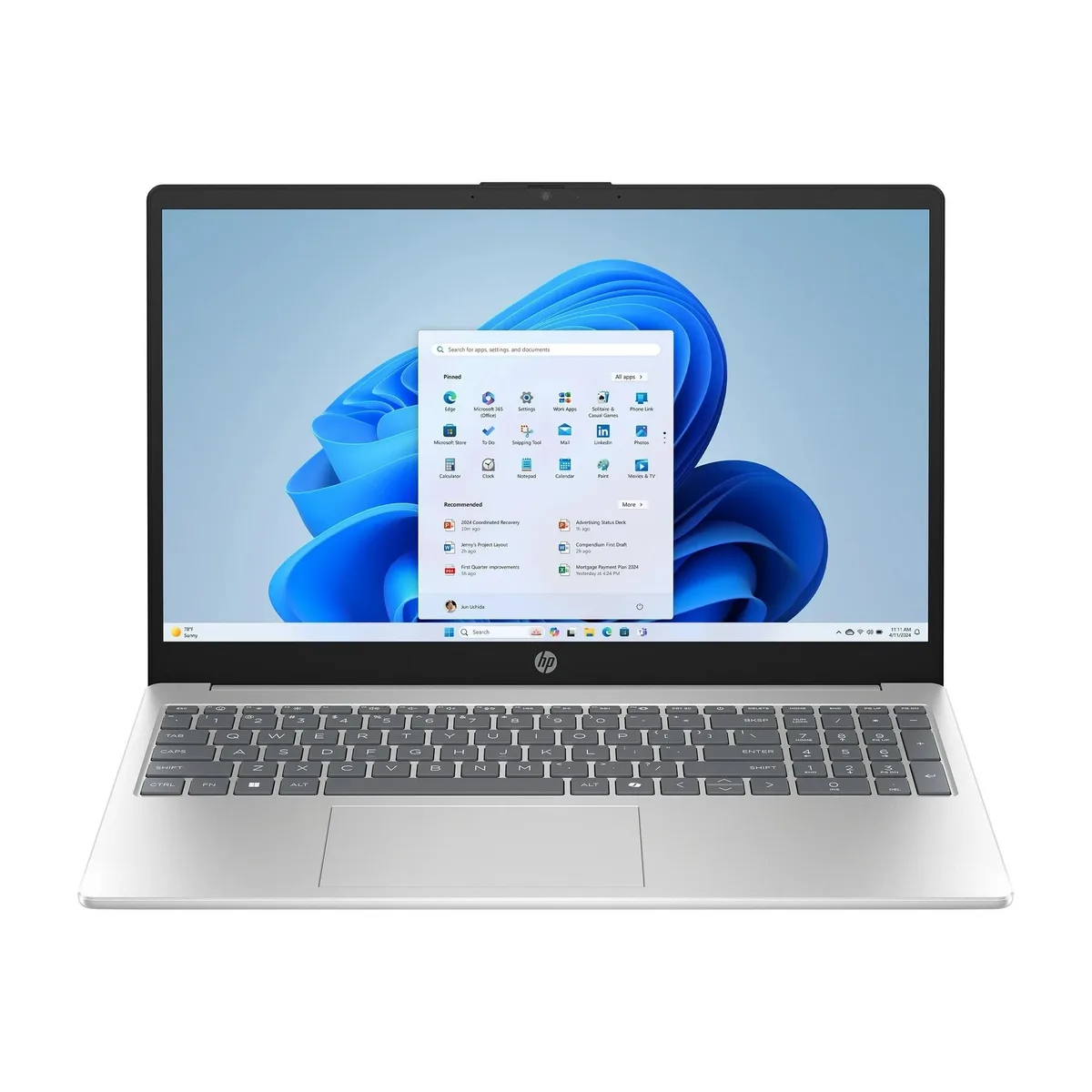
A 15.6 inch FHD touchscreen laptop with a 10-core Intel Core i5 processor, 32GB DDR5 memory and a 2TB NVMe SSD running Windows 11 Pro
This HP 15 laptop combines a 15.6-inch Full HD IPS touchscreen with an Intel Core i5-1334U processor that reaches 3.6GHz across 10 cores. The system includes 32GB DDR5 memory and a 2TB NVMe SSD running Windows 11 Pro. Integrated Intel Iris Xe graphics handle everyday visual tasks on the 1920 x 1080 display.
The touchscreen and 32GB DDR5 RAM support smooth multitasking across browser tabs, documents and video calls. Buyers who want discrete graphics for modern gaming or GPU-accelerated rendering should look at something else, as this model relies on integrated graphics only. The single 2TB NVMe drive offers no internal bay for a second storage device.
The 2TB NVMe SSD comfortably stores large project libraries, media collections and virtual machines with room to spare. The 32GB DDR5 memory handles heavy browser workloads, multiple Office apps and light creative suites without paging. Demanding 3D workloads, high-resolution video editing or large dataset processing will exceed the integrated graphics and thermal limits of this chassis.
| Brand | HP |
|---|---|
| Model | 15 |
| Part Number | BZ1W9UA#ABA |
| Color | Silver |
| Operating System | Windows 11 Pro |
| CPU Type | Intel Core i5 13th Gen |
| Turbo Frequency | 3.6GHz |
| Number of Cores | 10-core Processor |
| Smart Cache | 12MB |
| Screen Size | 15.6" |
| Touchscreen | Yes |
| Wide Screen Support | Yes |
| Display Type | Full HD |
| Resolution | 1920 x 1080 |
| Panel | IPS |
| GPU/VPU | Intel Iris Xe Graphics |
| Graphic Type | Integrated Card |
| SSD | 2TB |
| HDD | No |
| Storage Spec | 2TB NVMe SSD |
| Memory | 32GB |
| Memory Speed | DDR5 4800 |
| Memory Spec | 16 GB x 2 |
| Memory Slot (Total) | 2 |
| Memory Slot (Available) | 0 |
| Max Memory Supported | 64 GB |
| Optical Drive Type | No |
| WLAN | 802.11ax Wireless LAN |
| WiFi Generation | Wi-Fi 6 |
| Bluetooth | Bluetooth 5.3 |
| USB | 3 |
| Video Port | 1 x HDMI |
| HDMI | 1 x HDMI |
| Audio Ports | 1 x Headphone/Microphone Combo Jack |
| Audio | Integrated Sound card |
| Speaker | Integrated Stereo Speakers |
| Touchpad | Yes |
| Keyboard | Standard |
| Backlit Keyboard | Non-backlit |
| Webcam | Yes |
| Style | Standard |
| Type | Home / Personal |
| AC Adapter/Charger | 65-watt AC Adapter |
| Battery Life | Up to 3 Hours |
| Dimensions (W x D x H) | 9.29 x 14.17 x 0.73 in |
| Weight | 3 - 3.9 lbs. |
The laptop ships with 32GB DDR5 memory and a 2TB NVMe SSD already installed, so no additional modules are required.
The HDMI port outputs a digital signal; a passive VGA or DVI cable will not work, so an active HDMI-to-VGA or HDMI-to-DVI adapter is needed.
Open Windows Settings, go to System > Display, verify 1920 x 1080 resolution and touch input calibration, then test multi-touch gestures on the screen.
Also in this aisle
Same shelf, same checkout — eight coins and a 30-minute rate lock.
What you pay in, and what you read prices in.
Sent from your wallet at checkout
Display only — the catalogue is priced in USD
No currency matches that.
Pick the language the site speaks to you in.
New here?
Already have one?
There is no automatic reset: this shop sends no mail, so there is no one-time link to ask for. Leave the address on the account and it gets picked up by hand.
Request noted
Nothing is on its way to your inbox — this shop sends no mail at all. Someone picks these up by hand.
Remembered it?


