

HP
HP Z2 G5 Tower Workstation i7 2.9 GHz 8C 16 GB 512 GB Windows 10 Pro
- Monitor not included
- No Screen
$1,435.99
0.0182429BTC
In stockWe take cryptocurrency — so the coins you hold can buy real hardware.Pay in crypto, spend it on real hardware. Free insured shipping worldwide over $399. Plain, unbranded boxes, sent from Germany.Free insured shipping over $399. Your rate is locked for 30 minutes once checkout opens.Rate locked 30 minutes. Every item sealed, serial-checked and covered by a 24-month warranty.Sealed, 24-month warranty.

HP
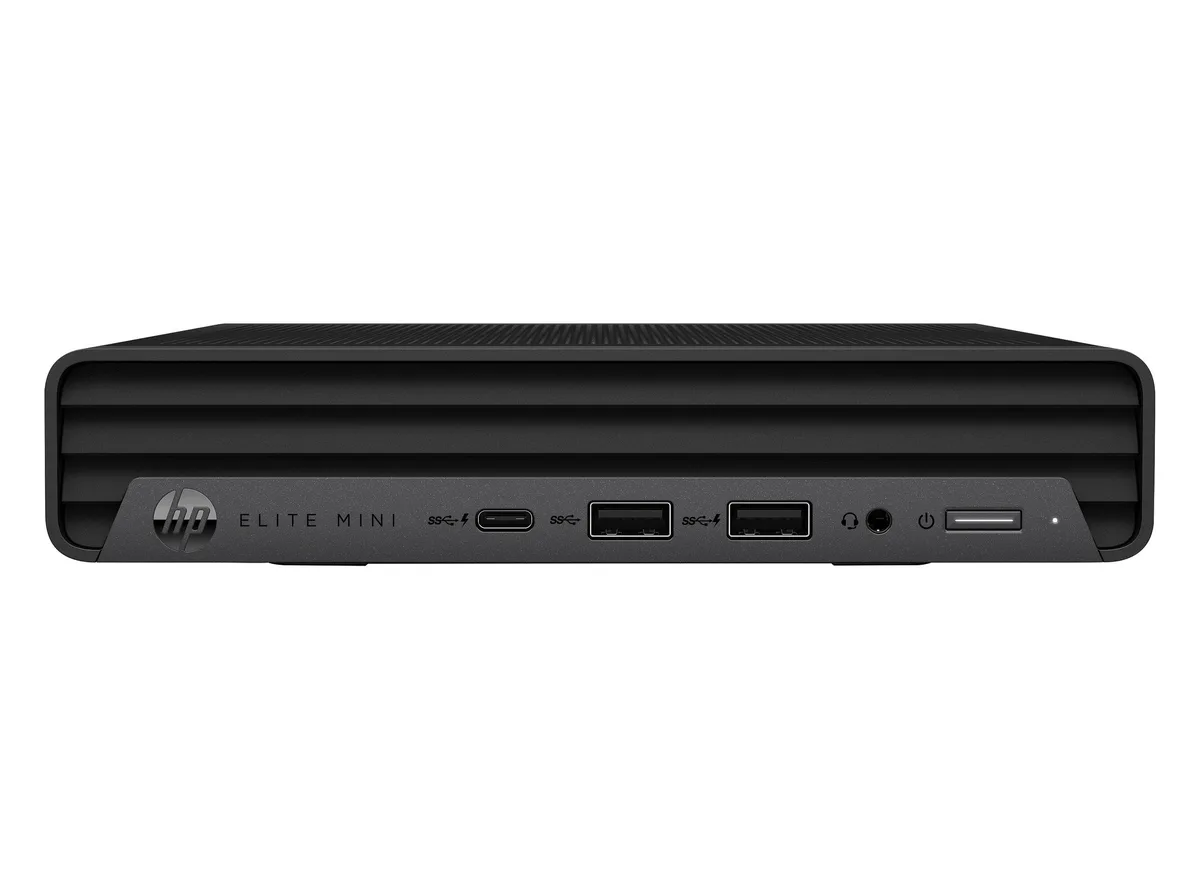
A compact business desktop with a 12th Gen Intel Core i5-12500T, 32GB DDR5, 512GB NVMe SSD, Windows 11 Pro and Intel UHD Graphics 770
The HP Elite Mini 800 G9 delivers an Intel Core i5-12500T processor with 32GB DDR5 memory and a 512GB NVMe SSD in a small black chassis. It ships with Windows 11 Pro and Intel UHD Graphics 770 for everyday office workloads. The 12th generation CPU provides 18MB L3 cache for responsive multitasking. This refurbished unit suits professionals needing capable performance in minimal desk space.
One USB-C 3.2 Gen 2 port and five USB-A ports handle peripherals and external drives. Video output uses one HDMI 2.1 and two DisplayPort 1.4a connectors for up to three displays. A single RJ-45 jack provides wired networking alongside a 3.5mm audio jack. The port selection covers modern docks, legacy accessories and multi-monitor setups without adapters.
Intel UHD Graphics 770 handles general productivity, video playback and multi-monitor desktop spanning. It is not suited for 3D rendering, CAD visualisation or modern gaming workloads. Buyers needing discrete GPU performance for creative or engineering applications should consider a workstation tower instead. The mini form factor prevents internal graphics upgrades.
| Brand | HP |
|---|---|
| Series | Elite Mini |
| Model | 800 G9 |
| Part Number | J1-800G9MA08 |
| Type | Business Desktops & Workstations |
| Form Factor | Mini PC |
| Usage | Business / Mainstream |
| Color | Black |
| Processor | Intel Core i5-12500T |
| Memory | 32GB DDR5 |
| Storage | 512GB NVMe SSD |
| Operating System | Windows 11 Pro |
| CPU Type | Intel Core i5 12th Gen |
| CPU Name | Intel Core i5-12500T |
| L3 Cache Per CPU | 18 MB |
| GPU/VGA Type | Intel UHD Graphics 770 |
| Memory Capacity | 32GB DDR5 |
| SSD | 512GB NVMe |
| Video Ports | 1 x HDMI 2.1 / 2 x DisplayPort 1.4 |
| RJ45 | 1 port |
| Dimensions (H x W x D) | 6.97" x 1.35" x 6.89" |
| Weight | 3.1 lbs. |
| Shipping weight | 3.10 kg |
| Package size | 70 × 69 × 13 mm |
The HDMI 2.1 and two DisplayPort 1.4 ports are driven by the integrated Intel UHD Graphics 770, which sets the practical resolution and refresh-rate ceiling for connected displays.
The mini PC uses a compact black chassis designed for VESA mounting behind a monitor or placement on a desk, with all ports — HDMI 2.1, two DisplayPort 1.4, RJ-45, USB-C 3.2 Gen 2, five USB-A and a 3.5 mm audio jack — accessible on the rear and front faces.
Connect power, attach a display to HDMI 2.1 or DisplayPort 1.4, plug in the RJ-45 cable, then complete the Windows 11 Pro first-run setup; the step users frequently skip is checking for and installing the latest HP driver pack so the Intel UHD Graphics 770 and all USB 3.2 Gen 2 ports operate correctly.
Also in this aisle
Same shelf, same checkout — eight coins and a 30-minute rate lock.
What you pay in, and what you read prices in.
Sent from your wallet at checkout
Display only — the catalogue is priced in USD
No currency matches that.
Pick the language the site speaks to you in.
New here?
Already have one?
There is no automatic reset: this shop sends no mail, so there is no one-time link to ask for. Leave the address on the account and it gets picked up by hand.
Request noted
Nothing is on its way to your inbox — this shop sends no mail at all. Someone picks these up by hand.
Remembered it?


