


ICY DOCK
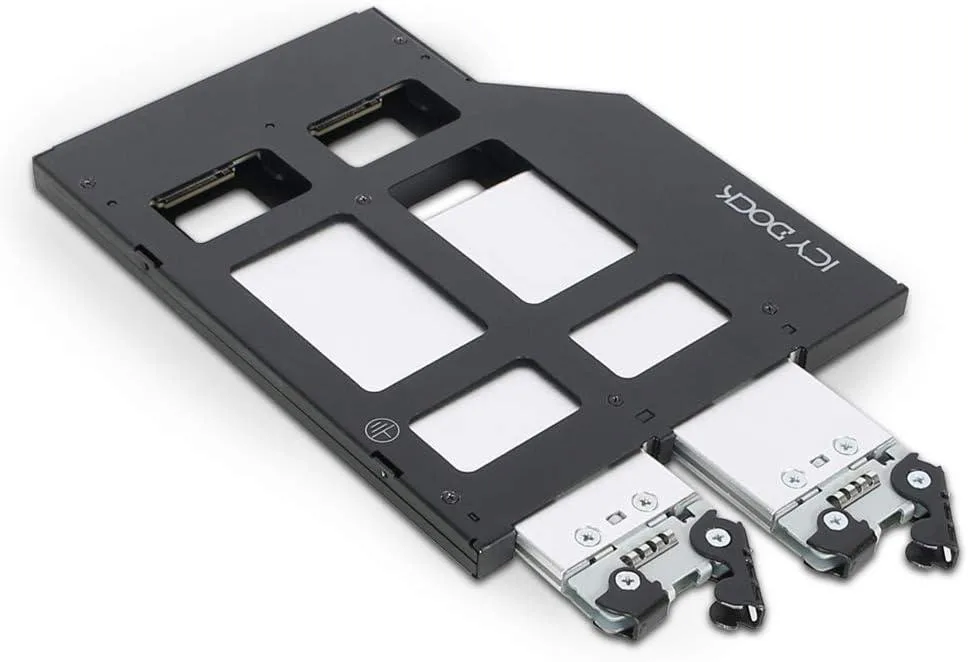
ICY DOCK ToughArmor MB852M2PO-B 2×M.2 NVMe PCIe 4.0 Mobile Rack 9.5mm ODD Bay
Holds two M.2 NVMe SSDs up to 22110 in a 9.5mm ODD bay with dual OCuLink for PCIe 4.0 speeds
- TypeRack
- Supports 64Gbps throughput via dual PCIe 4.0 OCuLink connectors
- Accepts M.2 NVMe drives from 30mm to 110mm length
- Fits 9.5mm ultra-slim optical drive bay
- Built-in thermal pad moves heat to metal tray
- OCuLink pinout follows SFF-9402 specification
Two-slot M.2 NVMe mobile rack
The ToughArmor MB852M2PO-B accepts two M.2 PCIe NVMe SSDs in lengths from 2230 to 22110 and mounts inside a 9.5 mm ultra-slim optical drive bay. It targets server or workstation builders who want high-speed solid-state storage without using a standard drive cage or PCIe slot.
OCuLink Gen 4 connectivity and thermal tray
Two PCIe 4.0 OCuLink connectors compliant with the SFF-9402 pinout deliver up to 64 Gbps of bandwidth per drive. A built-in thermal pad transfers heat from each SSD to the metal tray, helping maintain consistent performance during sustained workloads.
ODD-bay form factor limits expandability
The 9.5 mm bay height restricts the assembly to two drives and prevents the use of thicker cooling solutions or additional controllers. Systems without a compatible optical bay or spare OCuLink ports cannot use this rack, and the design does not support Tri-Mode operation.
Highlights
- Supports 64Gbps throughput via dual PCIe 4.0 OCuLink connectors
- Accepts M.2 NVMe drives from 30mm to 110mm length
- Fits 9.5mm ultra-slim optical drive bay
- Built-in thermal pad moves heat to metal tray
- OCuLink pinout follows SFF-9402 specification
Specifications
| Type | Rack |
|---|
Questions about this item
What PCIe generation and connector does the ToughArmor MB852M2PO-B use, and what throughput does it cap at?
It uses two PCIe 4.0 OCuLink connectors that support up to 64Gbps transfer speed.
Which drive bay size and drive lengths does this mobile rack accept?
It installs in a 9.5mm ultra-slim ODD bay and fits M.2 NVMe SSDs in 2230, 2242, 2260, 2280 and 22110 lengths.
How is the rack mounted and what step is commonly missed during installation?
Slide the rack into the 9.5mm ODD bay and secure it with the bay screws; the step often missed is removing the protective film from the built-in thermal pad so it contacts the SSD.
Also in this aisle
People compared these
Same shelf, same checkout — eight coins and a 30-minute rate lock.



HPE
HPE P22020B21 2U Cable Management Arm for DL38X Gen10 Plus Rail Kit
$52.99$67.99−22%
0.00067489BTC
In stock
Lenovo
Lenovo ThinkSystem ST250 V3 7DCEA01YNA Tower Server Xeon E-2434 16 GB RAM
$1,267.99
0.01614945BTC
In stock