


ICY DOCK
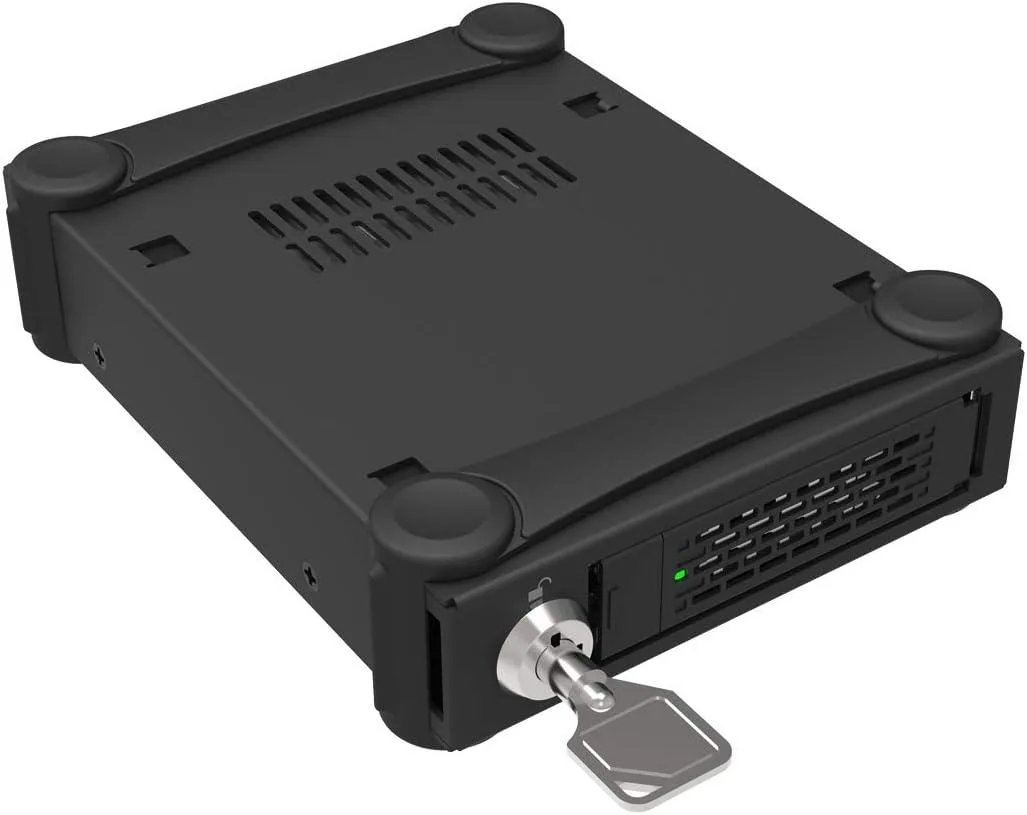
ICY DOCK ToughArmor MB991U3-1SB 2.5 SATA rack enclosure
A rugged full-metal rack enclosure holds one 2.5 SATA drive from 5 mm to 15 mm height and connects via USB 3.0 with UASP support
- TypeRack
- Rugged full-metal build withstands demanding medical and military deployments
- Accepts 2.5 SATA drives from 5 mm to 15 mm height
- USB 3.0 with UASP accelerates data transfers over legacy 2.0 links
- Universal tray slot works with MB991, MB992, MB994, MB996 and MB998 series
- Connects to wireless routers, DVRs, Smart TVs and Android TV boxes
Single-Drive USB Enclosure
The ICY DOCK ToughArmor MB991U3-1SB is a rugged full-metal rack enclosure that accepts one 2.5 SATA drive from 5mm to 15mm height. It connects through USB 3.0 with UASP support and remains backward compatible with USB 2.0. The unit is approved by Tier 1 companies for medical, military, media server and IPC deployments.
Suited For Single External Storage
This enclosure suits users who need a single, durable external drive for a wireless router, DVR, Smart TV or Android TV box. Builders who require multiple simultaneous bays or internal mounting options should look at other form factors.
Universal Tray Compatibility
The universal drive slot works with a wide range of ToughArmor trays including the MB991, MB992, MB994, MB996 and MB998 series. This interchangeability lets you standardise spares across compatible ICY DOCK systems.
Highlights
- Rugged full-metal build withstands demanding medical and military deployments
- Accepts 2.5 SATA drives from 5 mm to 15 mm height
- USB 3.0 with UASP accelerates data transfers over legacy 2.0 links
- Universal tray slot works with MB991, MB992, MB994, MB996 and MB998 series
- Connects to wireless routers, DVRs, Smart TVs and Android TV boxes
Specifications
| Type | Rack |
|---|
Questions about this item
Does this enclosure need a 2.5 SATA drive to operate?
Yes, the ToughArmor MB991U3-1SB accepts one 2.5 SATA III hard drive or SSD with a height between 5mm and 15mm.
Will the USB 3.0 connection still function if my PC only has USB 2.0 ports?
The enclosure is backward compatible with USB 2.0, so it will work at the slower USB 2.0 speed on older ports.
How can I confirm the UASP feature is active after plugging the enclosure in?
Check your operating system device manager or USB controller properties to see if the attached drive is listed with UASP support enabled.
Also in this aisle
People compared these
Same shelf, same checkout — eight coins and a 30-minute rate lock.



HPE
HPE P22020B21 2U Cable Management Arm for DL38X Gen10 Plus Rail Kit
$52.99$67.99−22%
0.00067489BTC
In stock
Lenovo
Lenovo ThinkSystem ST250 V3 7DCEA01YNA Tower Server Xeon E-2434 16 GB RAM
$1,267.99
0.01614945BTC
In stock