Logitech
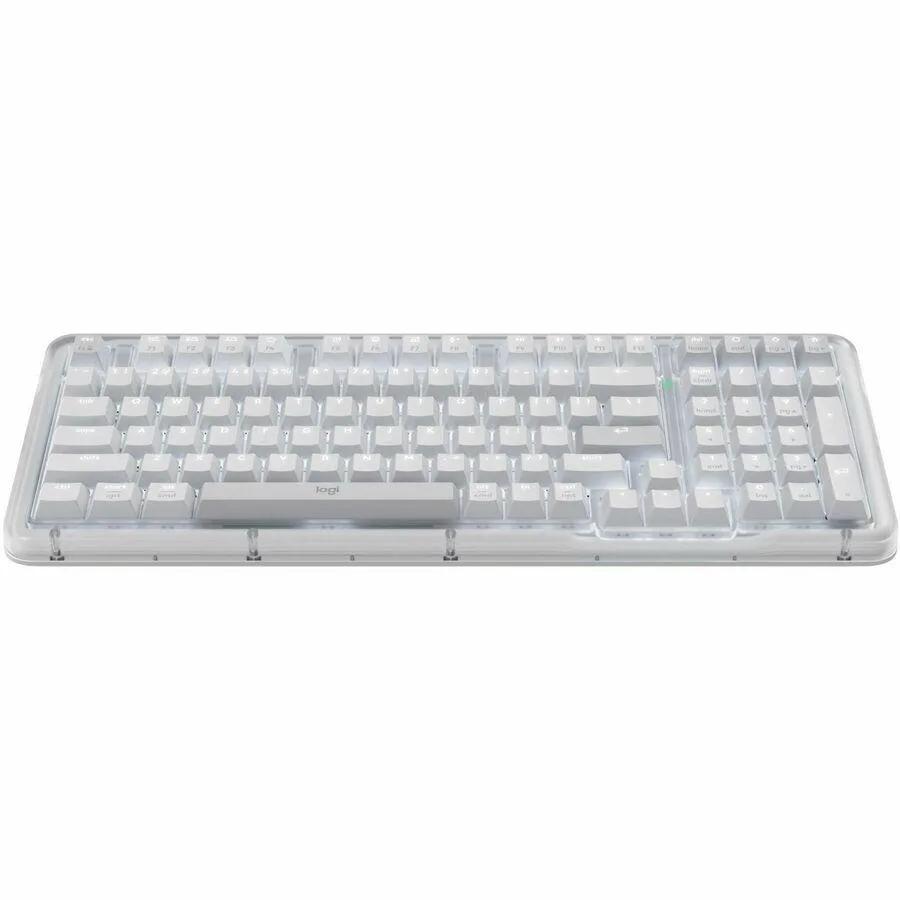
Logitech MX Keys Mini 920-010475 compact wireless keyboard
- MX Keys Mini
- Bluetooth
$68.99
0.0008931BTC
In stockWe take cryptocurrency — so the coins you hold can buy real hardware.Pay in crypto, spend it on real hardware. Free insured shipping worldwide over $399. Plain, unbranded boxes, sent from Germany.Free insured shipping over $399. Your rate is locked for 30 minutes once checkout opens.Rate locked 30 minutes. Every item sealed, serial-checked and covered by a 24-month warranty.Sealed, 24-month warranty.


Logitech
A compact Bluetooth keyboard with tactile keys, smart backlighting and multi-device pairing up to three devices
Size Mini
The Logitech 920-010473 MX Keys Mini is a compact wireless keyboard built for users who value a minimalist desk setup and multi-device flexibility. It connects via Bluetooth Low Energy to Windows, macOS, iOS, Android, Chrome OS and Linux systems. Tactile keys and smart illumination support typing in varied lighting conditions.
This model replaces a standard keyboard when desk space is limited or when a portable solution is needed for mobile workflows. The jump is worth it for users who switch between up to three paired devices and want dedicated keys for dictation, mic mute and emoji input. It does not suit buyers who require a dedicated number pad or function row.
The interface requires a host device with Bluetooth Low Energy support and a USB port for the included USB-A to USB-C charging cable. Battery life reaches 10 days with backlighting active or 5 months with it disabled. Logitech Options software must be installed on macOS or Windows to customise key functions and enable Flow features across multiple computers.
| Brand | Logitech |
|---|---|
| Model | 920-010473 |
| Keyboard Interface | Bluetooth |
| Design Style | Compact |
| Key Switch | Tactile |
| Backlit | Yes |
| Keyboard Color | Pale Gray |
| Dimensions | 5.19" x 11.65" x 0.82" |
| Type | Bluetooth Wireless |
| Power Source | Lithium-ion Rechargeable Battery |
| Operating Time | Full charge lasts 10 days - or 5 months with backlighting off |
| Operating System Supported | Requirements Internet connection for software download Logitech Options software on macOS and Windows Bluetooth Low Energy enabled device with keyboard support Bluetooth Required: Bluetooth Low Energy Windows 10, 11 or later macOS 10.15 or later Chrome OS Linux iOS 13.4 or later iPadOS 14 or later Android 5.0 or later |
| System Requirement | 1 USB Port |
| Package Contents | Universal Keyboard USB-C charging cable (USB-A to USB-C) User documentation |
| Shipping weight | 0.73 kg |
| Package size | 318 × 145 × 38 mm |
Other versions of this model
Same family, different memory, cooler or clock — compare before you commit.
The compact keyboard measures 5.19 inches deep by 11.65 inches wide and 0.82 inches high, so it fits on small desks or laptop trays without overhang.
Enable Bluetooth on the host, hold an Easy-Switch key until its LED flashes, then select MX Keys Mini in the OS Bluetooth menu; the step often missed is holding the Easy-Switch key long enough to enter pairing mode.
The sealed lithium-ion cell is rated for hundreds of charge cycles; typical users see several years before runtime drops noticeably, after which the unit must be serviced or replaced.
Also in this aisle
Same shelf, same checkout — eight coins and a 30-minute rate lock.
What you pay in, and what you read prices in.
Sent from your wallet at checkout
Display only — the catalogue is priced in USD
No currency matches that.
Pick the language the site speaks to you in.
No language matches that.
New here?
Already have one?
There is no automatic reset: this shop sends no mail, so there is no one-time link to ask for. Leave the address on the account and it gets picked up by hand.
Request noted
Nothing is on its way to your inbox — this shop sends no mail at all. Someone picks these up by hand.
Remembered it?