


MSI
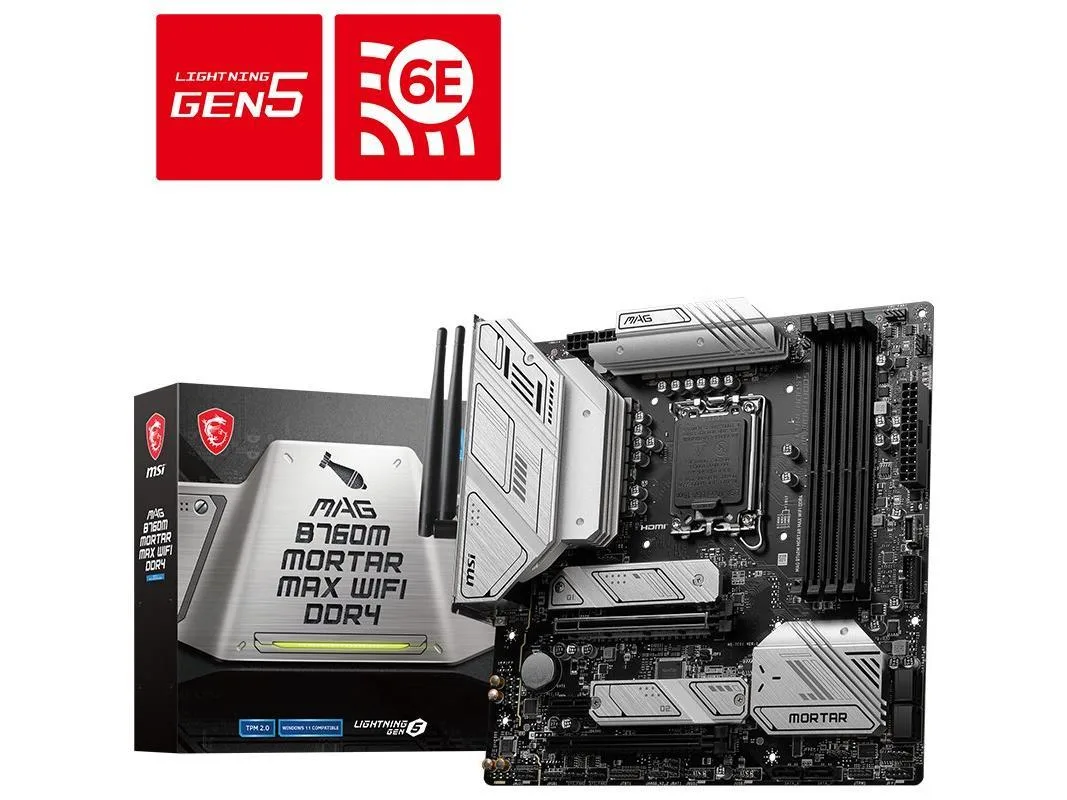
MSI MAG B760M MORTAR MAX WIFI DDR4 Intel Motherboard
Micro-ATX board for Intel 12th, 13th and 14th Gen CPUs with DDR4 up to 128 GB, 2.5 Gbps LAN, Wi-Fi and 20 Gbps USB-C
- CPU Socket TypeLGA 1700
- CPU TypeSupport Intel Core™ 14th/ 13th/ 12th Gen Processors, Intel P
- ChipsetIntel B760
- Memory StandardSupport dual channel DDR4 5333 (OC)/5200 (OC)/5066 (OC)/5000
- Maximum Memory Supported128GB
- PCI Slots2X PCI-E x16 slots (quantity) 1X PCI-E x1 slot (quantity) PC
- Supports Intel Core 12th, 13th and 14th Gen processors via LGA 1700 socket
- Dual-channel DDR4 memory up to 128 GB with speeds from 2666 to 5333 MT/s
- PCIe 5.0 x16 slot plus PCIe 4.0 x4 and PCIe 3.0 x1 for graphics and add-in cards
- Realtek 2.5 Gbps LAN plus Wi-Fi antenna included for wired and wireless networking
- 1-channel Realtek ALC897 audio with S/PDIF and USB 20 Gbps Type-C on rear I/O
Intel B760 micro-ATX for LGA 1700
The MSI MAG B760M MORTAR MAX WIFI DDR4 is a micro-ATX motherboard built around the Intel B760 chipset and LGA 1700 socket. It supports Intel Core 12th, 13th and 14th generation processors as well as Pentium Gold and Celeron CPUs. The board provides dual-channel DDR4 memory up to 128 GB and includes integrated 2.5 Gbps LAN, Wi-Fi antenna support and 7.1-channel audio.
Builders who need DDR4 memory
This board suits builders reusing DDR4 modules or choosing DDR4 for cost reasons while still wanting PCIe 5.0 for a graphics card and multiple M.2 slots. It also fits users who need front-panel USB 20 Gbps Type-C and rear USB 10 Gbps ports. Users requiring more than two full-length PCIe x16 slots or a full-size ATX layout should look elsewhere.
PCIe 5.0 x16 slot from the CPU
The primary PCIe x16 slot runs at PCIe 5.0 directly from the processor, delivering maximum bandwidth for current and future graphics cards. A second x16-sized slot operates at PCIe 3.0 x1 from the chipset, and a third provides PCIe 4.0 x4 for additional add-in cards. This lane allocation determines how many high-speed devices can run simultaneously.
Highlights
- Supports Intel Core 12th, 13th and 14th Gen processors via LGA 1700 socket
- Dual-channel DDR4 memory up to 128 GB with speeds from 2666 to 5333 MT/s
- PCIe 5.0 x16 slot plus PCIe 4.0 x4 and PCIe 3.0 x1 for graphics and add-in cards
- Realtek 2.5 Gbps LAN plus Wi-Fi antenna included for wired and wireless networking
- 1-channel Realtek ALC897 audio with S/PDIF and USB 20 Gbps Type-C on rear I/O
Specifications
| Brand | MSI |
|---|---|
| Series | MSI MAG B760M MORTAR MAX WIFI DDR4 |
| Model | MSI MAG B760M MORTAR MAX WIFI DDR4 |
| CPU Socket Type | LGA 1700 |
| CPU Type | Support Intel Core™ 14th/ 13th/ 12th Gen Processors, Intel Pentium Gold and Celeron Processors LGA1700 |
| Chipset | Intel B760 |
| Memory Standard | Support dual channel DDR4 5333 (OC)/5200 (OC)/5066 (OC)/5000 (OC)/4800 (OC)/4600 (OC)/4400 (OC)/4266 (OC)/4200 (OC)/4000 (OC)/3800 (OC)/3733 (OC)/3600 (OC)/3466 (OC)/3400 (OC)/3333 (OC)/3200 (JEDEC)/2933 (JEDEC)/2666 (JEDEC)/2400 (JEDEC)/2133 (JEDEC) MHz memory |
| Maximum Memory Supported | 128GB |
| PCI Slots | 2X PCI-E x16 slots (quantity) 1X PCI-E x1 slot (quantity) PCI_E1 Gen PCIe 5.0 supports up to x16 (From CPU) PCI_E2 Gen PCIe 3.0 supports up to x1 (From Chipset) PCI_E3 Gen PCIe 4.0 supports up to x4 (From Chipset) |
| SATA RAID | 2XM.2 interface, 6xSATA III interface |
| Audio Chipset | Realtek ALC897 Codec 7.1-Channel High Performance Audio Supports S/PDIF output |
| LAN Chipset | Realtek 2.5Gbps LAN |
| Onboard USB | 4X USB 2.0 (rear) 4X USB 2.0 (front) 2x USB 5Gbps Type A (Front) 3x USB 10Gbps Type A (Rear) 1x USB 10Gbps Type C (Front) 1x USB 20Gbps Type C (Rear) |
Questions about this item
What PCIe generation does the primary x16 slot use and what bandwidth does it deliver?
The primary PCIe x16 slot runs at PCIe 5.0 and delivers up to x16 bandwidth directly from the CPU.
What are the board dimensions and mounting standard for this Micro ATX motherboard?
The board follows the Micro ATX form factor and uses the standard Micro ATX mounting hole pattern for compatible chassis.
How is the Wi-Fi antenna attached and what is the common installation mistake?
Screw the supplied external antenna onto the rear I/O gold connectors; the step often missed is tightening both antenna leads before powering on.
Also in this aisle
People compared these
Same shelf, same checkout — eight coins and a 30-minute rate lock.


PrimoChill
PrimoChill Praxis Wetbench Open-Air Test Bench 461.8mm
- Open-Air
$274.89
0.00353779BTC
In stock
Silverstone Technology
SilverStone Technology Strider 1200W 80 Plus Platinum Modular Power Supply
- ATX Mid Tower
- 1200W
$324.03
0.00417022BTC
In stock