

Micron Technology, Inc.
Micron Technology, Inc. MT4JTF12864AZ-1G4D1 1GB DDR3 1333 Desktop RAM
- 1GB
- DDR3 1333 (PC3 1060…
$28.99
0.00037452BTC
In stockWe take cryptocurrency — so the coins you hold can buy real hardware.Pay in crypto, spend it on real hardware. Free insured shipping worldwide over $399. Plain, unbranded boxes, sent from Germany.Free insured shipping over $399. Your rate is locked for 30 minutes once checkout opens.Rate locked 30 minutes. Every item sealed, serial-checked and covered by a 24-month warranty.Sealed, 24-month warranty.


MSI
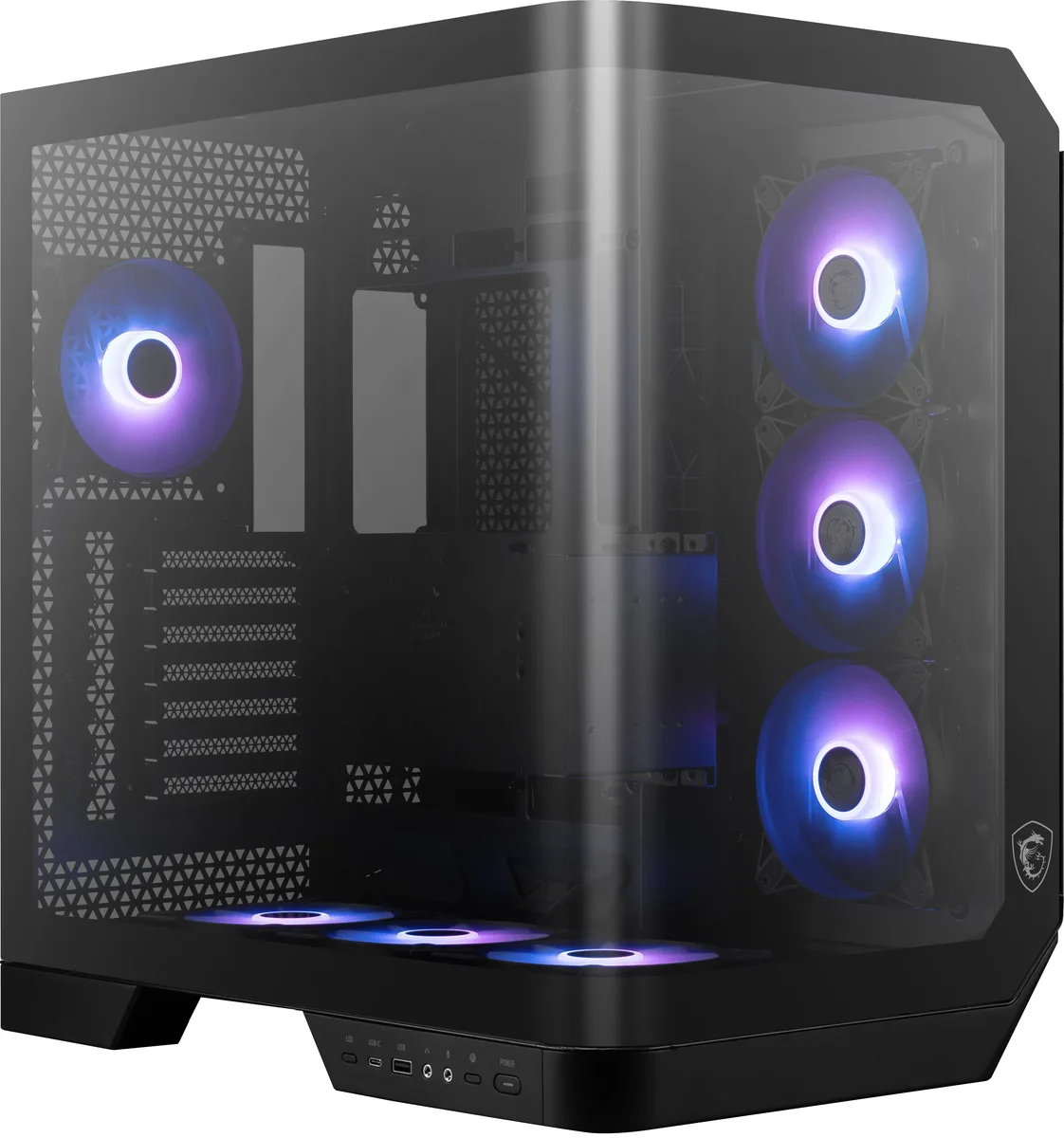
Mid-tower ATX case with a 270-degree tempered glass panel, seven pre-installed 120mm ARGB fans, support for 360mm radiators and GPUs up to 338mm
The MSI MAG PANO 120R PZ is an ATX mid-tower case built around a 270-degree tempered glass panel that turns the interior into a display cabinet. It targets builders who want their hardware and figurines visible from almost any angle while still fitting standard ATX, Micro-ATX or Mini-ITX motherboards. Seven pre-installed 120 mm ARGB fans provide immediate airflow and lighting without extra purchases. A bundled VGA bracket with a level indicator keeps long graphics cards from sagging.
This case replaces enclosures that lack tempered glass, pre-installed cooling or back-connect motherboard support. The jump is worth it when you need a 360 mm radiator up top, seven expansion slots for full-length cards up to 338 mm, and a CPU cooler clearance of 180 mm without buying fans separately. Builders who only need a basic steel box with no glass or RGB will not benefit from the extra cost and weight.
Installation is simplified by the back-connect motherboard layout, which lets you route cables before seating the board, and by the fan hub that consolidates PWM and ARGB connections to a single control board. Dust filters on the top and bottom pull out for cleaning. The main issues are the single internal 2.5-inch bay limiting SSD counts and the side glass panel adding bulk in tight workspaces.
| Brand | MSI |
|---|---|
| Model | MAG PANO 120R PZ |
| Type | Micro ATX Mid Tower |
| Color | Black |
| Case Material | ABS Plastic / SPCC Steel / Tempered Glass |
| With Power Supply | No |
| Motherboard Compatibility | ATX / Micro ATX / Mini-ITX |
| Side Panel | 1 x Side Tempered Glass Panel |
| Internal 3.5" Drive Bays | 2 |
| Internal 2.5" Drive Bays | 1 |
| Expansion Slots | 7 |
| Front Ports | 1 x USB 3.2 Type-C, 1 x USB 3.2 Gen 1 |
| Fan Options | Bottom - 3 x 120mm / Rear - 1 x 120mm / Side - 3 x 120mm |
| Pre-installed Fans | Bottom - 3 x 120mm / Rear - 1 x 120mm / Side - 3 x 120mm |
| Max GPU Length | 338 mm |
| Max CPU Cooler Height | 180 mm |
| Shipping weight | 16.33 kg |
| Package size | 591 × 578 × 394 mm |
The chassis accepts graphics cards up to 338 mm long and CPU coolers up to 180 mm tall.
All seven 120 mm PWM ARGB fans plug into the included 10-port ARGB and PWM control board; the step often missed is connecting that board to both a motherboard ARGB header and a PWM fan header so lighting and speed control work together.
Magnetic filters on the top and bottom panels pull out for cleaning; remove them, rinse or vacuum the mesh, then snap them back in place.
Also in this aisle
Same shelf, same checkout — eight coins and a 30-minute rate lock.
What you pay in, and what you read prices in.
Sent from your wallet at checkout
Display only — the catalogue is priced in USD
No currency matches that.
Pick the language the site speaks to you in.
New here?
Already have one?
There is no automatic reset: this shop sends no mail, so there is no one-time link to ask for. Leave the address on the account and it gets picked up by hand.
Request noted
Nothing is on its way to your inbox — this shop sends no mail at all. Someone picks these up by hand.
Remembered it?



