

Micron Technology, Inc.
Micron Technology, Inc. MT4JTF12864AZ-1G4D1 1GB DDR3 1333 Desktop RAM
- 1GB
- DDR3 1333 (PC3 1060…
$28.99
0.00037494BTC
In stockWe take cryptocurrency — so the coins you hold can buy real hardware.Pay in crypto, spend it on real hardware. Free insured shipping worldwide over $399. Plain, unbranded boxes, sent from Germany.Free insured shipping over $399. Your rate is locked for 30 minutes once checkout opens.Rate locked 30 minutes. Every item sealed, serial-checked and covered by a 24-month warranty.Sealed, 24-month warranty.


MSI
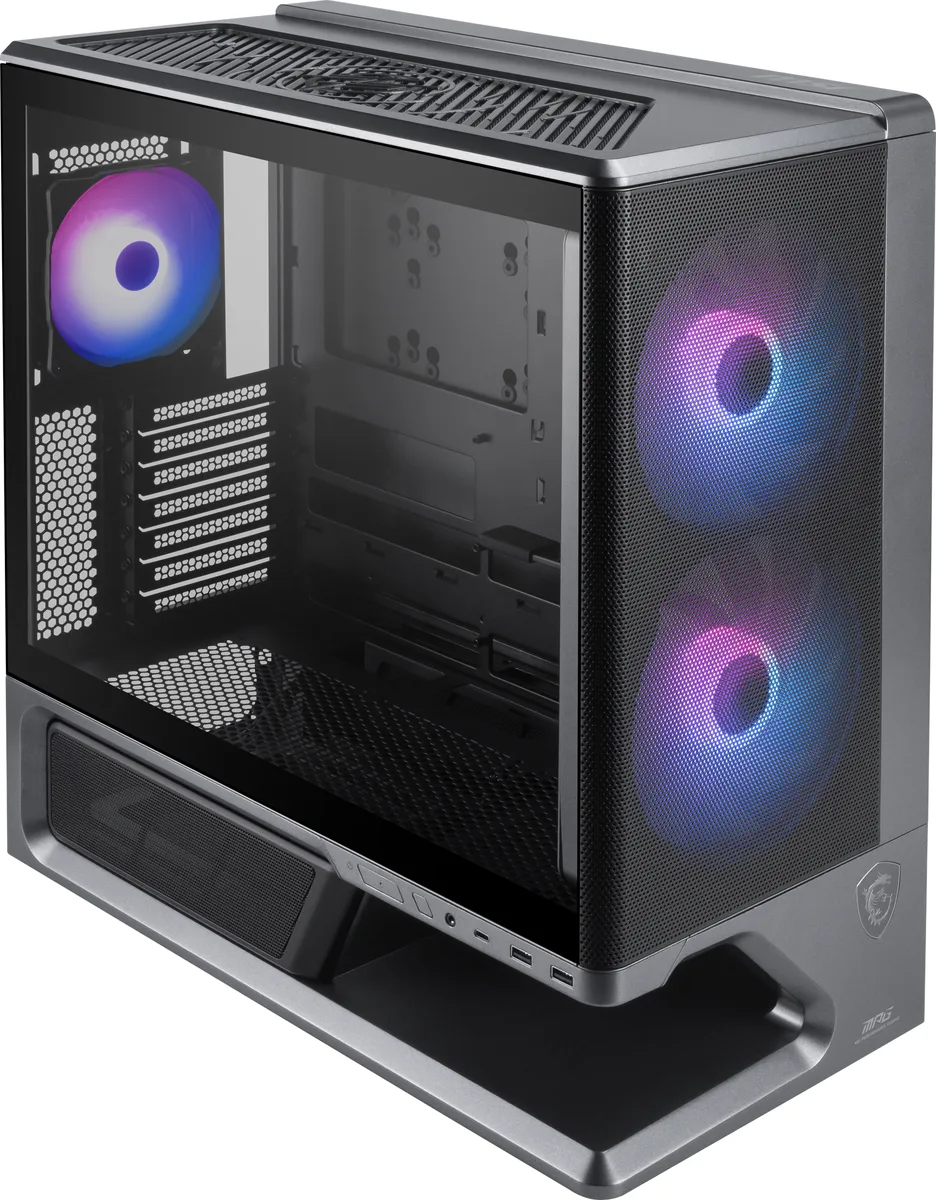
Mid-tower ATX case with floating base design, dual 160 mm front fans and support for 360 mm top radiators
The MPG VIXTA 300R AIRFLOW PZ is a mid-tower chassis built around a floating base design that separates the motherboard tray from the PSU shroud. It accepts ATX, Micro-ATX and Mini-ITX boards, including back-connect variants. Two pre-installed 160 mm front fans and one 120 mm rear fan provide immediate airflow through the mesh front panel.
The case suits builders who prioritise cooling headroom and tool-free maintenance. It offers space for up to 11 fans and a 360 mm top radiator, plus a magnetic PSU shroud cover and uni-front panel cable. Buyers needing more than one 3.5 inch bay or a second 2.5 inch bay should look at larger enclosures.
Side panels snap off without screws and the magnetic PSU shroud cover lifts away for cable routing. The 1-to-4 ARGB and PWM hub consolidates fan and lighting connections. Installers should verify that their graphics card does not exceed 390 mm and that the CPU cooler stays within 165 mm, otherwise clearance issues will arise.
| Brand | MSI |
|---|---|
| Model | MPG VIXTA 300R AIRFLOW PZ |
| Type | ATX Mid Tower |
| Motherboard Compatibility | Regular: ATX, Micro-ATX, Mini-ITX Back-connect: ATX / Micro-ATX |
| Internal 3.5" Drive Bays | 1 |
| Internal 2.5" Drive Bays | 1 |
| Expansion Slots | 7 |
| Front Ports | 1 x USB 20Gbps (Type-C) 2 x USB 5Gbps (Type-A) 1 x Audio-Out / Mic-in 1 x LED Button 1 x Power Button |
| Fan Options | Front: 2 x 160 mm Rear: 1 x 120 mm Top: 3 x 120 mm Side: 2 x 120 mm / 2 x 140 mm PSU Shroud: 3 x 120 mm |
| Pre-installed Fans | Front - 2 x 160mm / Rear - 1 x 120mm |
| Radiator Options | Rear - Up to 120mm / Side - Up to 120mm / Side - Up to 240mm / Top - Up to 120mm / Top - Up to 240mm / Top - Up to 360mm |
| Max GPU Length | 390 mm |
| Max CPU Cooler Height | 165 mm |
| Max PSU Length | 190 mm |
| Dimensions | 455 x 235 x 497 mm / 17.9 x 9.25 x 19.57 inches |
| Weight | 8.3kg |
| Shipping weight | 11.00 kg |
| Package size | 510 × 470 × 250 mm |
The case fits regular ATX, Micro-ATX, Mini-ITX and back-connect ATX or Micro-ATX boards.
Yes, the case provides one internal 3.5" bay and one internal 2.5" bay for those drives.
Power on the system; the two front 160 mm fans and rear 120 mm fan should spin, and the LED button on the front panel cycles the ARGB effects.
Also in this aisle
Same shelf, same checkout — eight coins and a 30-minute rate lock.
What you pay in, and what you read prices in.
Sent from your wallet at checkout
Display only — the catalogue is priced in USD
No currency matches that.
Pick the language the site speaks to you in.
New here?
Already have one?
There is no automatic reset: this shop sends no mail, so there is no one-time link to ask for. Leave the address on the account and it gets picked up by hand.
Request noted
Nothing is on its way to your inbox — this shop sends no mail at all. Someone picks these up by hand.
Remembered it?



