

Micron Technology, Inc.
Micron Technology, Inc. MT4JTF12864AZ-1G4D1 1GB DDR3 1333 Desktop RAM
- 1GB
- DDR3 1333 (PC3 1060…
$28.99
0.00037461BTC
In stockWe take cryptocurrency — so the coins you hold can buy real hardware.Pay in crypto, spend it on real hardware. Free insured shipping worldwide over $399. Plain, unbranded boxes, sent from Germany.Free insured shipping over $399. Your rate is locked for 30 minutes once checkout opens.Rate locked 30 minutes. Every item sealed, serial-checked and covered by a 24-month warranty.Sealed, 24-month warranty.
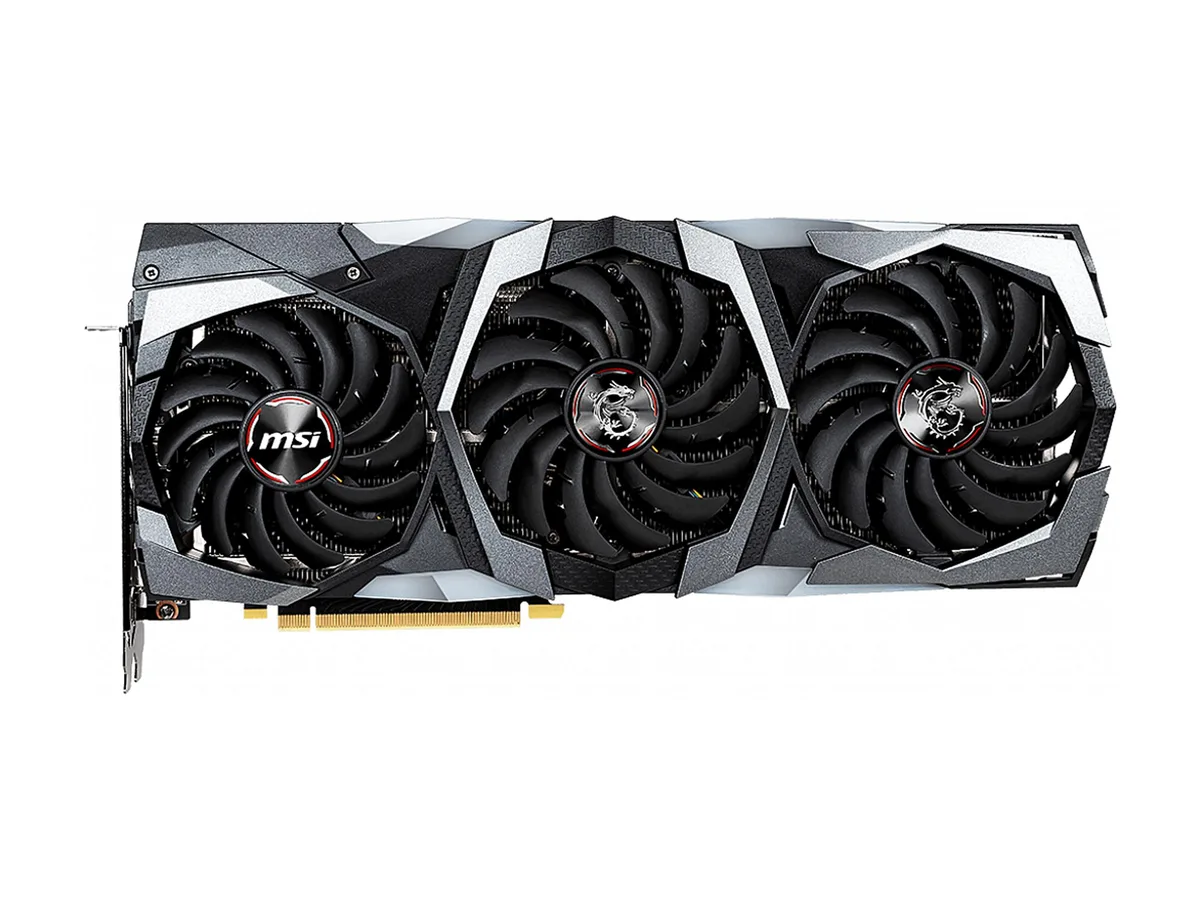


MSI
GeForce RTX 2080 graphics card with 8 GB GDDR6 memory, 2944 CUDA cores and a 1860 MHz boost clock for 4K gaming
This graphics card uses the NVIDIA GeForce RTX 2080 GPU with 2944 CUDA cores and a boost clock of 1860 MHz. It provides 8GB of GDDR6 memory on a 256-bit interface running at 14 Gbps. The PCI Express 3.0 x16 slot supplies power and data. It supports DirectX 12 and OpenGL 4.5 for modern rendering paths.
The 8GB frame buffer and high core count suit 1440p and 4K gaming as well as GPU-accelerated creative workloads. Four display outputs — one HDMI 2.0b, three DisplayPort 1.4 and a USB Type-C — drive up to four monitors at 7680 x 4320. Builders needing a single-slot design or lower power draw should consider other models.
The triple-fan cooler on the 12.87-inch by 5.51-inch board moves heat away from the GPU during extended sessions. NVLink allows two-way SLI for multi-GPU compute tasks. Clock speeds hold near the 1860 MHz boost target while thermals stay in range, letting the 2944 cores maintain throughput on long renders or gaming marathons.
| Brand | MSI |
|---|---|
| Model | RTX 2080 GAMING X TRIO |
| Interface | PCI Express 3.0 x16 |
| Chipset Manufacturer | NVIDIA |
| GPU Series | NVIDIA GeForce RTX 20 Series |
| GPU | GeForce RTX 2080 |
| Boost Clock | 1860 MHz |
| CUDA Cores | 2944 |
| Effective Memory Clock | 14 Gbps |
| Memory Size | 8GB |
| Memory Interface | 256-Bit |
| Memory Type | GDDR6 |
| DirectX | DirectX 12 |
| OpenGL | OpenGL 4.5 |
| Multi-Monitor Support | 4 |
| HDMI | 1 x HDMI 2.0b |
| DisplayPort | 3 x DisplayPort 1.4 |
| Other Ports | 1 x USB Type-C |
| Max Resolution | 7680 x 4320 |
| SLI Support | NVIDIA NVLINK (SLI-Ready), 2-way |
| Virtual Reality Ready | Yes |
| Thermal Design Power | 260W |
| System Requirements | Recommended PSU: 650W |
| Recommended PSU Wattage | 650W |
| Power Connector | 2 x 8-Pin |
| HDCP Ready | 2.2 |
| Features | TORX FAN 3.0: Supremely silent/Dispersion fan blade: Steeper curved blade accelerating the airflow./Traditional fan blade: Provides steady airflow to massive heat sink below./Double ball bearing: Strong and lasting core for years of smooth gaming.//TRI-FROZR Thermal Design/Using three of the award-winning TORX Fans 3.0 with Double Ball Bearings./Using groundbreaking aerodynamic techniques, the heatsink is optimized for efficient heat dissipation.//RGB Mystic Light/Customize colors and LED effects with exclusive MSI software and synchronize the look & feel with other components.// |
| Max GPU Length | 327 mm |
| Card Dimensions (L x H) | 12.87" x 5.51" |
Yes, the RTX 2080 GAMING X TRIO connects through a PCI Express 3.0 x16 interface and requires that slot to operate.
The card is backward compatible with PCIe 2.0 x16 slots, though bandwidth is reduced to half of the 3.0 specification; most games show only a small frame-rate difference at 1440p or 4K.
Run a GPU monitoring tool such as MSI Afterburner during a 3D load; the core clock should read 1860 MHz or higher when the card is at its default boost target.
Also in this aisle
Same shelf, same checkout — eight coins and a 30-minute rate lock.
What you pay in, and what you read prices in.
Sent from your wallet at checkout
Display only — the catalogue is priced in USD
No currency matches that.
Pick the language the site speaks to you in.
New here?
Already have one?
There is no automatic reset: this shop sends no mail, so there is no one-time link to ask for. Leave the address on the account and it gets picked up by hand.
Request noted
Nothing is on its way to your inbox — this shop sends no mail at all. Someone picks these up by hand.
Remembered it?



