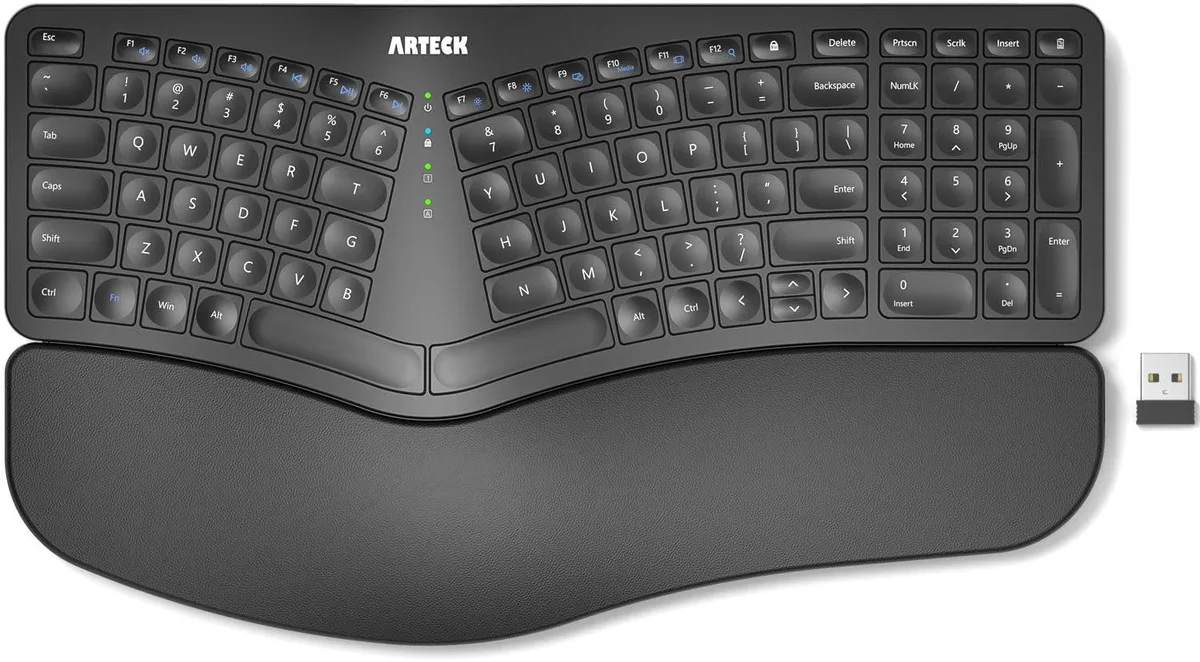


ORtek HW315 Split Ergonomic Keyboard with Palm Rest 2.4G Wireless
Split ergonomic keyboard with cushioned palm rest and 2.4 GHz wireless connection via nano USB receiver, scissor-switch keys and six-month rechargeable battery life
- MaterialPlastic
- Keyboard InterfaceUSB
- Palm RestContemporary, USB Cable
- Function Keys1
- Mechanical KeyboardScissor-Switch
- Key SwitchScissor Switches
- Split design keeps wrists and forearms in a natural position
- Soft cushioned palm rest supports wrists during long typing sessions
- Nano USB receiver stored in keyboard enables instant plug-and-play setup
- Rechargeable battery lasts six months on a single charge
- Scissor-switch keys deliver quiet, low-profile typing comfort
Split Ergonomic Layout
The ORtek HW315 is a split ergonomic keyboard designed to position wrists and forearms in a natural, relaxed posture. It features a cushioned palm rest for added support during long typing sessions. The keyboard connects wirelessly via a 2.4G nano USB receiver stored at the back of the unit. Scissor-switch keys provide a low-profile, quiet typing experience.
Built for Comfort-Focused Typists
This keyboard suits users who want a split layout with integrated wrist support to reduce strain during extended work periods. The ambidextrous design accommodates both left and right-handed users. Buyers needing a compact form factor or a fully mechanical key feel should look at alternative designs. The fixed split angle may not fit every desk arrangement or preference.
Wireless Desk Integration
The HW315 operates on a rechargeable lithium battery rated for up to six months of use based on two hours of daily typing. It charges via the included USB-C cable while the wireless receiver handles the data connection up to 33 feet away. Four foldable legs allow angle adjustment without extra accessories. The Windows layout includes dedicated media hotkeys for volume and playback control.
Highlights
- Split design keeps wrists and forearms in a natural position
- Soft cushioned palm rest supports wrists during long typing sessions
- Nano USB receiver stored in keyboard enables instant plug-and-play setup
- Rechargeable battery lasts six months on a single charge
- Scissor-switch keys deliver quiet, low-profile typing comfort
Specifications
| Brand | ORtek |
|---|---|
| Part Number | HW315 |
| Material | Plastic |
| Keyboard Interface | USB |
| Palm Rest | Contemporary, USB Cable |
| Function Keys | 1 |
| Mechanical Keyboard | Scissor-Switch |
| Key Switch | Scissor Switches |
| Key Switch Type | Scissor-Switch |
| Keyboard Color | Black |
| Dimensions | 2.4 in x 3.96 in x 1.3 in |
| Mouse Included | Contemporary |
| Mouse DPI | Ergonomic |
| Hand Orientation | Ambidextrous |
| Tracking Method | Ergonomic |
| Buttons | 2 |
| Scrolling Capability | Rechargeable |
| Mouse Color | Black |
| Power Source | Battery Powered |
| Operating Time | Battery Powered, true |
| Distance | 16.5 L x 9.6 W x 1.02 H inches |
| System Requirement | USB Cable |
| Features | Plastic, Ambidextrous |
| Package Contents | USB Cable |
Questions about this item
What type of USB port does the HW315's nano receiver need?
The nano receiver plugs into any standard USB-A port on a Windows desktop or laptop.
Will the scissor-switch keys and split layout feel different if I keep using a traditional flat keyboard at work?
The split design and low-profile scissor switches encourage a more natural wrist angle, so switching between the two layouts will feel noticeably different.
How can I confirm the keyboard is charged and connected after plugging in the receiver?
Insert the stored nano receiver, turn the keyboard on, and verify typing works; recharge via the USB-C cable when the battery runs low.
Also in this aisle
People compared these
Same shelf, same checkout — eight coins and a 30-minute rate lock.