


SMA
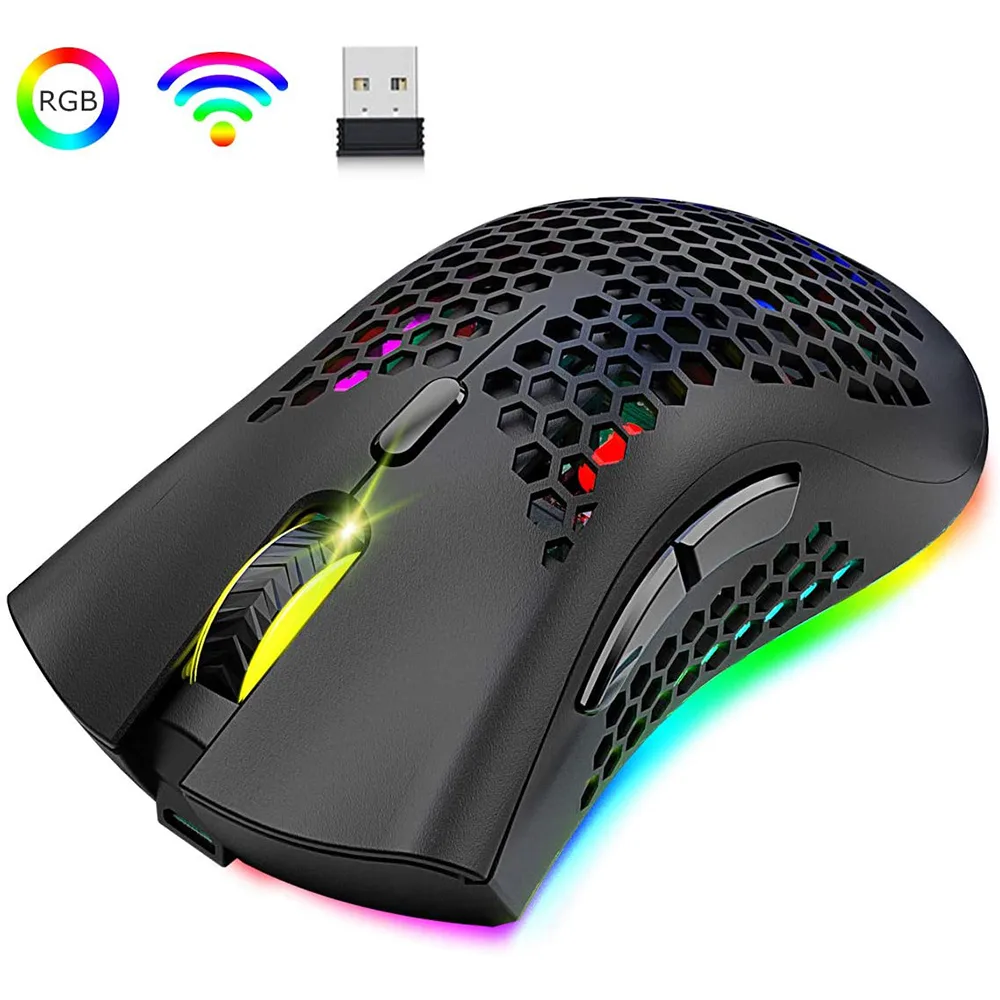
SMA X3 Gaming Mouse 2400 DPI 7 Button RGB 800mAh 2.4GHz Wireless Black
A lightweight honeycomb-shell gaming mouse with 2.4 GHz wireless, adjustable DPI up to 2400, seven buttons, RGB backlighting and an 800 mAh rechargeable battery
- TypeRF Wireless
- Tracking MethodOptical
- Resolution (DPI)2400 dpi
- Buttons7
- ColorBlack
- Lightweight honeycomb shell cuts fatigue during long sessions
- 4 GHz wireless gives stable cable-free control
- 16 RGB LEDs with four chroma modes add atmosphere
- Three adjustable DPI levels (1200/1800/2400) suit any play style
- Built-in 800 mAh rechargeable battery removes disposable cells
Purpose & Audience
The SMA X3 is a lightweight wireless gaming mouse built for players who want a perforated honeycomb shell that reduces hand fatigue during long sessions. Its 2.4 GHz RF link and optical sensor suit fast-paced titles on Windows or Mac systems.
Upgrade Path
The mouse replaces a wired or heavier wireless model by removing the cable and cutting mass through the hollow ABS housing. The jump is worth it when you need three selectable DPI steps — 1200, 1800 or 2400 — plus a built-in 800 mAh rechargeable cell that eliminates disposable batteries.
Interface Limits
The 2.4 GHz nano receiver occupies one USB-A port and offers no Bluetooth fallback, so devices with only USB-C require an adapter. The optical sensor tops out at 2400 DPI, which may feel low for users accustomed to higher-resolution sensors on competitive-grade mice.
Highlights
- Lightweight honeycomb shell cuts fatigue during long sessions
- 4 GHz wireless gives stable cable-free control
- 16 RGB LEDs with four chroma modes add atmosphere
- Three adjustable DPI levels (1200/1800/2400) suit any play style
- Built-in 800 mAh rechargeable battery removes disposable cells
Specifications
| Type | RF Wireless |
|---|---|
| Tracking Method | Optical |
| Resolution (DPI) | 2400 dpi |
| Buttons | 7 |
| Color | Black |
Questions about this item
What USB port does the 2.4 GHz nano receiver need?
The nano receiver plugs into any standard USB Type‑A port on the PC or laptop; no special port or driver is required.
What is the correct order to start the mouse?
Slide the bottom power switch to ON first, then insert the nano receiver into a USB port; reversing the order can prevent the link from establishing.
How do I recharge the 800 mAh battery when it runs low?
Connect the supplied charging cable to the mouse’s charging port and a USB power source; the mouse charges while in use or at rest.
Also in this aisle
People compared these
Same shelf, same checkout — eight coins and a 30-minute rate lock.



AVID Products
AVID Products R-Go HE Vertical Wired 3400dpi Left Hand Mouse Black Silver
$55.99
0.00071158BTC
In stock