

Micron Technology, Inc.
Micron Technology, Inc. MT4JTF12864AZ-1G4D1 1GB DDR3 1333 Desktop RAM
- 1GB
- DDR3 1333 (PC3 1060…
$28.99
0.0003731BTC
In stockWe take cryptocurrency — so the coins you hold can buy real hardware.Pay in crypto, spend it on real hardware. Free insured shipping worldwide over $399. Plain, unbranded boxes, sent from Germany.Free insured shipping over $399. Your rate is locked for 30 minutes once checkout opens.Rate locked 30 minutes. Every item sealed, serial-checked and covered by a 24-month warranty.Sealed, 24-month warranty.


Thermaltake
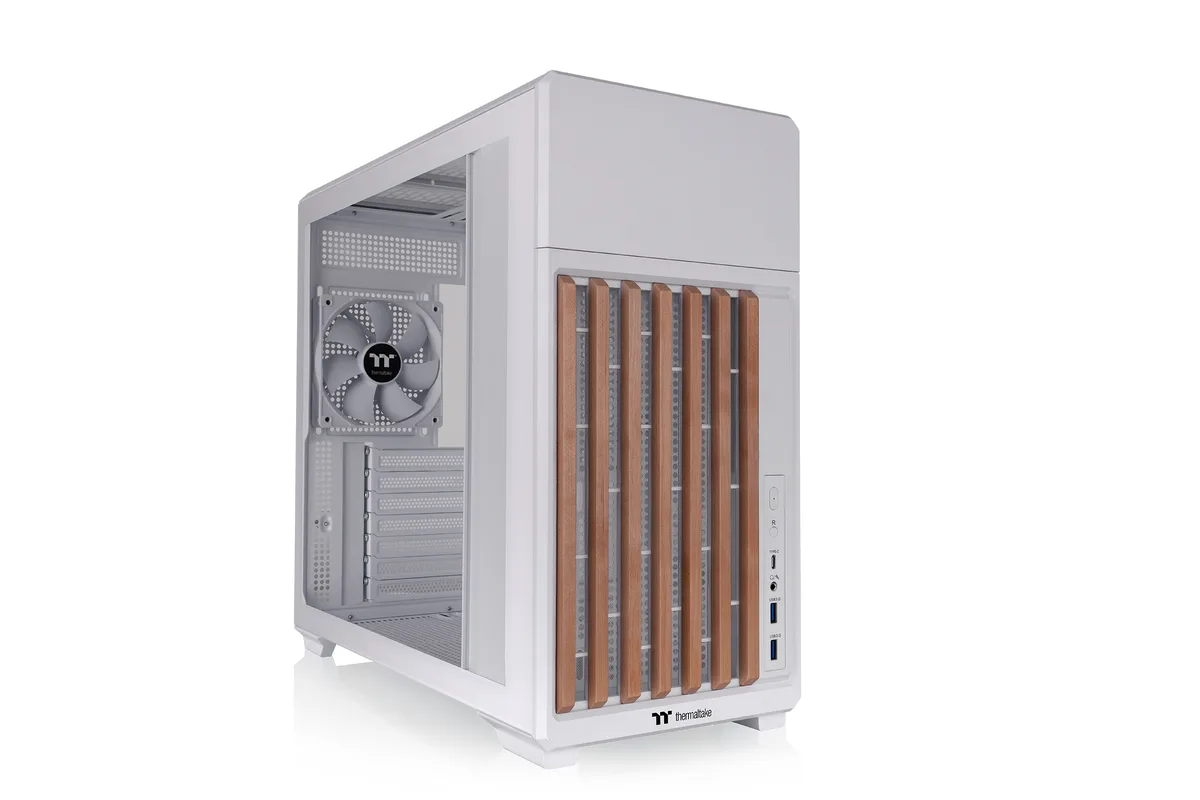
ATX mid-tower case in Snow with wooden front trim, tempered glass side panel, and space for a 360 mm radiator, 410 mm GPU, and 165 mm air cooler
The Thermaltake TR300 WS is an ATX mid-tower case finished in Snow with a distinctive wooden trim on the front panel. It supports ATX, Micro-ATX and Mini-ITX motherboards and includes a 3 mm tempered glass side panel for component visibility. A single 120 mm PWM fan is pre-installed at the rear.
The case suits builders who want a compact footprint with room for a 360 mm top radiator, long graphics cards and multiple drive configurations. Two 3.5-inch and three 2.5-inch internal bays provide storage flexibility. Those needing extensive front-panel I/O beyond USB 3.1 Gen 2 Type-C, two USB 3.0 ports and HD audio should consider other models.
Up to eight 120 mm fans can be mounted across top, bottom, front and rear positions, with additional 140 mm support at top and bottom. The front-mounted PSU bracket offers four height settings to balance GPU length against top radiator space. Radiator support includes 360 mm, 280 mm, 240 mm and 120 mm at the top plus 120 mm at the rear.
| Brand | Thermaltake |
|---|---|
| Series | TR Series |
| Model | TR300 WS |
| Part Number | CA-11M-00M6WN-WS |
| Type | ATX Mid Tower |
| Color | Snow |
| Case Material | SPCC |
| With Power Supply | No |
| Power Supply Mounted | Rear |
| Motherboard Compatibility | 6.7" x 6.7" (Mini ITX), 9.6" x 9.6" (Micro ATX), 12" x 9.6" (ATX) |
| Side Panel | 1 x 3 mm Tempered Glass |
| Internal 3.5" Drive Bays | 2 |
| Internal 2.5" Drive Bays | 3 |
| Expansion Slots | 7 |
| Front Ports | 1 x USB 3.1 (Gen 2) Type-C, 2 x USB 3.0, 1 x HD Audio |
| Fan Options | Front: 1 x 120mm Top: 3 x 120mm, 2 x 120mm, 1 x 120mm 2 x 140mm, 1 x 140mm Rear : 1 x 120mm Bottom : 3 x 120mm, 2 x 120mm, 1 x 120mm 2 x 140mm, 1 x 140mm |
| Pre-installed Fans | 1x 120 x 120 x 25 mm Standard Fan (1400rpm, 23.2 dBA) |
| Radiator Options | Top (AIO) : 1 x 360mm, 1 x 240mm, 1 x 120mm 1 x 280mm, 1 x 140mm Rear (AIO) : 1 x 120mm |
| Max GPU Length | 410mm (PSU length <= 160mm) |
| Max CPU Cooler Height | 165 mm |
| Max PSU Length | 260mm (VGA length<325mm) 160mm (VGA length>325mm) |
| Dimensions | 16.5" x 8.07" x 18.39" |
| Shipping weight | 7.62 kg |
| Package size | 541 × 476 × 287 mm |
Yes the TR300 WS supports ATX boards measuring 12 inch by 9.6 inch as well as Micro ATX and Mini ITX sizes
The rear mount holds a single 120mm fan so the pre-installed 1400rpm PWM fan occupies that slot and an additional rear fan cannot be added
Plug a USB C device into the front port and verify it appears at 10 Gbps speed in your operating system device manager
Also in this aisle
Same shelf, same checkout — eight coins and a 30-minute rate lock.
What you pay in, and what you read prices in.
Sent from your wallet at checkout
Display only — the catalogue is priced in USD
No currency matches that.
Pick the language the site speaks to you in.
New here?
Already have one?
There is no automatic reset: this shop sends no mail, so there is no one-time link to ask for. Leave the address on the account and it gets picked up by hand.
Request noted
Nothing is on its way to your inbox — this shop sends no mail at all. Someone picks these up by hand.
Remembered it?



