Ubiquiti Networks
Ubiquiti Networks UniFi nanoHD 802.11ac Wave 2 2-Pack wireless router
$316.99
0.00404298BTC
In stockWe take cryptocurrency — so the coins you hold can buy real hardware.Pay in crypto, spend it on real hardware. Free insured shipping worldwide over $399. Plain, unbranded boxes, sent from Germany.Free insured shipping over $399. Your rate is locked for 30 minutes once checkout opens.Rate locked 30 minutes. Every item sealed, serial-checked and covered by a 24-month warranty.Sealed, 24-month warranty.


TP-Link
Dual-band Wi-Fi 5 router delivering 1300 Mbps on 5 GHz and 600 Mbps on 2.4 GHz with four fixed antennas and MU-MIMO
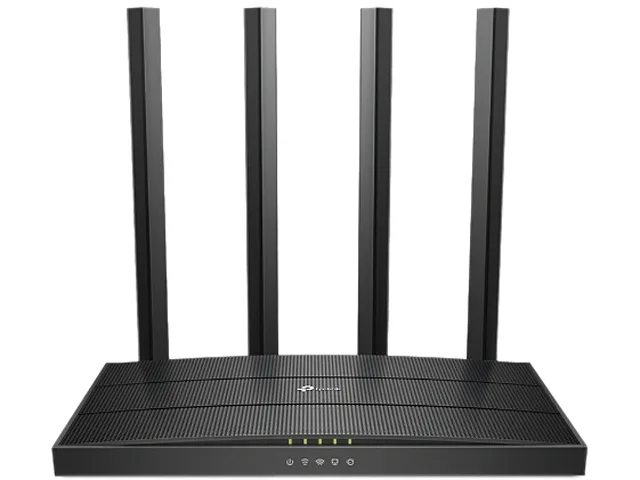
The TP-Link Archer C80 is a dual-band wireless router built on the Wi-Fi 5 standard. It delivers up to 1300 Mbps on the 5 GHz band and 600 Mbps on the 2.4 GHz band through four fixed omni-directional antennas. A 1.2 GHz processor handles traffic for typical household workloads.
This router suits homes where several devices stream or game simultaneously and benefit from 3x3 MIMO and MU-MIMO efficiency. Beamforming and Smart Connect help steer clients to the clearer band. Buyers who require more than four gigabit LAN ports or a multi-gigabit WAN connection should consider a different router.
The single 10/100/1000M WAN port and four 10/100/1000M LAN ports define the wired capacity of this unit. If your internet plan exceeds one gigabit or you need more than four wired endpoints, this specification becomes the limiting factor.
| Brand | TP-Link |
|---|---|
| Model | Archer C80 |
| Standards | Wi-Fi 5 IEEE 802.11ac/n/a 5 GHz IEEE 802.11n/b/g 2.4 GHz |
| WiFi Generation | Wi-Fi 5 |
| Wireless Standard | IEEE 802.11a / IEEE 802.11ac / IEEE 802.11b / IEEE 802.11g / IEEE 802.11n |
| Device Management | Parental Controls, Local Management, Remote Management |
| Security | SPI Firewall Access Control IP & MAC Binding Application Layer Gateway |
| WPA | 64/128-bit WEP, WPA/WPA2, WPA-PSK/WPA2-PSK encryptions |
| WAN Ports | 1 x 10/100/1000M |
| LAN Ports | 4 x 10/100/1000M |
| Buttons | WPS / Wi-Fi Button Power On / Off Button Reset Button |
| Wireless Data Rates | AC1900 5 GHz: 1300 Mbps (802.11ac) 2.4 GHz: 600 Mbps (802.11n) |
| Antenna | 4 x Fixed Omni Directional Antennas |
| Transmitted Power | CE: <20dBm (2.4 GHz), <23dBm (5.15 GHz~5.25 GHz) FCC: <30dBm (2.4 GHz & 5 GHz) |
| Receiver Sensitivity | 5 GHz: 11a 6Mbps: -98dBm, 11a 54Mbps: -78dBm 11ac VHT20_MCS0: -98dBm, 11ac VHT20_MCS8: -72dBm 11ac VHT40_MCS0: -92dBm, 11ac VHT40_MCS9: -68dBm 11ac VHT80_MCS0: -89dBm, 11ac VHT80_MCS9: -64dBm 2.4 GHz: 11g 6Mbps: -97dBm, 11a 54Mbps: -77dBm 11n VHT20_MCS0: -97dBm, 11n VHT20_MCS8: -72dBm 11n VHT40_MCS0: -92dBm, 11n VHT40_MCS9: -67dBm |
| Processor | 1.2 GHz CPU |
| System Requirements | Microsoft Windows 98SE/NT/2000/XP/Vista/7/8/8.1/10, MAC OS, NetWare, UNIX or Linux Internet Explorer 11, Firefox 12.0, Chrome 20.0, Safari 4.0, or other Java-enabled browser Cable or DSL Modem Subscription with an internet service provider (for internet access) |
| Dimensions | 8.50" x 4.60" x 1.26" |
| Temperature | Operating Temperature: 0°C~40°C (32°F ~104°F) Storage Temperature: -40°C~70°C (-40°F ~158°F) |
| Humidity | Operating Humidity: 10%~90% non-condensing Storage Humidity: 5%~90% non-condensing |
| Package Contents | Wi-Fi Router Archer C80 Power Adapter RJ45 Ethernet Cable Quick Installation Guide |
| Shipping weight | 0.84 kg |
| Package size | 349 × 241 × 76 mm |
The gigabit WAN port limits the internet connection to 1000 Mbps maximum throughput.
The router measures 8.50 by 4.60 by 1.26 inches; the non-removable antennas extend upward so allow several centimetres above the top surface.
Users frequently forget to give the 5 GHz network a distinct SSID or to enable Smart Connect so devices can use the 1300 Mbps 802.11ac stream.
Also in this aisle
Same shelf, same checkout — eight coins and a 30-minute rate lock.
What you pay in, and what you read prices in.
Sent from your wallet at checkout
Display only — the catalogue is priced in USD
No currency matches that.
Pick the language the site speaks to you in.
New here?
Already have one?
There is no automatic reset: this shop sends no mail, so there is no one-time link to ask for. Leave the address on the account and it gets picked up by hand.
Request noted
Nothing is on its way to your inbox — this shop sends no mail at all. Someone picks these up by hand.
Remembered it?