


ASUS
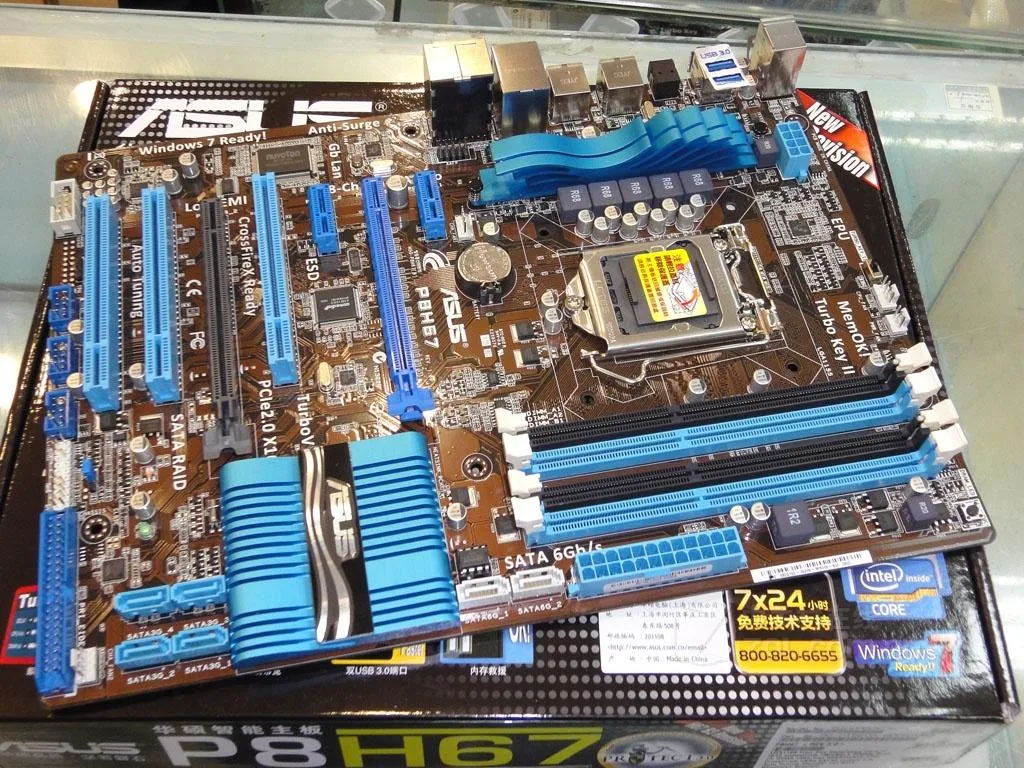
ASUS P8H67 Intel H67 LGA 1155 DDR3 32GB ATX motherboard
An LGA 1155 ATX motherboard on the Intel H67 chipset supporting up to 32GB of DDR3 memory
- CPU Socket TypeLGA 1155
- ChipsetIntel H67
- Maximum Memory Supported32GB
- Supports up to 32GB DDR3 for responsive multitasking
- LGA 1155 socket fits compatible Intel processors
- Intel H67 chipset provides integrated graphics capability
- ATX form factor suits standard desktop builds
- Includes SATA cable for drive connectivity
ASUS P8H67 Intel H67 LGA 1155 motherboard
This ASUS P8H67 motherboard uses the Intel H67 chipset and fits an LGA 1155 socket. It supports DDR3 memory up to 32GB capacity. The board follows the ATX form factor for standard desktop cases.
Suits builders replacing a board in an existing
This product suits users who need a direct replacement for an Intel H67 platform. It is not for buyers who want a new platform with current socket types. It is not for builders who need more than 32GB of system memory.
Maximum memory supported is 32GB DDR3
The single specification that decides fit is the 32GB maximum memory limit. If your build requires more RAM capacity, this board cannot meet that need. Verify your CPU and memory kit match the LGA 1155 and DDR3 requirements.
Pontos fortes
- Supports up to 32GB DDR3 for responsive multitasking
- LGA 1155 socket fits compatible Intel processors
- Intel H67 chipset provides integrated graphics capability
- ATX form factor suits standard desktop builds
- Includes SATA cable for drive connectivity
Especificações
| Brand | ASUS |
|---|---|
| Model | ASUS P8H67 |
| CPU Socket Type | LGA 1155 |
| Chipset | Intel H67 |
| Maximum Memory Supported | 32GB |
Perguntas sobre este artigo
Which processor socket must my CPU match for the ASUS P8H67?
The board uses the LGA 1155 socket so the installed processor must be an LGA 1155 model.
Can I keep my existing DDR3 memory when upgrading to this motherboard?
Yes the ASUS P8H67 supports DDR3 modules up to a total of 32GB.
How do I confirm the motherboard is working after I install it with the supplied SATA cable and I/O back panel?
Connect the SATA cable and I/O panel then power on; a successful POST and BIOS screen show the board is functioning.
Também nesta secção
Os clientes também compararam
Mesma prateleira, mesma finalização da compra — oito moedas e uma taxa bloqueada durante 30 minutos.


Mushkin Enhanced
Mushkin Enhanced 4GB DDR2-800 CL6 SoDIMM Apple 971741A memory upgrade
104,99 US$
0.00133514BTC
Em stock

SK hynix
SK hynix HYMD232M646C6-J 256MB DDR 333MHz PC2700 CL2.5 SODIMM laptop RAM
- 4GB (2 x 2GB)
7,99 US$
0.00010161BTC
Em stock