


TUKO
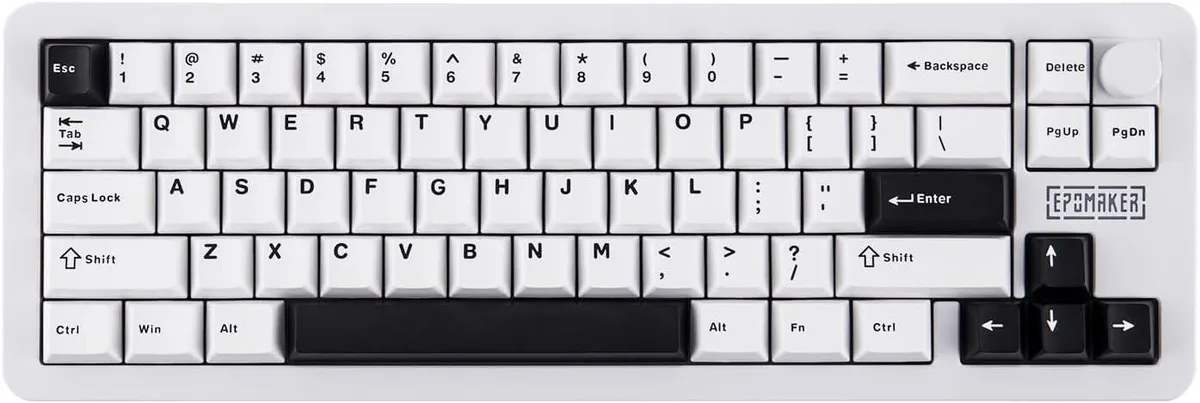
TUKO Galaxy68 65% Aluminium Gaming Keyboard White Marble White Switch
A 65% aluminium gaming keyboard with 67 keys, a metal knob, PBT keycaps, QMK/VIA support and a 6000 mAh battery
- Layout65%
- Compact 65% layout keeps every essential key while freeing mouse space
- Powder-coated aluminium shell weighs 1.25 kg for rigid, premium feel
- 67-key hot-swap PCB supports QMK and VIA for deep per-key remapping
- Metal rotary knob gives tactile volume and media control at your fingertips
- 6000 mAh battery enables extended wireless sessions between charges
Compact 65% Aluminium Build
The TUKO Galaxy68 is a 65% mechanical gaming keyboard housed in a 1.25 kg powder-coated aluminium shell. It features 67 keys with durable PBT keycaps and a metal rotary knob. The compact layout retains essential navigation and function keys while freeing desk space for mouse movement.
QMK and VIA Customisation
This model replaces fixed-layout keyboards by adding full QMK and VIA support for on-the-fly remapping and macro creation. The jump is worth it for users who need per-key programming, layer management or web-based configuration without proprietary software. Buyers who want a traditional full-size layout with a dedicated number pad will not find it here.
Hot-Swap Switches and Wireless Power
Hot-swap sockets let you change switches without soldering, and the 6000 mAh battery enables wireless use. Installation is straightforward: pull the old switch, press in the new one, and pair via the available wireless modes. Builders who require a wired-only connection or a non-hot-swap PCB should look elsewhere.
Pontos fortes
- Compact 65% layout keeps every essential key while freeing mouse space
- Powder-coated aluminium shell weighs 1.25 kg for rigid, premium feel
- 67-key hot-swap PCB supports QMK and VIA for deep per-key remapping
- Metal rotary knob gives tactile volume and media control at your fingertips
- 6000 mAh battery enables extended wireless sessions between charges
Especificações
| Layout | 65% |
|---|
Perguntas sobre este artigo
What desk space does the 65% aluminium case with its 1.25 kg weight need?
The compact 65% layout measures 39 cm wide and the powder-coated aluminium shell weighs 1.25 kg, so it sits securely without sliding while leaving extra mouse room.
How do I flash a new VIA keymap and what step do people skip?
Connect the USB cable, open the VIA web app in a Chromium browser, click "Authorize Device" once, then load your JSON — skipping the authorisation step is why the keymap appears unsaved.
When should the hot-swap Creamy switches or PBT keycaps be replaced?
Switches are rated for tens of millions of presses; replace individual Creamy switches only if a key feels scratchy or fails to register, and swap PBT keycaps when legends wear or shine appears.
Também nesta secção
Os clientes também compararam
Mesma prateleira, mesma finalização da compra — oito moedas e uma taxa bloqueada durante 30 minutos.



Cherry
Cherry MX 3.1 Mechanical Wired Gaming Keyboard White MX2A Silent Red
- Red Switch
- White
116,99 US$
0.00145564BTC
Em stock