

SanDisk
SanDisk Cruzer Blade 8 GB USB 2.0 USB flash drive Black SDCZ50-008G-B35
US$391.99
0.00500607BTC
現貨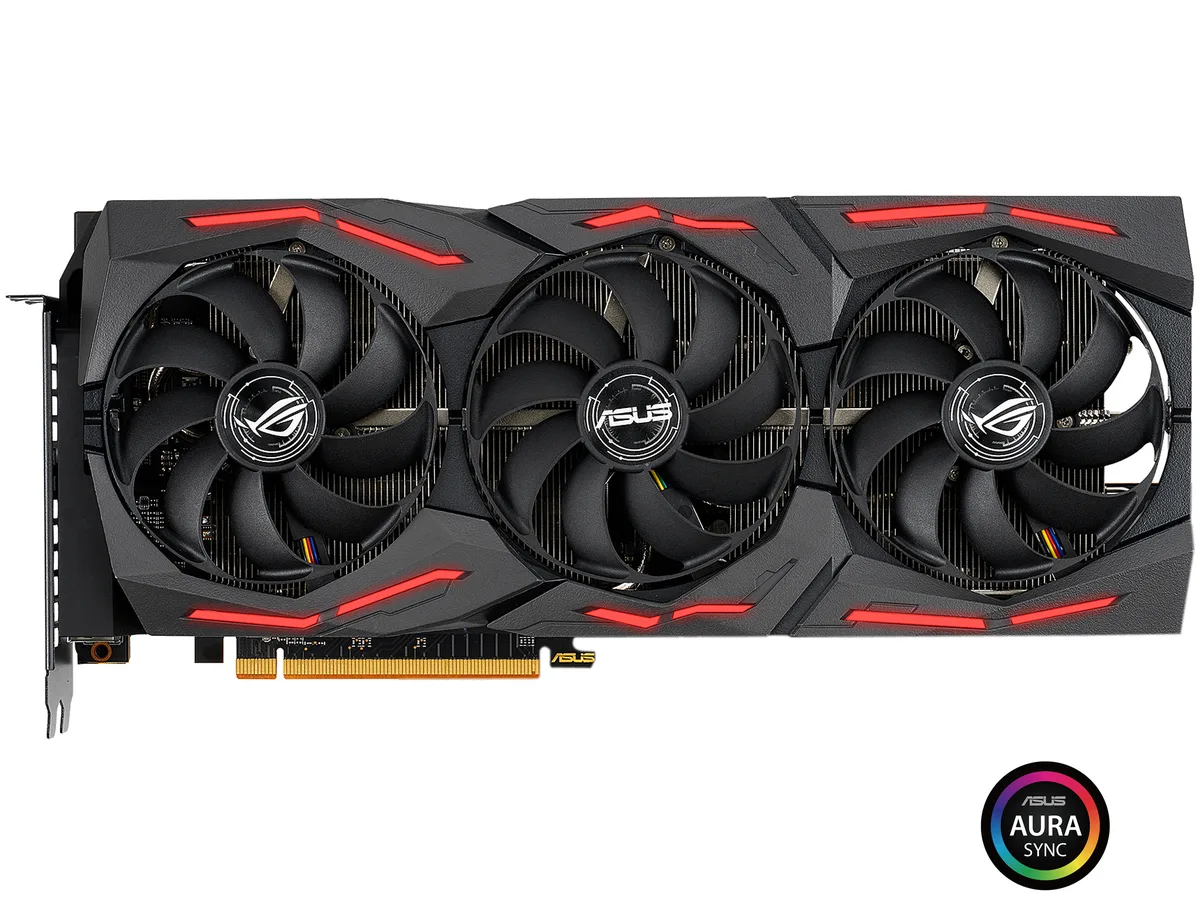


ASUS
Refurbished AMD Radeon RX 5700 XT graphics card with 8GB GDDR6 memory, 2560 stream processors, and boost clocks up to 2035 MHz for high-resolution gaming across multiple displays
This ROG Strix Radeon RX 5700 XT delivers 8GB of GDDR6 memory across a 256-bit bus, making it a strong match for high-refresh 1440p monitors. The 2560 stream processors and factory overclocks up to 2035 MHz boost clock in OC mode give consistent frame rates in modern titles. It targets enthusiasts who want premium cooling and durable Auto-Extreme construction.
If you are moving up from a 4GB or 6GB GPU, the 8GB frame buffer removes texture pop-in at higher settings. The PCI Express 4.0 interface doubles link bandwidth over 3.0, which matters when pairing with a compatible CPU and motherboard. The jump is worth it when your current card hits memory limits before the GPU core maxes out.
Your motherboard needs a PCI Express 4.0 slot for full bandwidth, though the card works in 3.0 slots at reduced speed. Verify the power supply has two 8-pin PCIe connectors and enough headroom for the board's peak draw. Confirm case length clearance for a triple-slot design and ensure DisplayPort 1.4 or HDMI 2.0b cables match your monitor inputs.
| Brand | ASUS |
|---|---|
| Series | ROG Strix |
| Model | ROG-STRIX-RX5700XT-O8G-GAMING |
| Interface | PCI Express 4.0 |
| Chipset Manufacturer | AMD |
| GPU Series | AMD Radeon RX 5700 Series |
| GPU | Radeon RX 5700 XT |
| Core Clock | OC Mode: 1840 MHz Gaming Mode: 1770 MHz |
| Boost Clock | OC Mode: 2035 MHz Gaming Mode: 2010 MHz |
| Stream Processors | 2560 |
| Effective Memory Clock | 14 Gbps |
| Memory Size | 8GB |
| Memory Interface | 256-Bit |
| Memory Type | GDDR6 |
| OpenGL | OpenGL 4.6 |
| Multi-Monitor Support | 6 |
| HDMI | 1 x HDMI 2.0b |
| DisplayPort | 3 x DisplayPort 1.4 |
| Max Resolution | 7680 x 4320 |
| Virtual Reality Ready | Yes |
| Cooler | Triple Fans |
| Thermal Design Power | Above 300W |
| System Requirements | Recommended PSU: 600W |
| Recommended PSU Wattage | 600W |
| Power Connector | 2 x 8-Pin |
| HDCP Ready | 2.3 |
| Features | Axial-tech fan design features longer fan blades and a unique barrier ring to increase air pressure. 0dB Technology lets you enjoy light gaming in relative silence. 2.7-slot Design expands cooling surface area to make the most of the three powerful Axial-tech fans. Auto-Extreme Technology uses automation to enhance reliability. Super Alloy Power II includes premium alloy chokes, solid polymer capacitors, and an array of high-current power stages. MaxContact Technology allows 2X more contact with the GPU chip for improved thermal transfer. A reinforced frame prevents excessive torsion |
| Max GPU Length | 305 mm |
| Card Dimensions (L x H) | 12.00" x 5.10" |
| Slot Width | 2.7 slot |
| 出貨重量 | 2.06 kg |
| 包裝尺寸 | 414 × 239 × 112 mm |
The card uses a 2.5-slot design, so verify your chassis has enough clearance for that thickness before buying.
Connect both 8-pin PCIe power plugs; the frequent error is seating only one, which prevents the GPU from posting.
Plan to repaste every two to three years or if temperatures rise noticeably under load, using a quality non-conductive compound.
同類商品
同一分類,同一套結帳流程 — 支援八種加密貨幣,匯率鎖定 30 分鐘。
您支付所用的幣種,以及查看價格所用的貨幣。
結帳時由您的錢包發送
僅供顯示 — 商品目錄以美元計價
查無符合的貨幣。
請選擇網站使用的語言。
查無符合的語言。
初次造訪?
已經有帳戶了嗎?
本店沒有自動重設密碼的機制:由於不寄送電子郵件,也就沒有一次性連結可供申請。只要將地址留在帳戶中,之後將由專人處理。
請求已收到
不會有任何郵件寄到您的信箱 — 本商店完全不寄送電子郵件。會有人親自處理這些申請。
想起來了嗎?



