

SanDisk
SanDisk Cruzer Blade 8 GB USB 2.0 USB flash drive Black SDCZ50-008G-B35
US$391.99
0.00501959BTC
現貨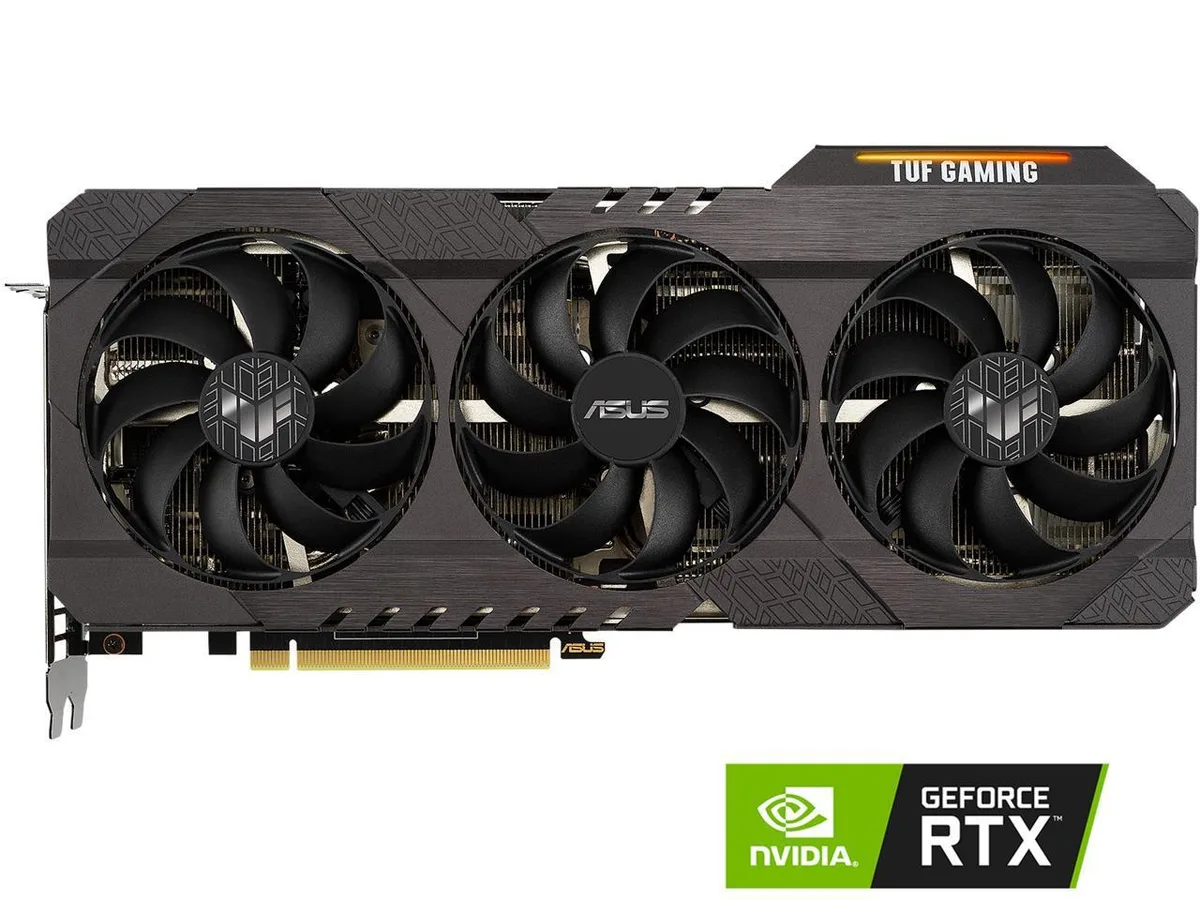


ASUS
GeForce RTX 3070 graphics card with 8 GB GDDR6 memory on a 256-bit bus, PCIe 4.0 interface, 5888 CUDA cores, boost clocks up to 1845 MHz, triple DisplayPort 1.4a and dual HDMI 2.1 outputs for
The ASUS TUF-RTX3070-O8G-V2-GAMING is a PCI Express 4.0 x16 video card built on the NVIDIA GeForce RTX 3070 GPU with 5888 CUDA cores. It carries 8 GB of GDDR6 memory across a 256-bit bus clocked at 14000 MHz effective. Factory clocks run at 1815 MHz in Gaming Mode and 1845 MHz in OC Mode. Outputs include three DisplayPort 1.4a and two HDMI 2.1 ports supporting up to 7680 x 4320 resolution across four displays.
Moving to this RTX 3070 makes sense when you need DirectX 12 Ultimate and OpenGL 4.6 feature support plus the higher 14000 MHz memory speed on the same 256-bit interface. The PCI Express 4.0 x16 link doubles host bandwidth over 3.0, which helps in bandwidth-heavy titles. If your current card already matches these clocks and memory specs, the jump brings little extra.
The card occupies a standard dual-slot PCIe x16 slot and draws power through the usual 8-pin connectors; no proprietary cables are required. Ensure the case has enough length clearance for the TUF Gaming cooler and that the power supply delivers the rated wattage on the 12 V rail. Common issues are forgetting to seat the power connectors fully and leaving the protective bracket on the I/O shield.
| Brand | ASUS |
|---|---|
| Series | TUF Gaming |
| Model | TUF-RTX3070-O8G-V2-GAMING |
| Interface | PCI Express 4.0 |
| Chipset Manufacturer | NVIDIA |
| GPU Series | NVIDIA GeForce RTX 30 Series |
| GPU | GeForce RTX 3070 |
| Core Clock | OC Mode: 1845 MHz Gaming Mode: 1815 MHz |
| CUDA Cores | 5888 |
| Effective Memory Clock | 14000 MHz |
| Memory Size | 8GB |
| Memory Interface | 256-Bit |
| Memory Type | GDDR6 |
| DirectX | DirectX 12 Ultimate |
| OpenGL | OpenGL 4.6 |
| Multi-Monitor Support | 4 |
| HDMI | 2 x HDMI 2.1 |
| DisplayPort | 3 x DisplayPort 1.4a |
| Max Resolution | 7680 x 4320 |
| SLI Support | No |
| Virtual Reality Ready | Yes |
| Cooler | Triple Fans |
| Recommended PSU Wattage | 750W |
| Power Connector | 2 x 8-Pin |
| HDCP Ready | Yes |
| Features | NVIDIA Ampere Streaming Multiprocessors: The building blocks for the world's fastest, most efficient GPU, the all-new Ampere SM brings 2X the FP32 throughput and improved power efficiency. 2nd Generation RT Cores: Experience 2X the throughput of 1st gen RT Cores, plus concurrent RT and shading for a whole new level of ray tracing performance. 3rd Generation Tensor Cores: Get up to 2X the throughput with structural sparsity and advanced AI algorithms such as DLSS. Now with support for up to 8K resolution, these cores deliver a massive boost in game performance and all-new AI capabilit |
| Max GPU Length | 300 mm |
| Card Dimensions (L x H) | 11.81" x 5.00" |
| Slot Width | 2.7 |
| Package Contents | Accessories: 1 x Speedsetup manual 1 x Collection card 1 x TUF certificate of Reliability |
The card uses a PCI Express 4.0 x16 interface, so it occupies 16 lanes in the motherboard slot.
Connect the required 8-pin PCIe power cables from the PSU to the card before powering on; missing this step is the most common install error.
Plan to replace the thermal paste after a few years of heavy load or if core temperatures rise noticeably above stock levels.
同類商品
同一分類,同一套結帳流程 — 支援八種加密貨幣,匯率鎖定 30 分鐘。
您支付所用的幣種,以及查看價格所用的貨幣。
結帳時由您的錢包發送
僅供顯示 — 商品目錄以美元計價
查無符合的貨幣。
請選擇網站使用的語言。
查無符合的語言。
初次造訪?
已經有帳戶了嗎?
本店沒有自動重設密碼的機制:由於不寄送電子郵件,也就沒有一次性連結可供申請。只要將地址留在帳戶中,之後將由專人處理。
請求已收到
不會有任何郵件寄到您的信箱 — 本商店完全不寄送電子郵件。會有人親自處理這些申請。
想起來了嗎?



