

SanDisk
SanDisk Cruzer Blade 8 GB USB 2.0 USB flash drive Black SDCZ50-008G-B35
US$391.99
0.00495769BTC
現貨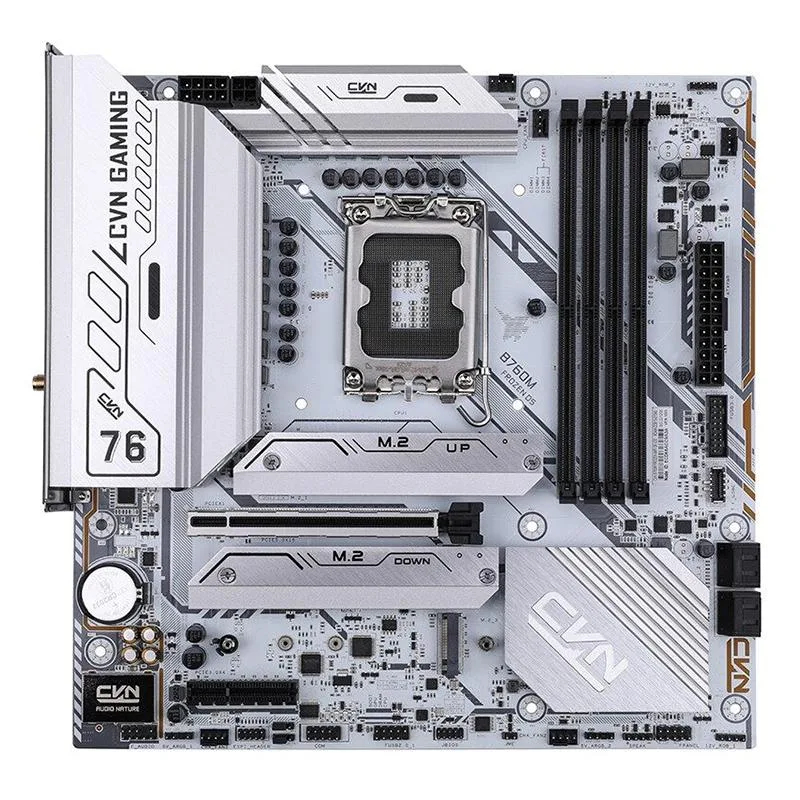


Colorful
Compact ITX board for 13th Gen Intel CPUs with DDR5 6400MHz support, PCIe 5.0, Wi-Fi 6, four SATA ports and M.2 NVMe storage
The Colorful B760M FROZEN D5 V20 is a Mini-ITX motherboard built for Intel Core 13th Gen processors on the LGA 1700 socket. It targets enthusiasts and overclockers who want a compact platform for gaming, content creation or workstation tasks.
Builders needing four SATA ports and an M.2 NVMe slot for fast storage will find the connectivity adequate. The single PCIe 5.0 slot restricts multi-GPU configurations, so buyers who want more expansion cards should look at larger form factors.
DDR5 memory support up to 6400 MHz sets the performance ceiling for this board. If your workflow depends on that memory speed the platform matches; if you require a different memory standard the board will not suit.
| CPU Type | Intel Core 13th Gen (LGA 1700) |
|---|
The board uses the standard LGA 1700 socket and ITX dimensions, so any cooler and chassis rated for LGA 1700 ITX will mount directly.
Insert each DDR5 stick until the side clips click, then enter the BIOS and select the XMP or EXPO profile that matches 6400 MHz; save and reboot once.
NVMe drives have no moving parts; plan a replacement only when SMART health warnings appear or sustained writes fall well below the drive's rated speed.
同類商品
同一分類,同一套結帳流程 — 支援八種加密貨幣,匯率鎖定 30 分鐘。
您支付所用的幣種,以及查看價格所用的貨幣。
結帳時由您的錢包發送
僅供顯示 — 商品目錄以美元計價
查無符合的貨幣。
請選擇網站使用的語言。
查無符合的語言。
初次造訪?
已經有帳戶了嗎?
本店沒有自動重設密碼的機制:由於不寄送電子郵件,也就沒有一次性連結可供申請。只要將地址留在帳戶中,之後將由專人處理。
請求已收到
不會有任何郵件寄到您的信箱 — 本商店完全不寄送電子郵件。會有人親自處理這些申請。
想起來了嗎?



